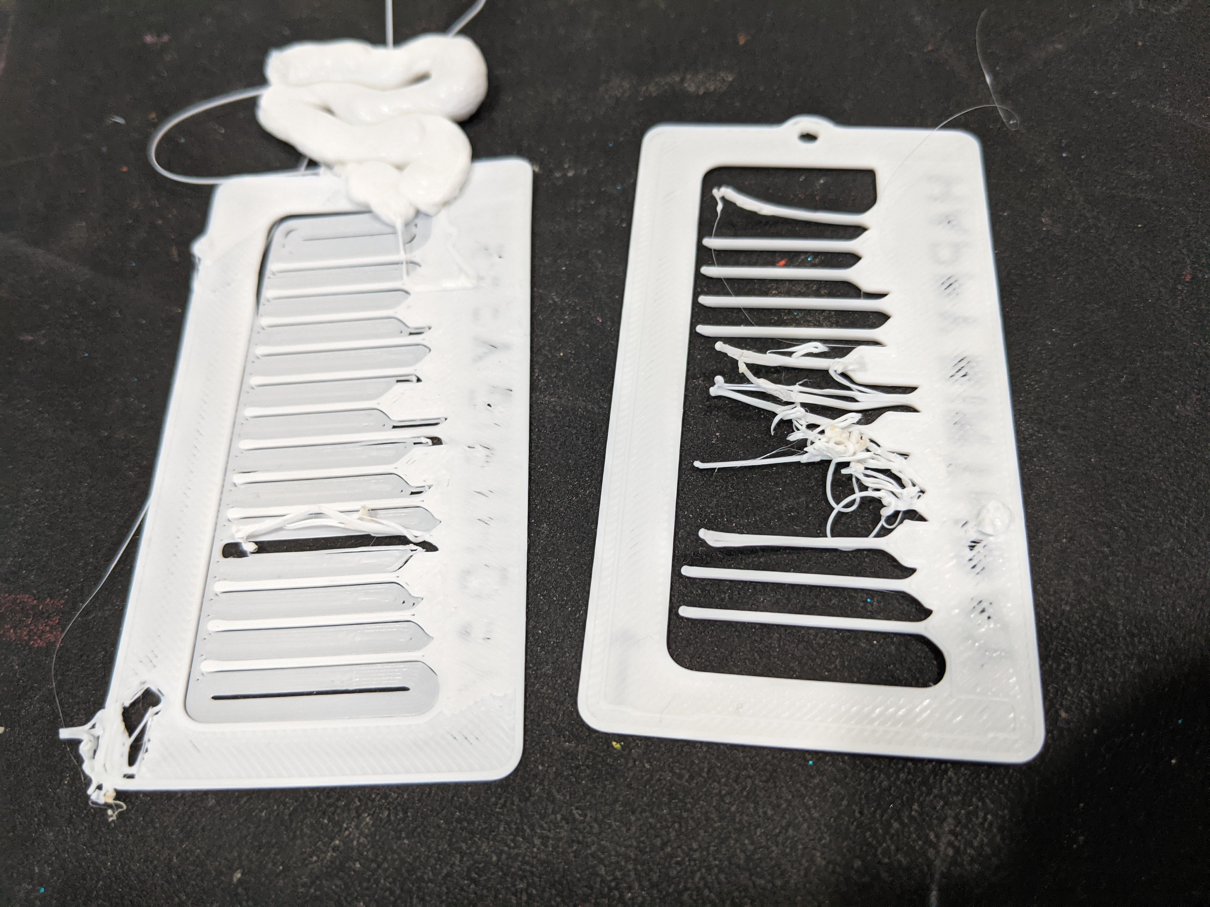
Hi all, I am new to printing and new to this forum as well. I recently got a new Ender 3 v3 SE. Here’s my observations:
Some prints especially chunky ones get printed fine.
Some small prints do not print at all, no matter how much I try.
One example is the “1492688-musical-fidget-generator” from makerworld that did not print well after multiple tries. I have my settings as follows:
Brim : inner only
shirt - combined, loop 1
Print sequence by object
layer height : 0.2mm
wall generator: Arachne
What am I doing wrong ?
Update: adding more details:
I am using PLA (Brand name Elegoo)
I reset the printer to default settings so all values are factory set including bed temperature, fan, etc.
In creality cloud, I used the preset “0.16mm Optimal @Creality Ender-3 V3 SE 0.4 nozzle“ and simply set the Layer height to 0.2mm (was 0.16).
It prints a layer or two without issues and then suddently ( I didnt notice when), the whole printed layer started dragging against the nozzle at which point, I went ahead and stopped the print.
I could not find any dirt under the bed or on the bed. I did not touch with bare hands and I have wiped it well.
print doesn’t seem to be sticking well enough to the surface of the bed plate?
Does it come off on it’s own or almost?
Possible too low bed temperature, too low nozzle temperature, too high speed on the model fan.
For many filaments i go with fan speed at 4% only, for example with ABS filament, bed temperature remains at 100°C the whole time, and on top of that, chamber temperature at some 45°C.
I tried once some model provided by other user and CP kinda took his settings and that did lead to a terrible print, even tho i used same filament.
Some other idea is, that the bed itself is not even, and the nozzle doesn’t have the 0,2mm Z height over the bed in some regions…..possibly some dirt under the bed plate?
When the small prints fail, is it the first layer not sticking, or does it go wrong partway up? For tiny parts like a fidget toy, the minimum layer time and cooling settings often matter more than they do on chunky prints, so it could be worth checking those.
default settings are terrible, especially fan speed, that is why there are these models to calibrate….
You have not mentioned the bed temperature, nozzle temperature nor fan speed.
According to Elegoo:
nozzle temp. 190~230°C
bed temp. 35~65°C
chamber 20~45°C , which means in summer you won’t need to do anything, room temperature should be enough, unless you run A/C a lot
I would suggest to see what happens if you go with max values, 230°C nozzle, 65°C bed and for model fan 4% only.
Also speed….i would suggest corners at 50~100 and max speed at 200~250.
For TPU i go with 30~80 on the speed, as it would string a lot, obviously printing will take forever at that speed, but precision is good.
190°C….so lowest temp on the nozzle but cooling fan(the one that blows air on the printed model and not the one cooling the radiator on top of the nozzel) at 100%.
Yea, there is your problem.
I am surprised the filament actually is bonding somewhat with the layers that were printed previously.
Set the nozzle to 210 or 220°C and the fan to 4%, if the printed model looks like it’s too soft when the nozzle moves over it, then increase fan speed, i would however not go over 30%.
Now some explanation….
First layer works, bcoz the bed is at 50°C and the cooling fan is unable to cool it below 50°C, therefore it kinda works - as the printed layer is in direct contact with the hot bed, but then you get more layers, and we all know - plastic does not conduct heat very well.
So the more layers you have, the quicker the layers would cool down. While such conditions are maybe even optimal for the first layer, it becomes more and more terrible the more progress the printer does on the printed model.
Need to mention, there are settings to increase/decrease fan speed after certain amount of layers.
Just wanted to share, your solution worked fine, almost no prints failed with bed adhesion after turning the bed down to 50. Thanks a lot and keep up the good work.