I posted a few days ago about the brand new K2 Plus Combo I received on 2026-04-23, set up on Sunday 2026-04-26.
From the initial start, this printer pooped out a black and blue filament when doing a calibration.
Then all prints are getting an “CF 0109 Abnormal Heat Break Fan” error. Opened a ticket. Reply was “check wiring, Heat the nozzle to 60°C / 140°F and observe fan, reseat connector”. Did all of that and still not working. Requested a replacement fan with the only follow up as “will confirm with our technical team”.
Since I could still print, I printed 2 items. All of a sudden, the filament became severely jammed in the extrusion module. Cleared that, Cleaned the gears of any residual filament particles. Print nozzle was blocked and cleared it. Restarted printing. Print nozzle became massively jammed and would not clear at 220 read bring temp to 300 to clear. Did that. Solid jam.
Checked the filament. The CFS states between 20 & 24%, below the moisture levels where it will not print right.
Had to replace nozzle, clean extrusion gears and put back together. Is it normal that a nozzle jams within 3 prints ?
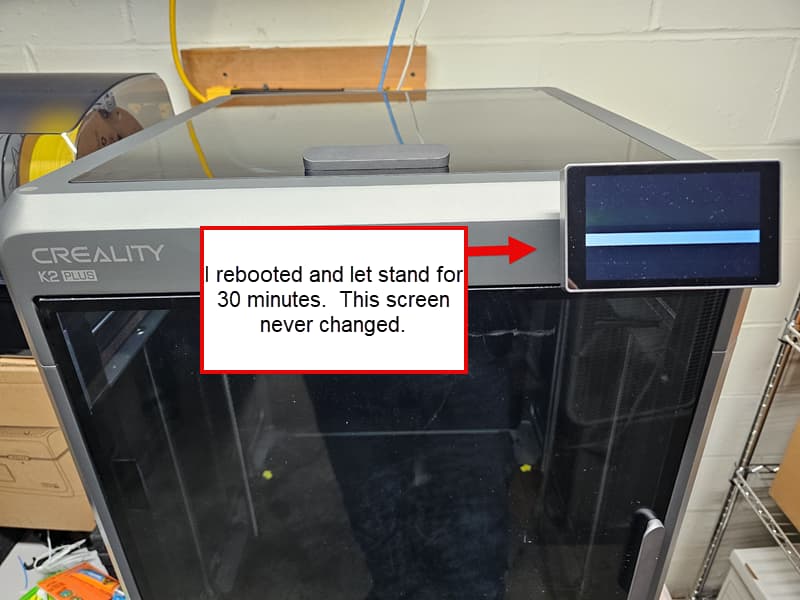
This morning, I turn on the printer and get the Creality screen then it went black with a thick white line through it. Bricked itself?
Ok, tried to do the Manual Reflash following the instructions.
The USB driver will not load on Windows 11, Windows 8, windows 7 and Windows XP.
What am I supposed to do with a brand new (2 week old) K2 Plus that is now an ornament on a desk ?
Anybody have any ideas?
Thanks
Man I feel so bad for you I’m sorry your having all these issues it seems like your pretty adapt to the machine as far as the display goes have you tried to reseat the cable it’s an off shot but wiuls be nice to at least see your screen
1 Like
And connecting via Ethernet might switch things up
1 Like
I will give you one very strong word of advice: Creality will stall you to run out the dead-on-arrival return window.
Do not wait. Demand an advance replacement with paid return shipment and pickup at your location. Accept nothing less. Tell them you are giving them 72 hours, and after that you will issue a chargeback through your credit card company.
It is your responsibility to keep records. Save every email, chat transcript, photo, video, ticket number, tracking number, and timestamp.
On the technical side, the common element across these failure modes appears to be the mainboard controller. The failures are showing up across different systems that are not directly connected except through the mainboard. That points to a controller-level problem, not a normal customer troubleshooting issue.
Creality should not be asking a customer to diagnose or repair cascading failures on a printer that failed within the first 24 hours. Even if the repair is mechanically possible for someone who can turn a screw, it is still time-consuming and inappropriate for a dead-on-arrival machine.
At this point, you have two choices: keep letting Creality run out the clock, or force the issue while you still have leverage.
If you do not document everything, demand an advance replacement, set a hard deadline, and prepare to issue a chargeback, then you are giving Creality exactly what they want: more time. They have shown that they respond better to financial pressure than to customer frustration. Stop waiting for them to do the right thing voluntarily.
2 Likes
Thank you all for your posts & responses.
Attached is the lovely boot screen I get now. CS says oh you’re using the wrong method to reflash, TS says no use this (as posted). The driver is outdated and does not work on Windows 11, 10, 8, 7 and XP. I’m lucky to be an Uber-Geek to have multiple laptops, each with different Windows OS’s to test on.
This has been a true nightmare. It’s their “Flagship” product too! They ship out defective? OK, within electronics & especially Computers, there IS a thing as “infant mortality/death” rate for new systems. I guess I got the cream of the crop here.
Funny, CS said “what motherboard version do you have” and took about 4 minutes to tell me where it is located. In that time alone, I found where is is and said “brand new unit, I should NOT have to disassemble this to figure out what is going on.” It’s a defective unit.
I’ve demanded an advanced return to be overnighted to me.
I charge high $ for my expertise in electronics, computers and systems. If I billed them for my time to date, it would exceed 6 units at their price.
I’m annoyed and disgusted by the delays. I do believe it is probably the best choice in my price range at this moment. But something is nagging me in the back of my mind that I SHOULD have gone with a different manufacturer. You live and learn…
From day 1, it’s set up with Ethernet, behind a firewall where the Mac/IP is only allowed to transverse the FW. No inbound traffic at all unless originated from the printer
I’m an uber-geek 


See my new post. It has a photo of the front of the printer with the display.
Adept? eh, been around the block multiple times with Technology to the point I document everything. People love my technical documentation because it points out what exactly is happening. In the Tech /Troubleshooting world, it’s called discovering the root cause of an issue.
Thanks!
As a follow up, I’ve read all the reviews both positive and negative about various 3d printers in my price range.
While the biggest complaint about Creality is about their customer/tech service, there is way more information people have posted about their products! However, sometimes people post misleading information. Why? Who knows. One can usually decipher the information to what works and what does not.
I was able to get 3 prints out of this unit before it totally bricked itself. What I saw in the prints are hopeful and encouraging.
I hope their replacement works better than this unit did.
Side note, does anyone know of a reference/maintenance do’s don’ts guide for 3d printing? Example:
- always brush off your nozzle between prints for excess residue. Some suggest a light wire brush (pros/cons).
- best suggestions for how to store filaments.
etc.
Thanks again all !
Follow up:
It is now 2026-05-18. I have requested a new printer due to multiple defects with this K2 Plus printer. I requested a return for today. Customer Service said the 19th, then today I come to discover that they STILL have not issued a return label NOR scheduled a pick up of this unit.
I have a defective Flagship K2 Plus printer and it was defective straight from the factory. CS wanted me to take apart the complete printer (starting with a failed Throttle Body Fan), tell them the version of the motherboard and all other boards. It bricked itself and while I am capable of doing what they asked, for a brand new “flagship” printer, no one should have to take the whole unit apart. No one!
Requested a return and swap but they hide behind “our policy is that the unit has to arrive at the factory BEFORE we can issue a return”. Delays, nothing but delays.
Is Creality for real here? It’s your flagship product. So stand behind it and do the right thing instead of abusing a customer.
This is unprofessional and beyond a complaint at this point in time.
I now own a Flagship K2 Plus brick as a paperweight with no Customer satisfaction in sight.
insane
You are experiencing heat creep from a faulty fan. You really need to wait on the fan if you haven’t yet.
It became an escalation of failure. Throttle Fan, DOA, Nozzle failure & replaced this also failed. Then the complete unit bricked. I did nothing. Followed their instructions to unbrick… nope. Still nothing. DOA unit.
They wanted me to take off the back cover and tell them what Motherboard version (yes remove the MB completely too!)
This is “supposed to be” a BRAND NEW K2 Plus. Then I come to discover that the CFS was inaccurately reading heat/moisture. I found that some of the screws were over torqued and stripped. Unit was USED ! Probably a return that was refurbished and cursed. (lol)
I sent it back and demanded my money back. This was defective right out of the box.
I had to open a dispute with the payment company and now after they picked up the Combo unit to send back, they refuse to repay me! They want me to cancel the dispute. Ok, what garantee do I have that I get my $$ back if I cancel the dispute…. zero. Let the payment company handle it. Ultimately is may cause the company to be dropped by the payment company.
This is not a good company and policies. I’m purchasing a different 3d printer from another company.
horrible situation.
I would not cancel the dispute based only on a promise. That dispute is the leverage you presently have.
I did not see you clearly state the timeline, so I would suggest documenting these points carefully:
- How long have you had the printer?
- How long after receiving it did you first report the problem to Creality?
- Did you report the defect during the original return window?
- How long after failing to receive a satisfactory resolution did you initiate the chargeback?
- Do you have Creality’s refusal in writing, specifically that they will not provide further support or issue an RMA unless you cancel the dispute?
At this point, what I have done with vendors like this is contact my state attorney general’s office or state consumer protection office. If you are not in the US, many countries have similar consumer protection agencies.
The key is not to call and ask them to solve the problem for you. Ask them what your consumer rights are in this situation and whether they have a website link that explains the rules. I have found that approach tends to get more useful information than simply asking them to intervene.
I would also keep the chargeback active unless Creality provides a written resolution first. If you cancel the dispute, you may lose the leverage that forced them to respond in the first place.
Here is an example of what I might send as a written demand. Do your own research as well. There are plenty of consumer-rights and small-claims resources that explain how to structure this kind of letter.
Sample email:
I am requesting written confirmation that you will honor the warranty and issue a prepaid RMA for the defective printer.

The printer was reported defective during the original return window. The issue was not resolved, and I opened a credit-card dispute within the applicable dispute period because the product was defective and your company did not provide a working remedy.

Your current position appears to be that warranty service and a prepaid RMA will be refused unless I withdraw the credit-card dispute. I will not withdraw a lawful payment dispute in exchange for an unsupported promise of future action.

Please confirm within 5 business days that you will:

1. Issue a prepaid RMA;
2. Repair or replace the defective printer at no cost;
3. Preserve all warranty rights; and
4. Not condition warranty service on withdrawal of the credit-card dispute.

If you refuse, please state in writing the warranty term that allows you to deny warranty service because a credit-card dispute is pending.
Thank you for your insight.
I am sure that I am not the only person that this company has done this against. Thank you for the information about consumer protection.
Poor customer service especially after sales and/or QA , can be VERY detrimental towards a companies future. Sad.
I have NO intention to close the dispute. Let the payment company deal with their nonsense.
thanks again.