Does anyone have an idea why I’m unable to use the autofocus for the 20W laser on the Falcon A1 Pro?
What happens: I use the autofocus calibrate option on the engraver’s panel, and it resets the laser to the top left of the working area. I then open up the example file on the panel, and use the autofocus option. It places the laser near the red dot, then raises the laser head to roughly 3cm above the material.
When I attempt to engrave the sample file, it is very blurred and lacks definition.
If I use the focus block and manually set the laser height then it engraves the sample file correctly with clear definition.
I have performed a ramp test to verify the best distance, and the focus block is pretty accurate, so for now I can manually focus and it’s all okay.
If I insert the honeycomb tray and try to use the autofocus, it shows an error on the control panel.
The firmware was originally .29 and exhibited this behaviour. A new firmware (.38) was applied yesterday, but the autofocus still insists on placing the laser head 3cm away from the material.
I’ve had a lot of fun trying things out on vegetable tan leather (took a while to figure good settings in Falcon Design Space!). Once the 2W laser head arrives I’ll eagerly try out some metal etching and give the rotary kit a whirl (no pun intended… maybe!), but for now I eagerly await any advice to get this autofocus working properly - thank you
Great. Early adopters=beta testers. I got mine yesterday and have the same issue. Also, I can’t get camera calibration to work right; the scores are all over the place. At least it’s still accurate. Even the Falcon Design Space app is still in beta! Come on, Creality! This is a good machine but it’s stuck with undercooked firmware.
Did you figure yours out? I did some measuring and the x axis gantry on mine is 1mm higher on the right than the left. I’m waiting to hear back from Creality on what they are going to do.
Nothing to help from my side yet. I noticed they added a direct link to the manual focus tutorial video on the A1 Pro’s wiki page, so I’m guessing more people have been reporting the problem. If I figure anything out I’ll share it here for sure.
I’ll measure the gantry heights later and let you know if there’s anything off with my unit.
One thing I’m aware of, the autofocus is supposedly driven by ‘AI’ via the camera though there is little info about this aside from a brief mention of it with the material cards and their QR codes in the documentation. None of the official Creality material packs I’ve received contained these material cards. I’ve tried camera calibration using the firmware values, and have tried with manual calibration but to no benefit for the autofocus.
The camera calibration is broken, too. I can’t get consistent results no matter what I do. It should not be so difficult to do basic setup. Something tells me they pulled these out of the oven before they were done baking.
Patrick on the camera calibration I will tell you that even the smallest bend like the edges curly even a little can throw off the calibration. Good luck
@Patrick_McNeal I checked the measurements on mine, and after evaluating the height difference you pointed out, I am confident that this is a deliberate design choice and is not affecting the output in any way.
@anyidiot Good advice! My own calibration card is perfectly flat from when it first arrived, but to be absolutely sure I keep it stored under the pile of hardwood sheets I’m using at the moment.
The auto-focus issue is still unresolved for me. This issue does not affect the review models that were sent out to some people. It only appears to be an issue for those who ordered and received the Falcon A1 Pro during the promotional release.
I finally received the 2W infrared laser yesterday and will see if it makes a difference this weekend.
same here, my auto focus issues persist as well. However they seem to be more prevalent using the honeycomb. I took it out of the A1 and am going to run few test focuses to see if it comes back with out the honeycomb.
Today I’ve had a go with the 2W infrared laser, have been looking forward to trying it with acrylic and metal materials!
First the bad news, using the 2W laser made no difference to autofocus. Whatever the problem is, it’s independent of the laser mechanism and the camera calibration.
Good news is that Creality seem to be aware of the issue, and the latest 1.79 version of Falcon Design Space now has a manual focus option for the Falcon A1 Pro. It’s not a fix, but it shows they’re aware of the problem and are trying to make our lives a bit easier in the meanwhile.
One of those links is a video showing a Z-axis calibration feature for the laser - BUT the video starts by saying the user needs firmware v1.1.0 or higher. So it’s coming - we’re getting a fix! No idea when 1.1.0 firmware (or higher) will be released to us, I can wait a while longer though
This sounds promising. will give the wiki a look at. I have had no response from creality since I sent them a log file they asked for from the autofocus portion of the laser log. Thank you for the update.
Just watch the youtube video and funny enough I had been doing that as they state in the wiki you can do a manual focus and to use the supplied focus tool. I was use to that from the A1 original. Just was hoping to not have to do that anymore. I should add that I also did the manual calibration as well.
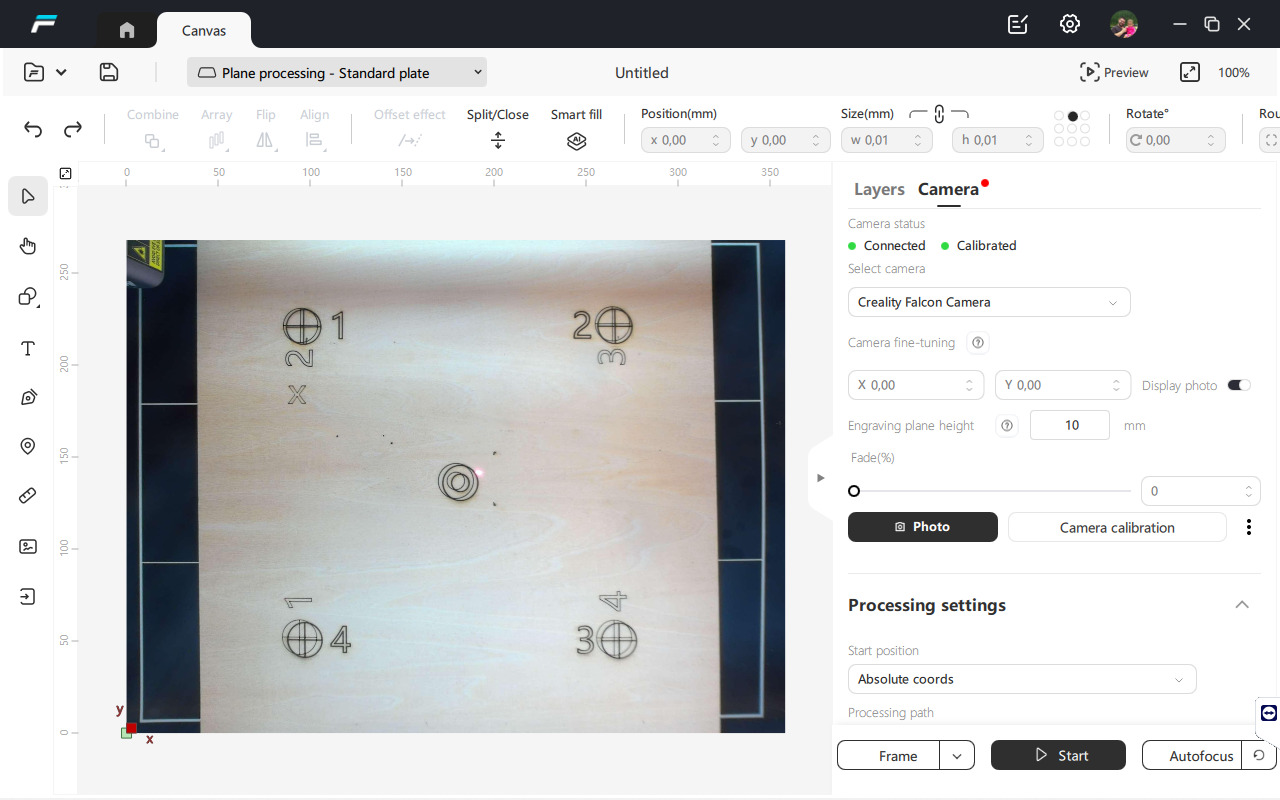
On my Falcon A1 Pro, the projected point does not fall exactly at the center of the working area but is shifted to the right.
Does this happen on your machines as well, or is mine misaligned?
When you look at your picture you can see where it says Creality falcon camera. right below you can see the camera fine tuning. use this to move the lines to over lap as close as possible.
For those who don’t have that firmware yet (most of us!) there is a new feature available in the latest version of Falcon Design Space that also allows for calibration of the Z-axis:
Do you know when they plan to release the new firmware. thank you for sharing the videos they are ok but that makes no difference if we cannot get the firmware.
No idea when the new firmware comes out, but the Z-axis calibration feature in Falcon Design Space (second video titled Service Tutorial Falcon A1 Pro Auto Focus Repair Tutorial) fixes the issue fully even without the firmware.
I noticed as soon as I started the Z-axis calibration feature in Falcon Design Space that it must have reset something, because the red focus light was no longer blurry on the base plate. From there I followed the instructions and now whenever I use autofocus I get perfect focal distance for any materials. Doesn’t matter if I use the control panel on the device, or autofocus macro in LightBurn or Falcon Design Space, the issue is fixed for me.
ya when you do the manual calibration. Agree. I am not sure if you noticed the calibration they show in the video, when they do the manual calibration they do it backwards from what the software says to do. they do the 0-3mm on the 6mm> and the 7mm on the 0-3mm on the calibration block.