I’m looking to 3D print some custom Lego parts.
I’m looking for good clutch power (pieces should stick together but be able to be taken apart without using tools) and high enough precision (if the filament makes things different more than the printer itself).
I’ll be printing some regular parts as well as some technic elements such as gears that needs to be able to handle some forces.
@Joakim_Jidbacken I noticed no one answered yet, so I’ll do my best. I’m not big on Lego’s . Take this with a grain of salt. This is more of a filament question. Filaments vary by brand quite a bit. I’m a Polymaker filament fan. My answer is from a Polymaker perspective.
Since I don’t print Lego’s, I asked Polymaker’s AI chatbot. It has been fairly reliable in the past. Here is what it had to say:
For Lego parts, I recommend Panchroma™ Matte PLA for its reliable printing and smooth matte finish, PolyMax™ PLA for excellent impact resistance, and Panchroma™ Glow PLA if you want a fun glowing effect.
My take on it; Personally, I use Panchroma™ Matte PLA for anything that doesn’t have special needs. Polymax is probably overkill, but you might want it for the gears. I haven’t used Glow PLA much, but when i did, I had to add extra adhesion and brim.
In general I suggest a custom calibrated filament profile for precision printing. Hope this helps.
Hello, LEGO bricks are originaly made from ABS, the problem is that ABS tend to warp and it releases toxic fumes. I recomend PETG but use a finer resolution, slow printing speeds, and a nozzle of 0.4 or even a 0.2 if you want high precision.
Have you used Studio 2.0 to make anything with Lego ? They have a whole catalogue of every part Lego has made and you can design also. I have experimented and taken parts from there, and printed them with PLA and they fit snug and pulled apart like a regular Lego piece. Printed on a K2 Pro with a .4 nozzle and layer height of .2.
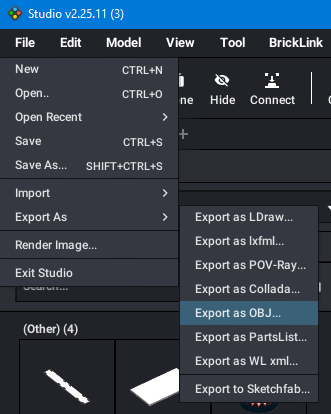
Thank you everyone! Yeah I have built a lot with studio, @jimandyen how do you export a piece from there? And is it possible to export into a format I can edit (using Fusion 360)? I’m looking to print some of my own designs but it would be helpful to use some real pieces as a base. I will experiment using PLA and PETG. It will be interesting!
In studio you can export pieces in the .obj format. In the file menu go to export and choose .obj and save. Remember where you save or make a special folder for these files. Take the file you just saved and drag and drop into Creality Print or select Creality Print / File / import. I still use Creality Print ver 3420 and haven’t tested this in the newest version which might not work.. Let us know if this works for what you are doing…
I’ve printed a few LEGO parts for my family using ABS but I do have a serious activated charcoal room air filter otherwise the fumes fill the house and give me a headache. Haven’t had any problems with warping anything ABS.