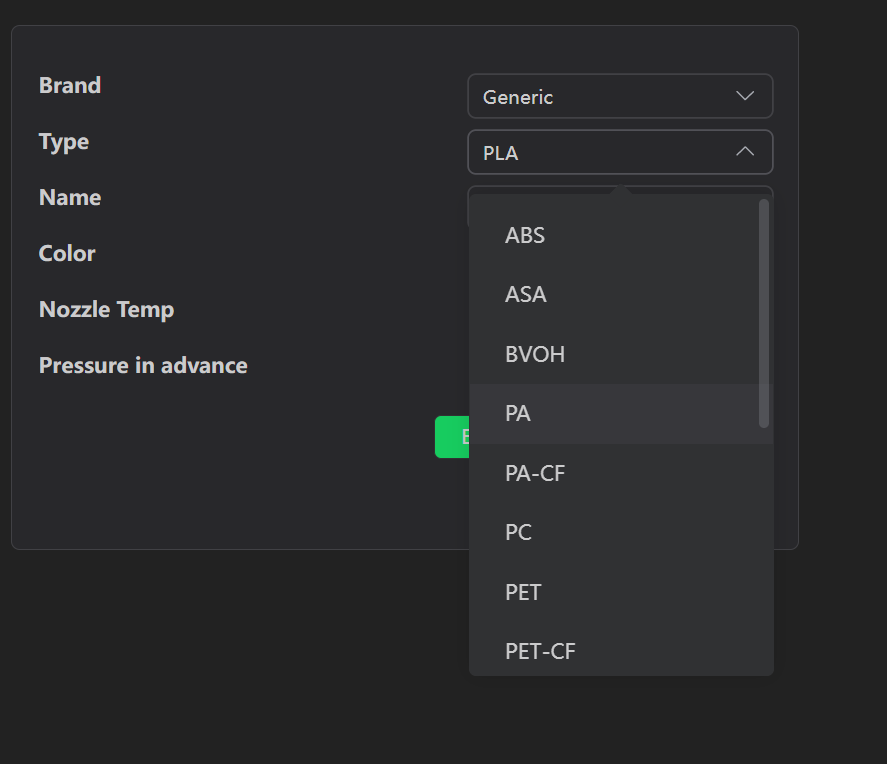
Well, we are suppsosed to embrace all the new Updates. But it seems like when we do, that is when the troubles starts.
So I updated my Creality K1 Max with the new Update this last Tuesday 11/4/2025. And developers wonder why we hate updates? Well, that was the last time I have sent anything to my printer from my creality slicer. Ever since then, it states simply:
“The machine consumables do not match the printed file. Please check and restart printing”
I would love to know what that means, as I am set to print Flash Forge PLA, which I made sure to setup with the parameters that I feel would do best on the current print. I have reset the printer 5 times now, but it doesn’t seem to do much.
I was getting this error too after the update. If you go to the Device section in Creality Print, in the lower right you can change the type of filament that it thinks the spool holder has loaded to match what you sliced your object to print with, and then you can send normally. I think there should be a way to disable this warning. It just seems silly to have to set the type of filament you are using in two different places.
… The biggest problem is that they didn’t test before releasing firmware… I think it can be solved with a update of Creality Print… but like always… this will take a long, long, long time…
At work 2 printers updated to the latest firmware, the one at home will stay at the previous version untill Creality has fixed this problem…
Thank you. After a long time and asking around I found they added some idiot design that you can load the type of filament you plan to use. Which is redundant as hell, considering you have to set the paramaters for your filament and setup the profile you will use. I am not sure what idiot they got to design this, but they should leave CFS designs to people who actually install them and want them!!! I have been printing from dryers on a singular spool since I started, and when I am ready to go to CFS, I will!!! This was the dumbest update I have seen!!
I came here because I couldn’t work out why my printer wouldn’t let me print all of a sudden. Now I know why and I agree this functionality is bad. Nobody is going to know where to look without finding some kind of support, what was Creality even thinking?
Reboot workaround stopped working and now I absolutely HAVE to set the filament type via devices. This is ludicrous - and it seems to break pressure advance? Pretty upset about this and the fact that it has been weeks without a peep from creality.
@Mr_MBR I still have the same problem, but i don’t have the option in the device tab to change the filament type. Its just a blank window.
I am on MAC V7.0.0.4127
2 months later, is there any progress on this issue?
Until now, I’ve always been printing with default material settings, but now I want to print with HIPS.
HIPS is not available in the printer material selection. But it is available as material profile in Creality Slicer. I loaded my HIPS on the spooler (disconnected the CFS), I selected ABS just as closest one, and in slicer of course HIPS and hitting the same material compatibility issue.
Is there any solution to this?
In the device tab, filament section edition is strictly limited to options available on the printer, so it’s not possible to select HIPS.
I can start the print from the printer after sending the file, but I notice that the printer ignores material edited in the slicer and uses the generic filament settings.
What is the slicer material edit option for, if it’s completely unusable? And how do I print with HIPS?