I had issues with the first layer adhesion and I ran a bunch of z offset tests from the K1 MAX’s touch screen. It seems -0.105 is the sweet spot.
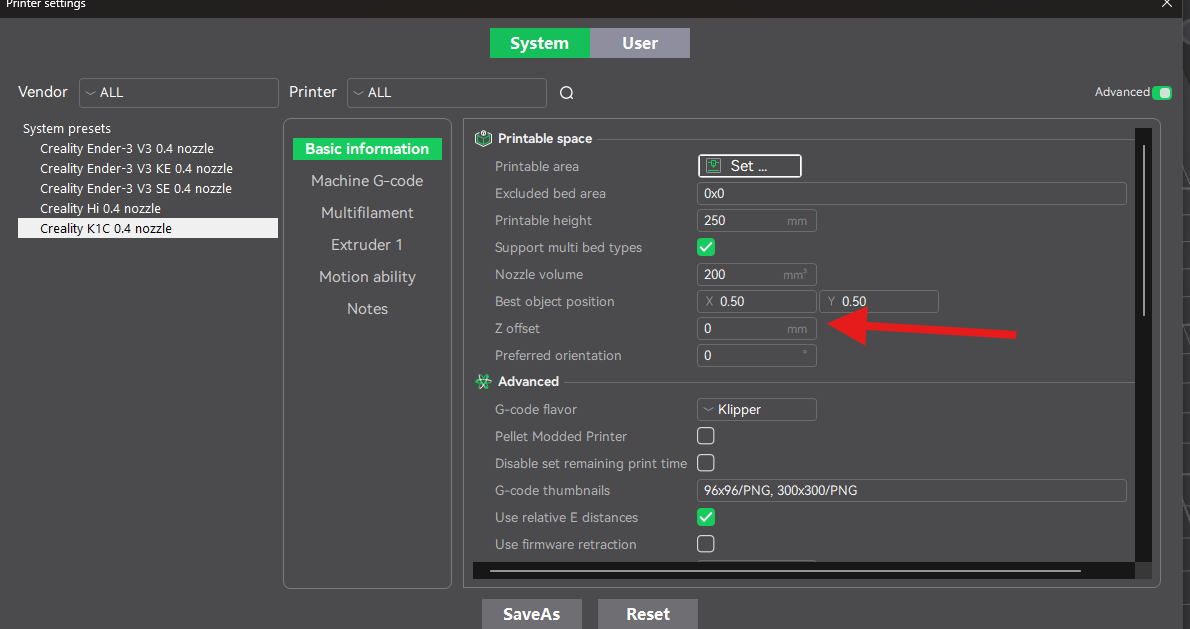
I tried to go to Creality Print to save this new z offset but I can’t find the Advanced mode tab/menu anywhere!
Am I blind or just otherwise losing it???
Somebody please tell me where I can find it…
Hello ! You have to put it in the printer profile
1 Like
Well that was well hidden… thank you very much!
Does this preset apply when using Creality Cloud or when printing from the printer’s local files or does it apply only when using Creality Print?
Edit: it doesn’t seem to work when using Creality Cloud.
It’s only for CrealityPrint !
If you want to change it on your K1 directly (so it works everytime on any platform), you have to root it, access the printer.cfg file and modify there 
1 Like