For the last year or so I was happy with my K1 Max, no problems at all. Last week I bought the CFS upgrade kit and installed it expecting to be able to print in color. But even the benchy does not work. Every color change, it seems like the layers are offset by about 1mm in both X and Y but it is not entirely consistent. It is a bit hard to photograph but this shows the problem:
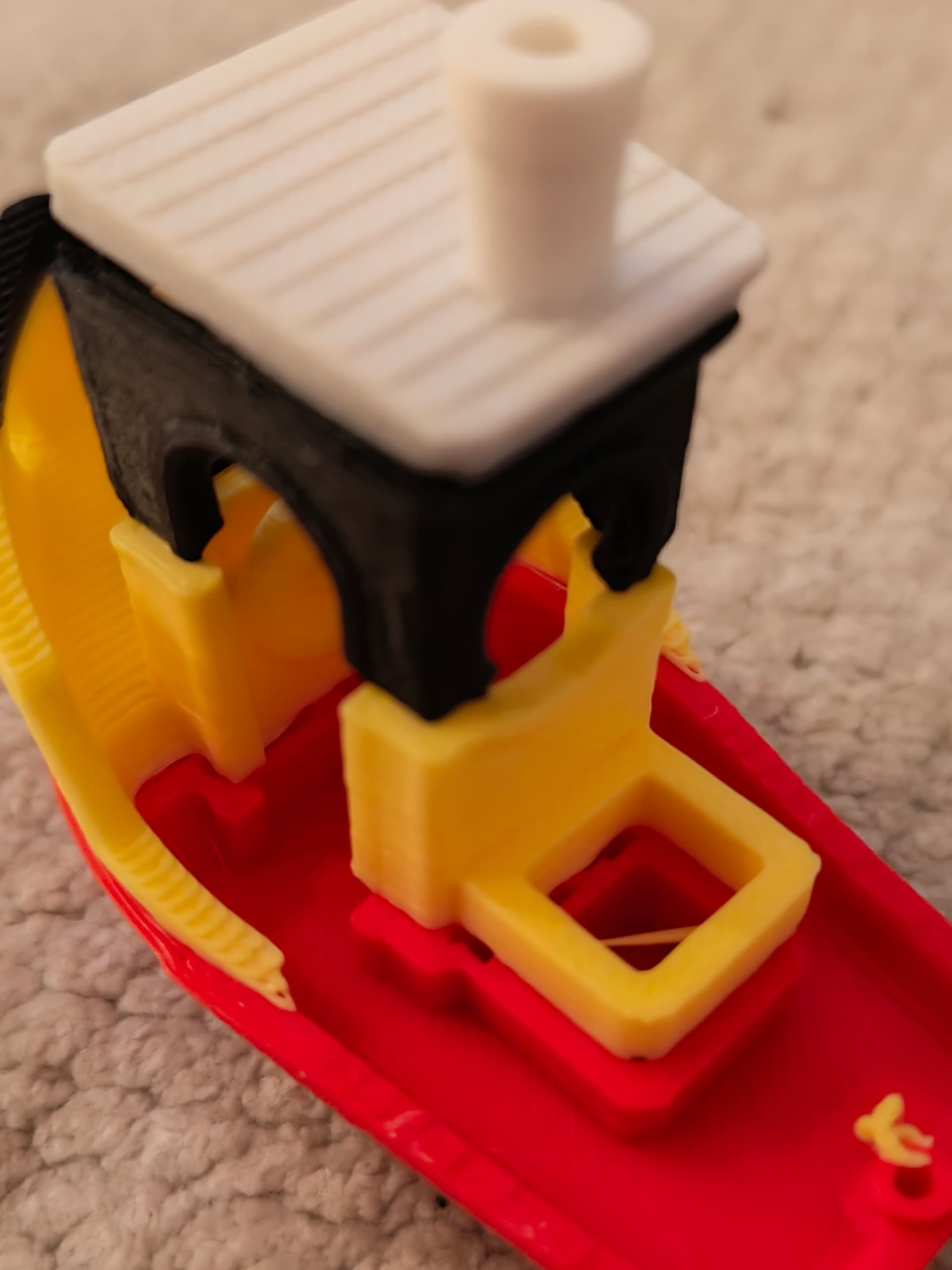
As can be seen, the print within one color is fine, but the yellow layer is offset with respect to the red, the black is offset about the same distance from the yellow, etc.
What I tried so far:
- check the belts are tight
- use extra adhesion to make sure the problem is not that the model as a whole is moving
- use different filaments (still PLA, but different manufacturer, including Creality)
- use the filaments in a different order to make sure the problem is not that the Nth spool is offset by a certain amount
- look at the nozzle coordinate setting where you align the head with the ‘V’ in the chute in the back
- perform a full reset including bed leveling, etc
- perform a full self-test
- check for updated firmware
- instead of the Benchy, use Creality Print to slice a model with 2 colors. This results in the same kind of offset
- move the printer from the desk to the floor to make sure the underground is stable.
It is probably some easy fine-tuning to get this to work, but I am a bit lost.