I have a 0.2mm nozzle and im trying to print in black and white with it. However, i am unable to do so because the CFS ignores the max volumetric speed set in the slicer and instead chooses it own unchangeable value that is too high and causes the nozzle to jam!
Here is a video that shows the problem.
Hopefully creality can at least add an option to change these values hardcoded into the CFS🙏
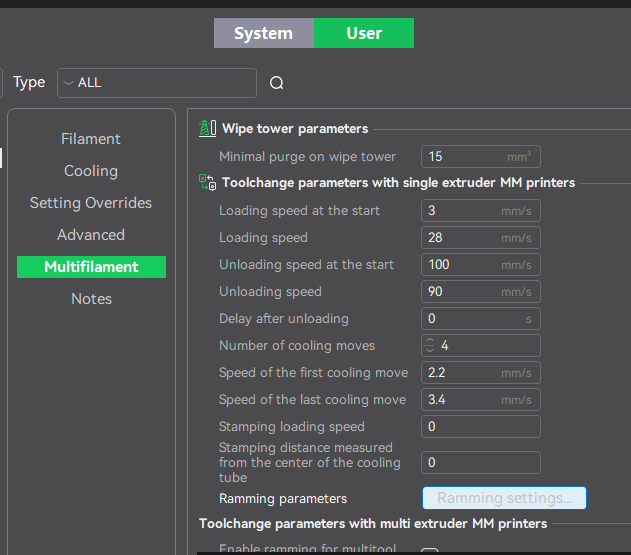
have you looked at the filament ramming advanced settings ?
I’ve not played with that, but I understand its what you are looking for.
Sadly this did not solve the issue. I think that it has to just be the max volumetric speed that the CFS has hardcoded into it.
Out of interest, do you have custom user filament profiles for the 2 (or more) filaments you are switching between, for 0.2 nozzle sizes ?
& which 0.2 profile are you using (of either the online params or user customized)
And lastly what brand / type are you using ?
Ive switched between PLA’s using a 0.2 nozzle, but not yet tried multi colour 0.2 PETG or ABS, only single colour prints of those.
Ive lost a nozzle to ABS and am thinking of trying to use the CFS to ram through PETG then PLA post an ABS print, to try to reduce post ABS nozzle clearing failure/jamming on the next print. As a custom post/end/macro
I’m using my custom filament profiles because the ones Creality provided were very inaccurate for what the nozzle actually requires.
I’m using the printer profile Creality provided for the 0.2mm nozzle.
Interesting to hear that about ABS. Hopefully, Creality can take notice and fix this issue with their closed-source CFS.
Are you trying to print nylon, CF, or exotics ?
I used ABS on 0.2 to print tiny screws / nuts.
I couldn’t get the threads to print well enough using 0.4 even tried spiral vase…
But 0.2 worked
Im using black and white PETG.
I started with Creality’s profile but ended up changing a lot. I’m definitely interested in the answer to this question because not only is volumetric flow too high, but the temperature is different too. I was worried these values for calibration and filament changes were coming from firmware where they are very hard to change.
Did you try adjusting directly via fluidd,
Are you on the Creality discord site/forum ?
Maybe post there and get a wider audience/response…
My solution was to download the filament RFID app and through that i was able to update the printers filament database settings. Once i did that, the issue has stopped and its at a regular volumetric flow speed of 8
I don’t see that option in the RFID for CFS (beta) android version, is that a different app than this ?
That app is far more “polished” than the one I was using 
1 Like