I am using a Creality Ender 3 V3 plus. I have a project with 300 layers. I want to change the color of the filament at layer 150. How do I add a pause in Creality Print v7.1 Slicer on a Mac? I tried right clicking and it does give that option. Thanks in advance.
Slice the file. Go to the preview tab and move the slider on the right down to the layer you want to pause at. Right click the + on the slider, (or the mac equivalent - do macs still have only 1 mouse button???) choose “add pause”. Reslice.
2 Likes
You slice your model, then on the right move the slicer to the layer you want, and right clicking you get a menu and you can add a pause.
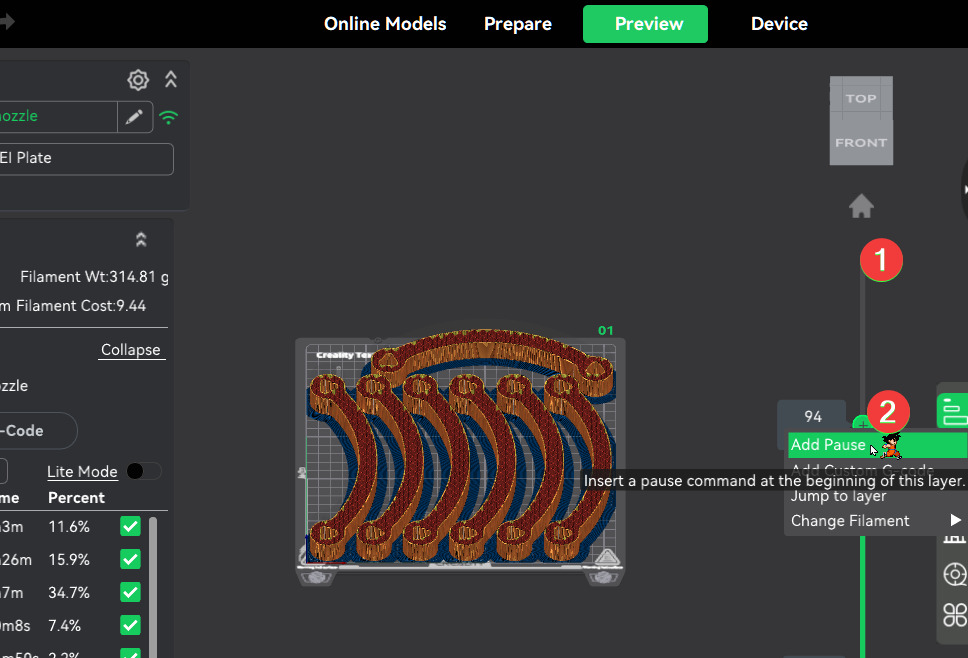
The printer will pause when got that layer and let you to do the manual steps you need.
I use this trick to put inside magnets on my prints, I add the pause on the layer where the void for the magnet will be start so I put the magnet in place and then resume the printing and the magnet is covered by next layer.
1 Like
Thank you all for your help. I was finally able to get it to work.
1 Like