My 3D printer had been out of action for a while so I recently took the decision to pick up the Sprite Extruder Pro Kit so that I could move towards direct drive and hopefully get things working again.
Through a process of trial and error i’ve managed to overcome most problems but for the time being i’m having to use the previous cable for the BL Touch as i’ve been unable to get it working by plugging the BL Touch into the Sprite Pro so that it can then carry the signal back to the SKR mainboard.
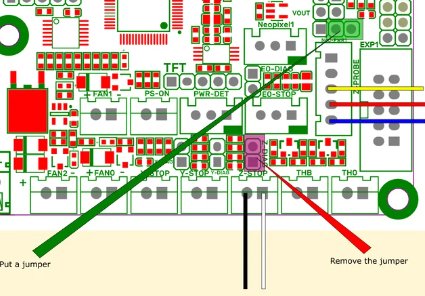
The original cable has 5 cores with three of these being split off and going to the Z-probe port. The other two cores then go to the ZStop connector on the mainboard.
I tried connecting the CDTouch connector which is on the wiring loom for the Sprite Pro to the Z-probe port but found that when trying to home it wouldn’t work. It would reach the point where it should lower on the Z axis but nothing would happen and it would then just report an error.
I could just live with using to old cable as it does work but i’m just curious if there is some way to get it working via the Sprite Pro. Has anyone any experience on getting this working please?
Which model printer and Btt e3 board. ie E3v3 , v2? I upgraded my old ender 3v2 with a sprite pro and a Btt E3v3 board, but did not use the bltouch plug on the ribbon cable as my bltouch has the long cable attached. Are you using the old Z limit socket or the pins on the BL touch socked? The wiring polarity on the Z limit socket apparently has to to correct. Also the marlin firmware has to be correct for the connection used.
Not sure on the board revision but using the previous cable means i’m using both the old Z limit socket and some of the pins on the BL touch socket. I’ve got a pin header with the brown, red and yellow wires on 3 of the 5 pins for the BL touch socket and a black/white pair of cables which go to the z limit socket.
That configuration works fine but was just trying to figure out if there is a way to get it working with the CR touch pinheader they provide. Its not a big deal if not as I can just tie-wrap the extra cable to the wiring bundle for the sprite pro.
When you connected the BLTouch via the ribbon cable, did you plug the 5 cores into the BLTouch socket?
If so, you will need to modify the Marlin firmware.
The Z Limit in the bltouch socket uses a different CPU pin than the dedicated Z limit switch socket.
Used my multi meter to trace the pinout from the CRTouch connector and realised there is an unused two pin header on the wiring loom.
So I’ve isolated the two z-stop pins and moved them over to the spare connector before taping off the original wires.
That left me with three wires which just happened to align with the previous setup. Plugged this pin header into the sensor port and it works fine now using the small adapter cable from the BLTouch to the Sprite.
Could you explain what you did to resolve it? I’m having the same issue. I’ve used a multi meter to trace the Red, Yellow, and White wires, but I find there’s 3 signal for the Gnd wires, so I’m not sure how to isolate them. Or if indeed it matters for Gnd.
But no matter what I do, I can’t get the probe to work.
The difference to you is I’m using the BTT SKR 1.4 Turbo, but I’ve got the wiring diagram and matching where the pins go. I’m also using Klipper.
I made up a small electrical connector that worked the same as the old BL touch cable. Nice since I had a set of 2 and 5 conductor plugs. (I only put 3 in the 5 conductor plug.) It took a bit with an ohm meter to figure out the pins. Noting also that the ribbon cable with the sprite shorts what I labelled the 1st and 4th pin. Those are both ground.