Somewhat new to 3D printing (about a year), but started with Creality and have several of their printers as well as a second HI Combo. Never had an issue with initial setup until this unit. I received a new HI Combo direct from Creality. Assembled and ran through the calibration / update / calibration process as usual. Upon starting the first print, the purge line dug the nozzle into the PEI sheet. Ran another calibration. Same result, leaving a big gouge and shredded PEI bits behind. I double checked the nozzle install, then checked z-offset manually through fluidd using a feeler gauge. Everything appears to be normal. But in order to make a print work, I have to set the z-offset to +0.300, and even with this, the purge line still drags the nozzle against the plate, causing the extruder to skip a few times until it gets to the front left corner and makes the turn. At that point, filament will start flowing and the print will usually turn out OK. I am working with Creality support to troubleshoot, but with the time difference, updates are slow going. I was hoping someone here could help me out with ideas. I have a new strain gauge on the way, just to see if that makes a difference.
My printer has been scratching the build plate out of no where, it would work perfect one day the next it would start scratching the build plate for no reason. It has ruined two plates already.
To fix this, I reset to default settings and reinstall creality print. When the printer is in ‘scratching mode’ I have tested it by sending a print from orca slicer and it does not do it, leading me to think it could be a creality print issue as well.
Did you get this sorted. I was having lots of problems with Z offset recently but after a creality print update a while ago everything came good. I think the Hi is a bit of a work in progress 
Somewhat. I landed on a Z-offset of +.250, and this seems to have fixed most of the issue. However, when it does the initial prime line, the first half is still so close that no filament will be extruded.
Have you updated to the latest firmware and software (Creality print) I also did a full system restore so Z offset back to 0.00
Working fine now. Also replaced nozzle and found original nozzle was loose…finger tight.
I had a similar issue. I tried leveling with the Fluidd interface. Now it’s much, much better. For anyone who dont know how to do it. Try the steps below.
- Access your printer with a browser via ip, http://:4408
- Go to “Tune” page from left menu
- Click “Calibrate”.
PS: You can backup your calibration with “Save As” button.
After calibration is complete “Range” value should be much smaller, and the “Bed Mesh” should be smoother. Mine dropped from about 1.59 to 0.9330. Now its not scratching the plate and guide line is more smooth.
Hi. I received my second Hi Combo machine today. I can print using 0.350 Z offset on both, but the old one works normally.
Hello! I've had my printer for two days now! Of course, I wanted to get started right away. Unfortunately, my first print, the Benchy, resulted in a scratch on the print bed. I suspect the Z offset is incorrect. However, I've calibrated everything.

It would be great if someone could help me!
I have the exact same issue. I manually need to rise the Z Offset by 0.225mm for it to start printing nicely, and even with that, the purge line scrapes the bed for the first half and the extruder skips, and after the corner, it starts extruding roughly especially near the end.
I tried with firmware versions 1.1.0.44, 1.1.0.50, 1.1.0.65, 1.1.0.60 and the issue is still there.
Did you manage to solve it ?
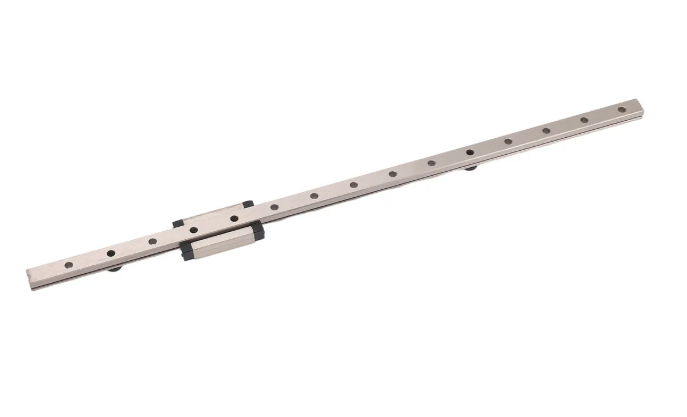
Tive o mesmo problema em uma das minhas maquinas e depois de verificar tudo, vi que o carro do hotend tinha uma leve folga para cima e para baixo no rolamento da guia e com isso eixo z nunca nivelava corretamente. Acredito que a cada nova impressão ele calculava errado devido a folga. Comprei o kit de guia e rolamento e efetuei a troca. Problema resolvido! Não sei se seria o seu problema, mas vale verificar se tem folga no hotend, pois ele deve esta firme na guia e não pode haver folga vertical.
Segue imagem do que foi trocado.
This solved it for me! Thank you!  I didn’t even know about this browser interface, I did what you said, not that I couldn’t press Calibrate until I also pressed (House/Home) All, after it was done calibrating I had to save and restart via the web interface.
I Had bad problems with the first guide line and squished first layer and I kept having to manually increase Z-Offset but now it seems fine with the first print after web calibration.
Thank you very much <3
Thank you so much! You literally saved my prints.
For a while, my prints had been coming out really bad, and my print tolerance errors had gotten significantly worse. I honestly had no idea why. Then I noticed that quite often there was some lines appearing on the first layer, so I thought maybe it was related to the Z offset.
I tried the method you suggested, and now my prints are back to being as good as they were on day one. I really appreciate it!