Hello,
My multicolor prints on a K1 with the CFS-C stop at the first filament change with error XD2571 “Current print file is corrupted”.
Setup:
- Printer: Creality K1 with CFS-C upgrade kit
- Printer firmware: V1.1.0.27.20260703
- CFS-C firmware: V1.0.0.27.20260703
- Creality Print: V7.3.0.6157, and two older versions show the same problem
- Printer preset: Creality K1_CFS-C 0.4 nozzle, process 0.16mm Standard
What I found:
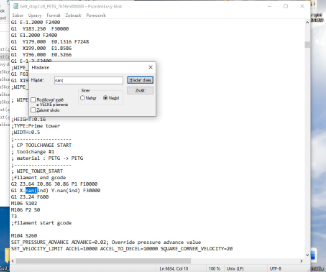
At every filament change the exported G-code contains an invalid travel move:
; CP TOOLCHANGE START
; toolchange #1
;filament end gcode
G2 Z2.04 I0.86 J0.86 P1 F10000
G1 X-nan(ind) Y-nan(ind) F30000 ← invalid coordinates
G1 Z1.64 F600
T3
This line comes from the “Change filament G-code” of the printer preset:
G1 X{wipe_tower_outer_wall_x - prime_tower_width*wipe_tower_random_num} Y{wipe_tower_outer_wall_y+0.1} F30000
It is not related to the model. It happens with every multicolor model I tried, including a model downloaded from the internet and colored directly in Creality Print. It happens with prime tower width 180 mm and “Middle Upper” position, and also with width 60 mm and automatic tower placement turned off.
Removing wipe_tower_random_num did not help, so the NaN seems to come from wipe_tower_outer_wall_x / wipe_tower_outer_wall_y.
Working workaround – this replacement line in the Change filament G-code produces valid G-code:
G1 X{wipe_tower_x + prime_tower_width*(0.1 + 0.11*(layer_num - 7*int(layer_num/7)))} Y{wipe_tower_y + 0.1} F30000
Feature request – smaller prime tower:
With the K1_CFS-C preset the prime tower is 180 mm wide by default (position “Middle Upper”). On a 220 x 220 mm bed it takes a large part of the build area, roughly 40%, so there is much less space for the models. Printers with smaller beds are affected the most.
Could you please:
- fix wipe_tower_outer_wall_x / wipe_tower_outer_wall_y returning NaN in the change filament G-code,
- use a smaller default prime tower for printers with small beds (for example 40–60 mm wide),
- add an option for a compact, square prime tower that can be placed in a corner.
I can provide the full G-code file if needed.
Thank you.