I’m using the latest Creality Print V7 software, but this problem is not new to that version. As long as I’ve been using Creality Print, under the “Device” details, when starting a print if I click on speed “Stable 50%” anytime before purging filament to start the print then it will automatically change it back to “Standard 100%” speed without warning. I have had numerous failed prints that could have been prevented if the speed stayed at “Stable 50%” during actual printing. I would like to request that your technical team change the Creality Print software so that when selecting a print speed change before filament purging the selection will remain for the actual printing process. This is for a K1C with Creality CFS.
I agree, it is annoying. But if it is any consolation, this bug has been in place since Bambu Studio which Orca Slicer was forked from and which Creality Print is forked once again. I did a little Googling and it looks like the first mention if this feature is the introduction of the G-code M220 command which overrides speed.
Here’s the first reference in RepRap’s Wiki page which appears to go back to 2012. Now having said that, it’s certainly a slicer bug but whoever introduced it first, remains a mystery.
I haven’t experimented in a while but I did have marginal success with modifying the machine G-code and inserting the m220 override there and save the machine profile as your default. I changed it to M220 S50which is 50% speed. But truth be told, upon upgrading my Orca, it seems to work randomly but in fairness, I did not do a lot of testing.
Note: G-code edits can mess up your machine if you’re not comfortable with G-code editing but this is a simple experiment. You may also have to place it again in the “Printing by object” section if the firmware is ignoring the command.
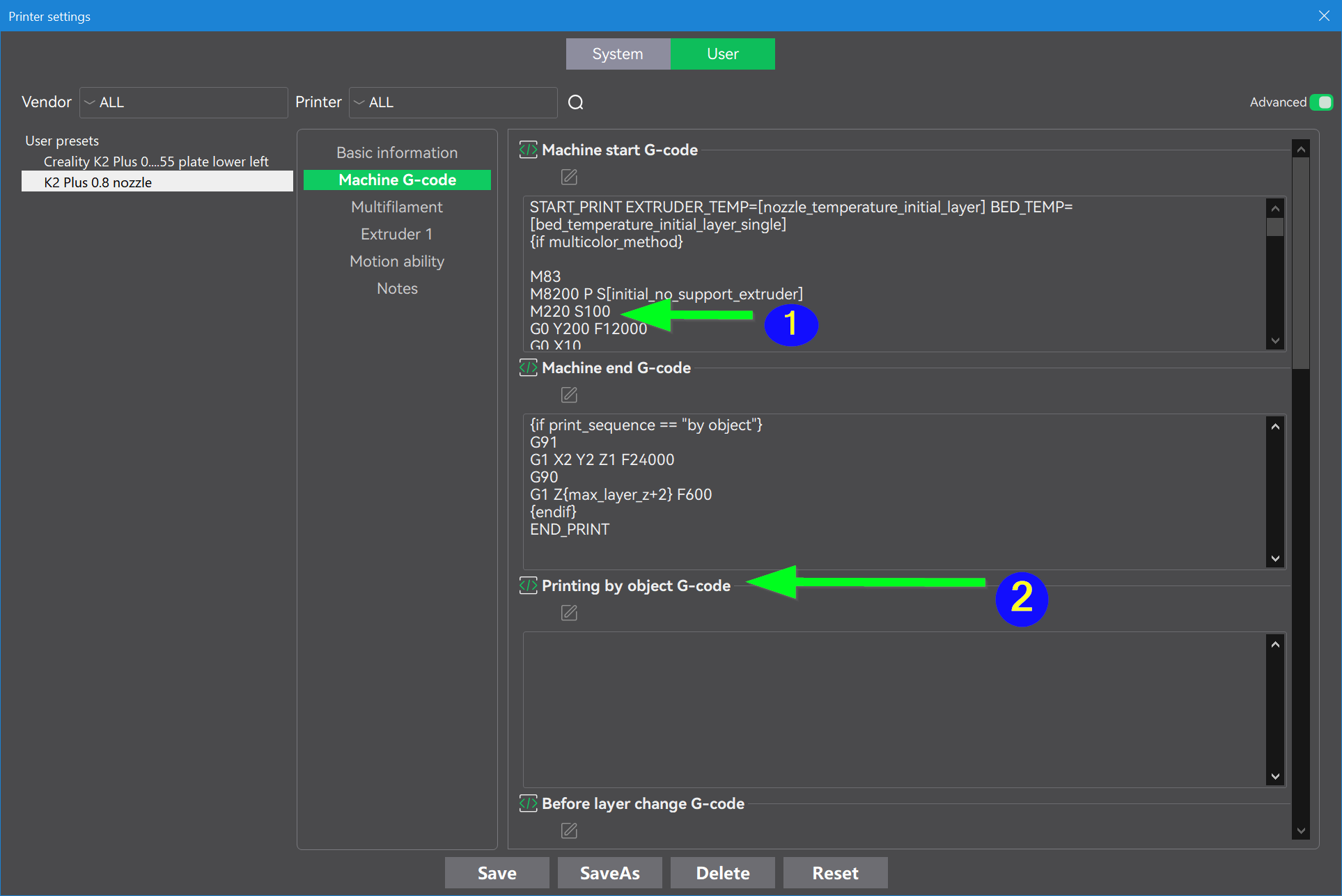
The only “semi-reliable” remedy I found - on the K2 Plus - was that I’ve been forced to change it directly from the front panel. I’ve found that this is a far more reliable method to ensure that the command “registered” but even then, if I don’t get that visual confirmation on the display panel, it may revert back to 100%. Annoying? Absolutely!!! But if BL, Orca and Creality sales aren’t being affected by this annoyance, it becomes more of a “quality of life” issue rather than a functional bug.
You may find that you will get a more sympathetic ear by directly cross-posting this on the Orca Github forum. The folks at Softfever(Noisyfox) do listen because they are 3D Printer enthusiasts like us that are in it for the craft, not the money.
https://github.com/OrcaSlicer/OrcaSlicer/issues
1 Like
Thanks so much for this reply. My K1C started having regular layer shifts after I installed the CFS mod package and hooked up my CFS. I don’t necessarily think that means this caused it to start happening. But the ONLY thing that reliably stops it now is using that Stable 50% button, so I think this is definitely a speed related causation for the layer shifts.
I think I’m going to try your G-Code modifications just to see what happens. I don’t want to got with the Stable 50% as a default, but I hate having to waste time setting and waiting for the printer to go through necessary prep steps prior to starting a print before I can select the setting. I assume I can set the Speed to any % amount using the G-Code command, so it might be worthwhile to see if I can get stability at a little higher than 50% speed. Just wanted to thank you for giving me another way to work on getting rid of layer shifts.
Just to let you know, I created a new user printer profile with the G-code you suggested and it working fantastically. Totally solved the problem so far. Now, when the printer is preparing to print is shows speed at 100% then switches to Stable 50% automatically when the print starts. Easy fix, now I’m going to take a closer look at the default g-code and what is actually going into the g-code I’m sending to the printer.
1 Like