Has anyone else had stringing issues? Are you satisfied with how Creality Print slicer is printing your projects?
Has anyone has major nozzle jamming issues where the only way to remove the nozzle unit is with pliers which bends the filament tube between the cooling fins and the nozzle?
I’ve sent DETAILED messages to tech support, but because of their limited education in understanding the English language, I’m not getting results and I continue to have a $355.00 paperweight.
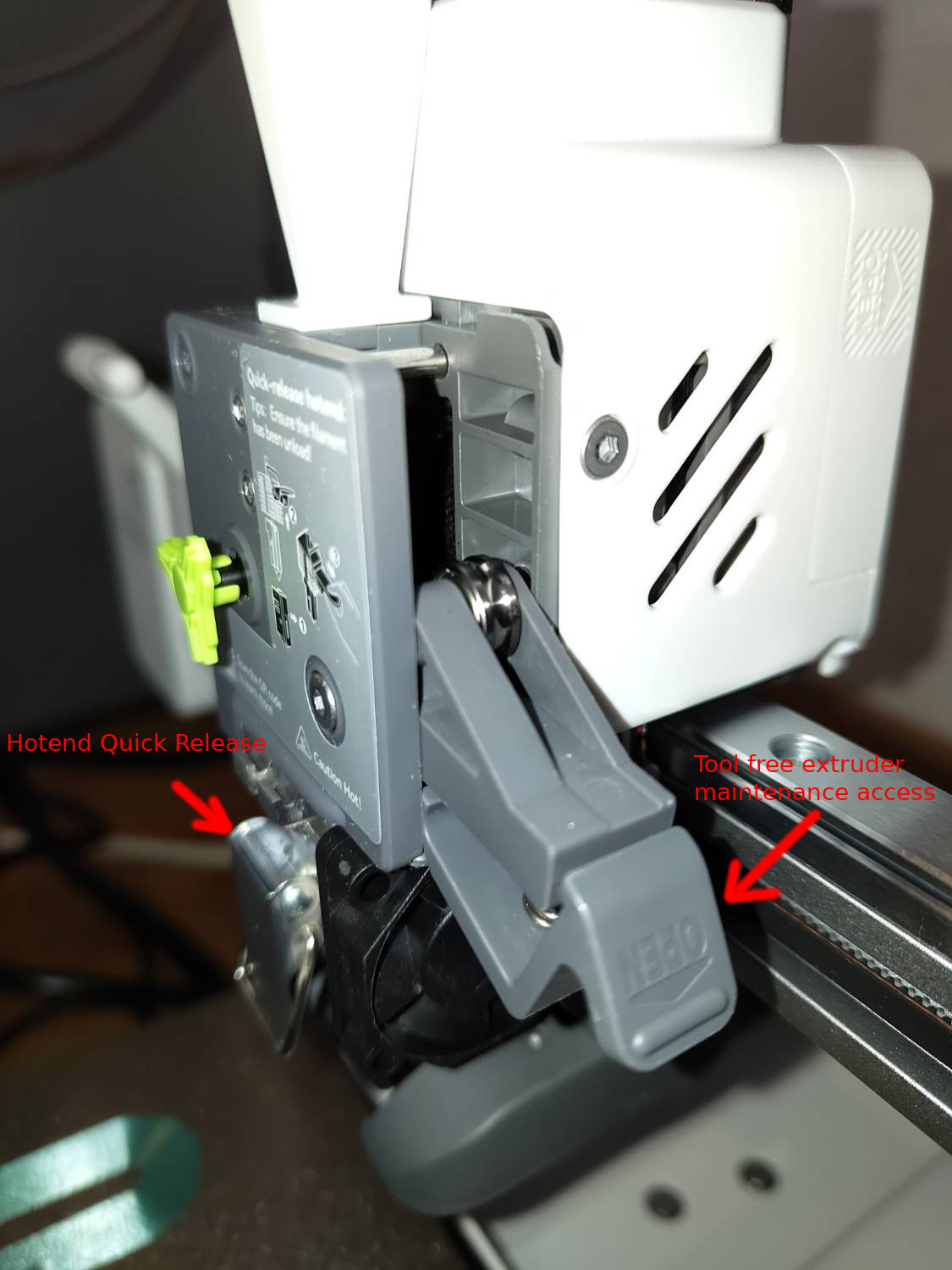
Not sure what you tried to do there, the Sparkx i7 has a quick change nozzle, so after opening the lever it should just slide out. In the worst case I could imagine that you have to loosen the three screws of the extruder above it, to also take it off.
To respond to both Sebastian and 3dprinting4educators: All I asked for was if anyone had the same issues I’m having, not some off-the-wall answers, “assuming” you know more than I’ve done. I have TEN YEARS of 3D printer experience. Sebastian, your "imagination” is running wild. Others reading your reply to my simple question will question you and will probably take your answer into consideration when they see your name appear to try and help them.
My nozzle was jammed. I did, simply, take out the nozzle unit and heat the filament out and with my filament plunger (which I’d NEVER used before, in the ten years of 3D printing) I was able to plunge out the filament, but not at the rate it’s suppose to come out. Meaning, I think I received a factory defective nozzle with, maybe, a very small piece of metal blocking the .4 nozzle from extracting the proper amount of filament out and onto the build plate.
As for Creality tech support, I’ve had no actual help from them.
@CreatorGuy You’ve asked three different questions, and the members here are genuinely trying to understand your situation so they can give you the most helpful advice possible. They’re volunteering their time to assist you, so please try not to criticize their responses. Instead, appreciate that people are stepping up to help. Everyone is working with the information available and sincerely aiming to point you in the right direction. Your ten years of experience will also help others with these type of problems.
I have the printer here myself. It sounds to me that you tried something involving more force than actually needed.
The nozzle/hotend has the said quick change mechanism. Above that sits the filament cutter, so usually even if it’s jammed the filament is cut and you can pull it out (if not try to actuate the filament cutter manually). The hotend has to be pulled the front after it slid down just a bit, not straight down, you can’t pull it down through the heater. If for whatever reason that still doesn’t work you can open the extruder (the arm snaps right open, no tools needed) to get maintenance access if filament accumulated on the gears or something like that. If there’s still filament stuck somewhere, in the worst case, as I said take the hex keys that you got with the printer and unscrew the extruder.
None of these scenarios involve using pliers and force and bending stuff. If the support gave you other advice that ruined the hotend assembly that’s unfortunate. In this case maybe ask them if they can send you the replacement parts to make up for that mistake.
10 year of experience doesn’t help much with these newer generation printers because the hotend and extruder assemblies changed completely in recent years. You have to familiarize yourself with this newer construction, it’s actually way more maintenance friendly.
With the modern hotends and their long melt zones, it’s probably not so easy to tell if it should come out at that rate when pushing it by hand.
I would try to extrude some filament in the air via the Fluidd interface and check if it’s coming out in a straight line. Also print a max. flow rate test to see if it works up to 20mm³/s or so (use high speed PLA of some kind). If that doesn’t work well yeah replacing the nozzle might be easier than trying to fix it, because cold pulls are not so easy to do with these long melt zones either.
Sebastian, thanks for responding. The reason the tube is bent (between the cooling fins and the nozzle, is because the nozzle was stuck/fused in place and gently pulling the nozzle unit out by the quick latch pull tab wouldn’t work. As for heating the nozzle to get the stuck filament out, I did heat the nozzle, plunged the filament out, but is wasn’t a normal amount of filament coming out, a smaller diameter than it should have been. I do not know why, even heating up the nozzle at a higher temperature to force the filament out, while it was in the printer didn’t work. Even the cutter wouldn’t cut. So, I believe there is a factory mis-alignment of the filament gearing system to the downtube. Or…the nozzle itself has an obstruction (not from me, nor my clean filaments) that is within the nozzle itself and won’t come out.
I did receive, from Creality tech, an offer to replace the printer, which I will gladly do, because I like this printer and how it prints, based on other Sparkx i7 I’ve witnessed in person printing parts.