Hello there people,
This review is based on my first experience with any multi-filament system. It may include issues that are already solvable, but due to lack of documentation or experience, I have not yet resolved them.
I have owned the K1C for a little over a year, with approximately 750 print hours prior to installing the CFS-C (these hours were reset after the firmware update).
And just a hardware note, from the beginning, I have been using unicorn nozzle hotend - mentioning this here, ‘cause I’ve read that people are having trouble loading/unloading filament on MicroSwiss hotends.
Initial Setup & First Print
After successfully connecting the K1C and CFS-C:
-
Both devices updated firmware automatically
-
I completed initial calibration
-
Loaded three filaments:
-
HyperPLA Black (cardboard spool)
-
HyperPLA White (cardboard spool)
-
HyperPLA Brown (RFID spool)
-
For my first print, I selected a Benchy directly from the slicer (not from USB). I wanted to paint it by myself - the one on USB was 4-colored, and I painted it with two for a start.
Issue: Extremely Large Purge Tower
-
The purge tower was massive, and to add a surprise, it’s even extending beyond the build plate
-
I was unable to modify it initially (settings were greyed out)
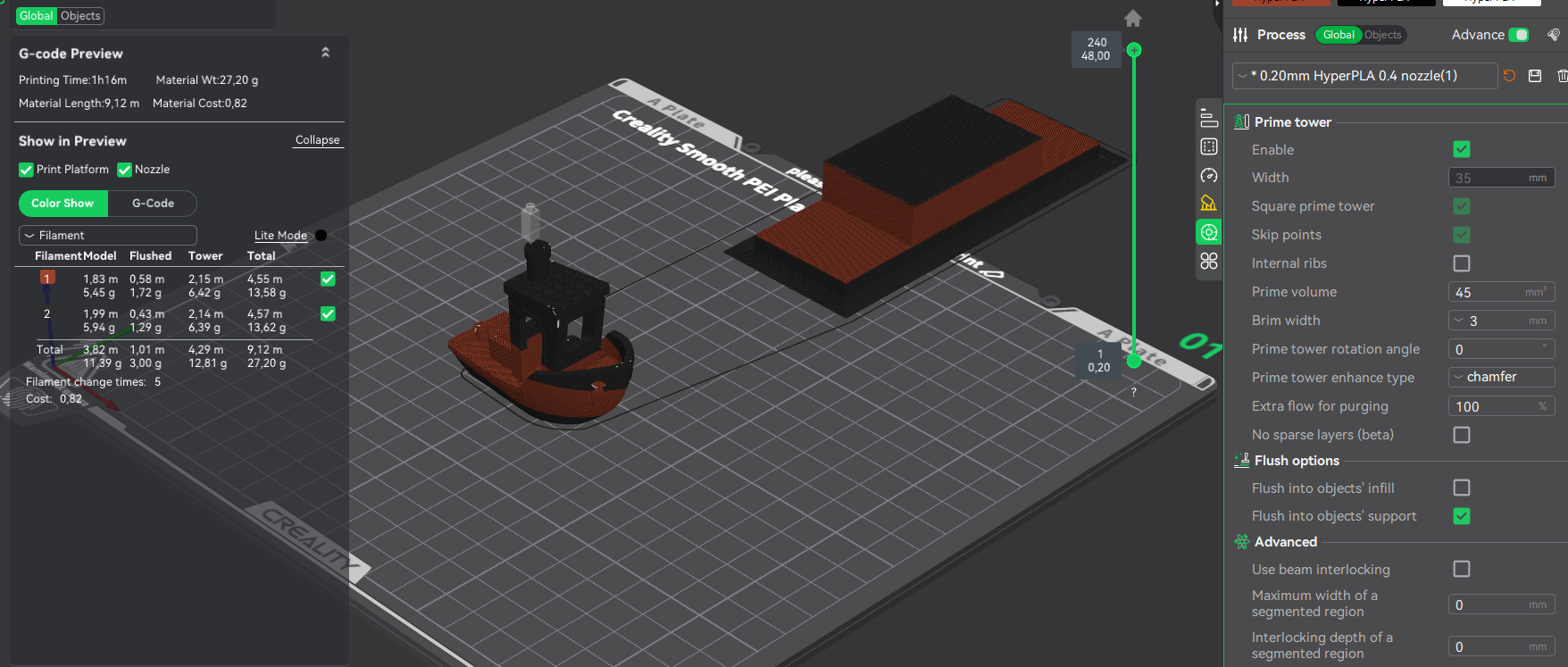
Eventually, I managed to reduce it by:
-
Adjusting flush volume
-
Importing previous K1C settings using the “Transfer” option

Filament Handling Issues During Start
The print start took ~15 minutes, with the following behavior:
-
Filament was retracted from the nozzle
-
Another filament was loaded
-
That loaded filament was being retracted again
-
Retraction failed
-
I manually removed filament from the extruder and returned it to the CFS
-
Cleaned nozzle and extruder
-
Reconnected PTFE tube and locked the extruder
After restarting:
-
The printer repeated the same load → retract cycle
-
Only after another filament load attempt did printing actually begin
Final result:
-
Benchy (2 colors)
-
~1h 5min print time
-
Large purge tower
Yet, when I think about it, my first-first print when I got the printer was benchy from that USB I got with the printer. Now that I think about it, that print lasted about 18 minutes - now it says that for a single color benchy is approx 45 minutes. It makes me wonder, how fast is that first one being printed?

Second Test – Multi-Color Model
Model: Easter egg with articulated legs
~8 color changes
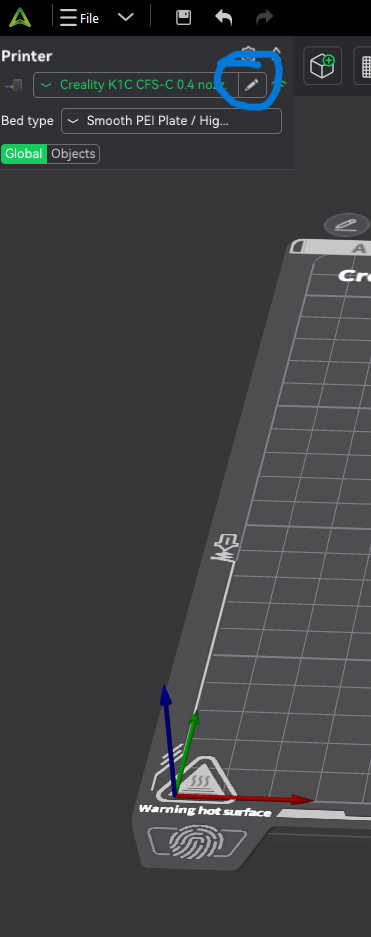
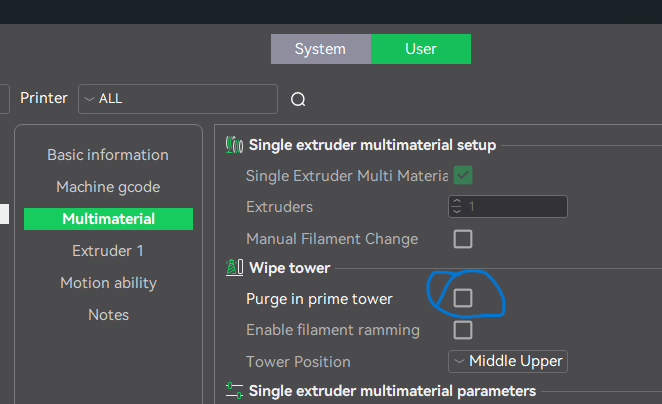
I successfully reduced purge tower size to a reasonable level (via printer settings), and uncheck the “Purge in prime tower” - then you can make changes to prime tower.

Unexpected Filament Behavior
I attempted to preload white filament (slot 3) to reduce startup time.
Issue:
-
Printer retracted the white filament
-
Then loaded black filament (slot 1), which was not needed
-
Attempted to retract black filament → error occurred
After inspection:
-
Filament was not even inside the printer
-
CFS could have retracted it but did not
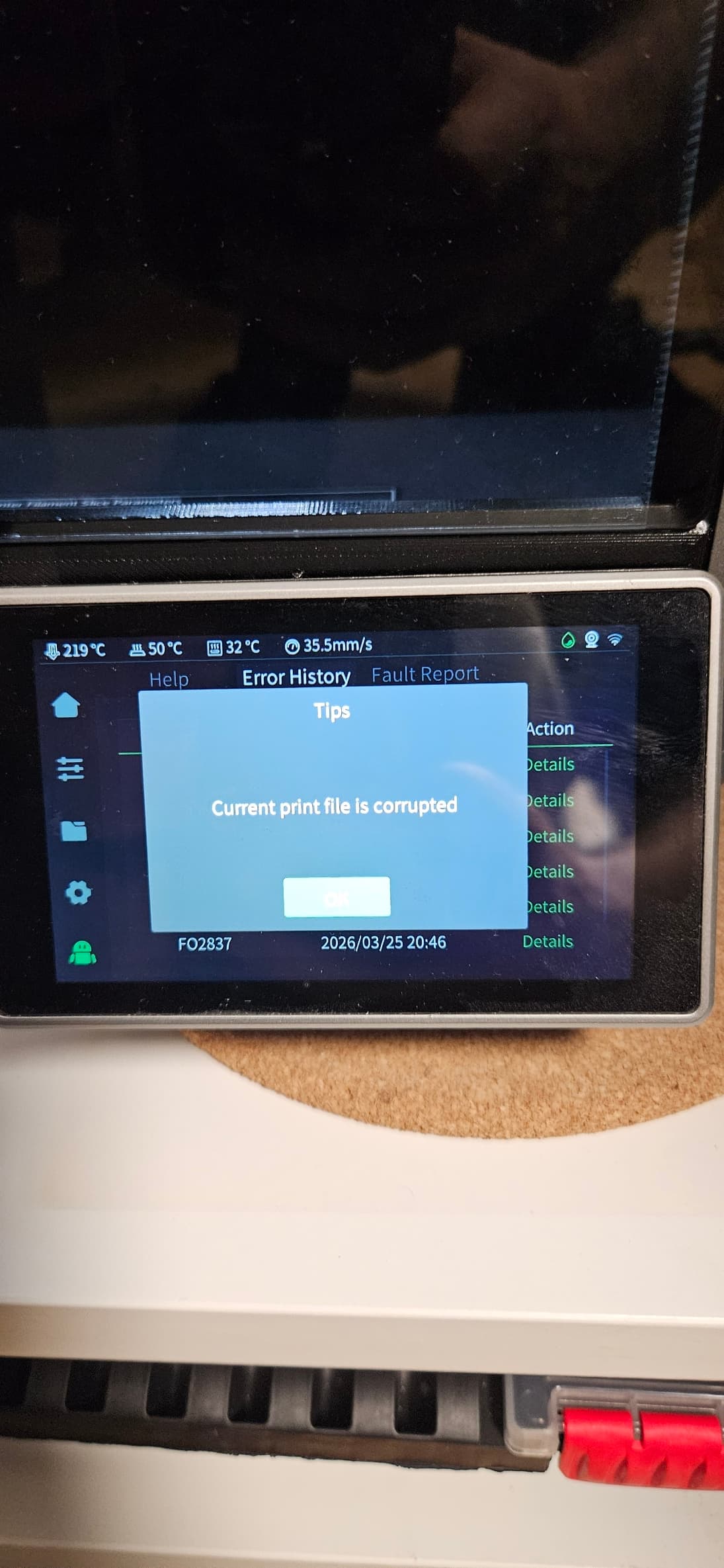
I restarted the print, and after it’s startup procedure, the print finally started, and went alright up until the first color change (about 12 minutes in), when the print stopped, resulting an “Print file corrupt” error.
I thought, maybe because I fiddled with prime tower settings, and I got back to it and re-adjust it a bit more.
Send print - print started - approx 12 minutes in, first color change - same error!
Later I found online that by downgrading to Creality Print 6.3 solves this issue, so I give it a shot.
Result:
- Warning about newer project version
- Loss of some settings (including purge tower options)
- BUT: Print completed successfully (~1h 50min)
This strongly suggests a slicer-related bug

Single-Color Print Behavior
Test 3 – Toy Trailer (Single Color)
-
Model: toy tractor trailer (for my son)
-
Material: black (single color)
-
Print time: ~1h 26min
I was not present during print start, but:
-
Print started successfully
-
Completed without issues
This test did not allow me to observe startup behavior, but it confirms that single-color printing with CFS can work reliably.
Test 4 – 250g Spool Adapter
-
Selected filament: brown (slot 2)
-
Black filament was still loaded in the printer
Observed behavior:
-
Printer correctly retracted black filament
-
Loaded brown filament (expected behavior)
However:
-
Instead of starting the print → it retracted the same brown filament
-
Then loaded it again
-
Only after that did the print start
This again points to unusual startup logic in the CFS system
Startup Behavior Observation (General)
Across multiple tests:
-
Printer often:
-
Loads a filament
-
Retracts it
-
Loads another (or the same one again)
-
Only then starts printing
-
If this is intended behavior:
It would be very helpful to have an explanation of this logic, as it:
-
increases startup time
-
adds unnecessary wear
-
creates confusion for users
Purge Line Behavior
The new purge line:
-
Is now longer, thicker, and L-shaped
-
Prints significantly slower compared to previous K1C behavior
This may be intentional for reliability, but:
-
Some optimization could be beneficial
-
Or at least documentation explaining the change
Missing Feature – Root & Web Interface
I have not rooted my K1C before and I understand people who did. Personally a web view was enough for me so I could check on my bed mesh. Everything I wanted to make, or do with my printer, I did it without rooting, cause at the moment, I do not do heavy mods.
To be honest, even if I don’t use it, I’m up for the root option to return eventually - but until then, maybe just return the web interface.
General Stability Observations
After several prints (currently on my fourth ongoing print):
-
CFS appears to be working more reliably
-
Filament retraction/loading is smoother
-
No recent errors in last prints
This suggests:
-
Initial issues may stabilize over time
-
Or require a “learning curve” / tuning phase
Extruder Lock Question
-
Does the extruder lock/unlock mechanism affect:
-
Filament feeding reliability?
-
Retraction performance?
-
I experienced improved behavior after locking it, but it is unclear if this is expected.
Positive Notes
-
Print quality is good once printing starts
-
Multi-color capability works
-
System shows strong potential
-
Reliability improves after initial setup
Suggestions for Improvement
-
Allow full control of purge tower from the beginning
-
Improve / clarify filament startup logic
-
Fix slicer compatibility issues (Creality Print 7)
-
Provide basic web interface (read-only would be enough)
-
Improve documentation for new CFS users
Final Thoughts
This is my first experience with a multi-filament system, and while the concept is excellent, the current user experience still needs refinement.
With better transparency, documentation, and small workflow improvements, the CFS-C system could become significantly more user-friendly and efficient.
Over and out 