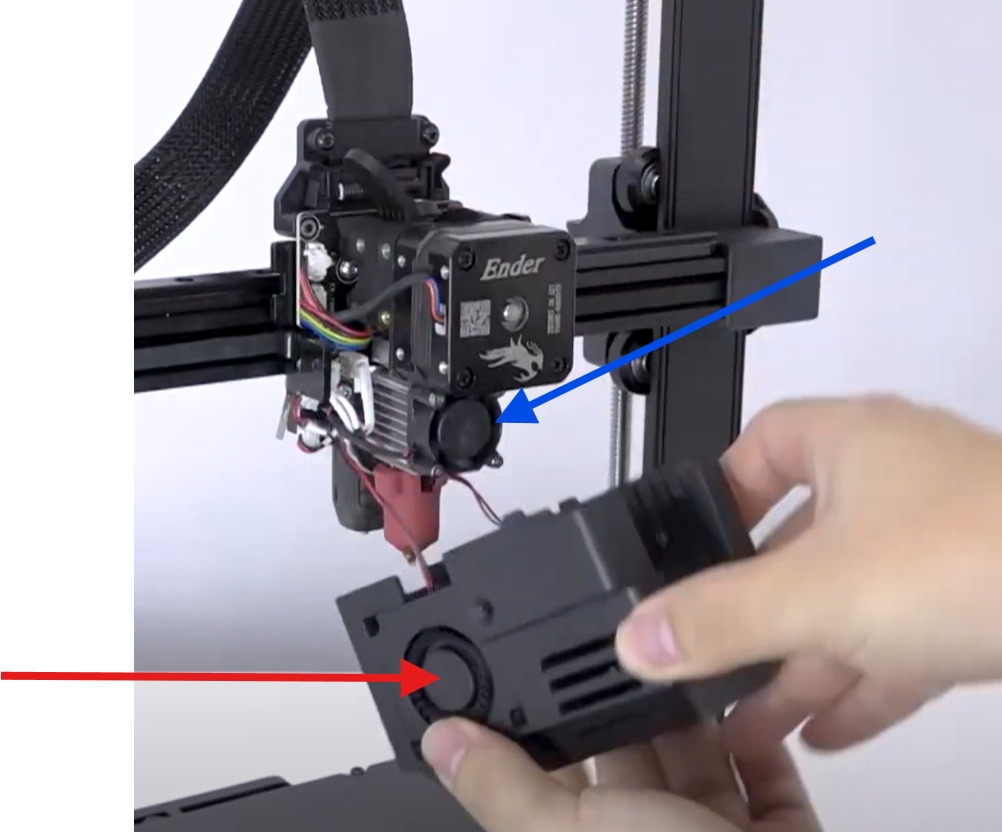
I need help to fix my printer. It started since some weeks doing this. At some point the filament is not extruding anymore. Disassembled hot end reveals that there is a broken piece of filament in it that I can get out only ripping apart the entire hot end. What I have tried:
using different pla spool
using different slicer settings (prusa and orca)
changing the hot end, the heat sink and the nozzle.
removed the gears from the extruder and cleaned them with wd40
print using klipper or loading the file from the usb stick directly
Nothing of that worked, it prints some layers and after that it just stop extruding. Did the described process above multiple times already.
Hi sorry for the late reply.
I am using creality filament (PLA) and printing a 200 degrees.
Max volumetric speed is the default one and is 0 in Prusa Slicer
I also though that the filamente could be try therefore I opened a brand new filament but still had the same issue, to I tent to exclude this.
Actually this is a good point, in order to remove the clog that was created I pushed the ptfe tube a little too much with the pliers and in one section is a bit compressed, but that said, the problem was occurring before as well. I will try to exchange it with a new tube.
I only have two main recommendations that could fit your issue:
1_ Too low extrusion temp – 200 °C may be insufficient for Creality PLA. It prints a few layers, then back-pressure builds and it clogs. Try 210–215 °C.
2_ Heatsink fan not working – If this fan is off, heat creeps up, PLA softens too high, and forms a plug or even melt the filament (thus doesn’t push anymore). Check that the fan runs at 100% as soon as the hotend heats.
Also: if you changed only the nozzle, it must be tightened hot (~230 °C). If not, a small gap forms and leads to jams.
And to see if your filament is wet (even a new one can be humid),
you can check if you hear a popping sound out the nozzle (that’s vapor)
or if you can break the filament by gently folding it
I think you are right, I am trying to spin the extruder fan and is not turning on, and while doing the self test some kind of steam is coming out. So I assume that is broken and the filament is breaking.
What do you think?
EDIT: It worked once while testing then I started to print and seems that the fan is not spinning.
This is condition. It seems that the plug is melted. Not sure if you can see but during printing the fan is off.
Digging more into the issue the fan seems to be not even the problem.
I saw that the slicer had the setting to activate the fan from the third level on. So that could be the issue.
The main point is that after printing that some layers from the video the filament is again non flowing through. I am trying from klipper to press the EXTRUDE button but seems that the filament is not grabbed, I also tried to regulate the screw on the right side but did not helped.
Sorry for my late answer. I think you’re confusing the part/model fan and the heatsink fan.
The Part/model fan is the one you can control thanks to the screen or the slicer. Its job is to cool the filament leaving the nozzle. It’s generally off during the first layers (to avoid warping)
The Heatsink fan is the one that you can’t control. It actives as soon as the hotend is hot. Its job is to make sure the heat of the hotend doesn’t go up. It only stops once the hotend is cold so it’s always on during printing.
Currently searching for a photo. Give me 10-15minutes (EDIT : OK, maybe more . Waiting for my contact, owner of a KE
Sorry for the late response. Actually you are right, the setting about the fan you were referring to was about the two fans on the cover.
Anyway, the problem is still not yet solved (I had to switch back to my good old Ender 3), I have noticed that the fan on the heatsink is not turning but if is working or not I cannot tell, also tried to change to a different port to check if the plug was somehow not working.
I have tried simply now to press the extrude button on the printer directly and looks like that is not even pulling the filament. It says extruding but nothing is going out. I am not sure anymore if during my testing I am causing more problems than solving.
So I have excluded in the order:
The heat-sink
The hot end
The nozzle (I swapped to a new one)
the PTFE tube (new one)
The gears of the extruder which I have cleaned and re-installed again
What still stand out then is, as I said, the fan of the hot end and the step motor itself.
Anything else that can be the cause, or anything I can try?
“that the fan on the heatsink is not turning but if is working or not I cannot tell,”
=> so it’s not turning while printing ? That’s the potentiel issue then. It should be on during all the print (once the hotend has a higher temperature than 50-50°C)


 Also: if you changed only the nozzle, it must be tightened hot (~230 °C). If not, a small gap forms and leads to jams.
 . Waiting for my contact, owner of a KE