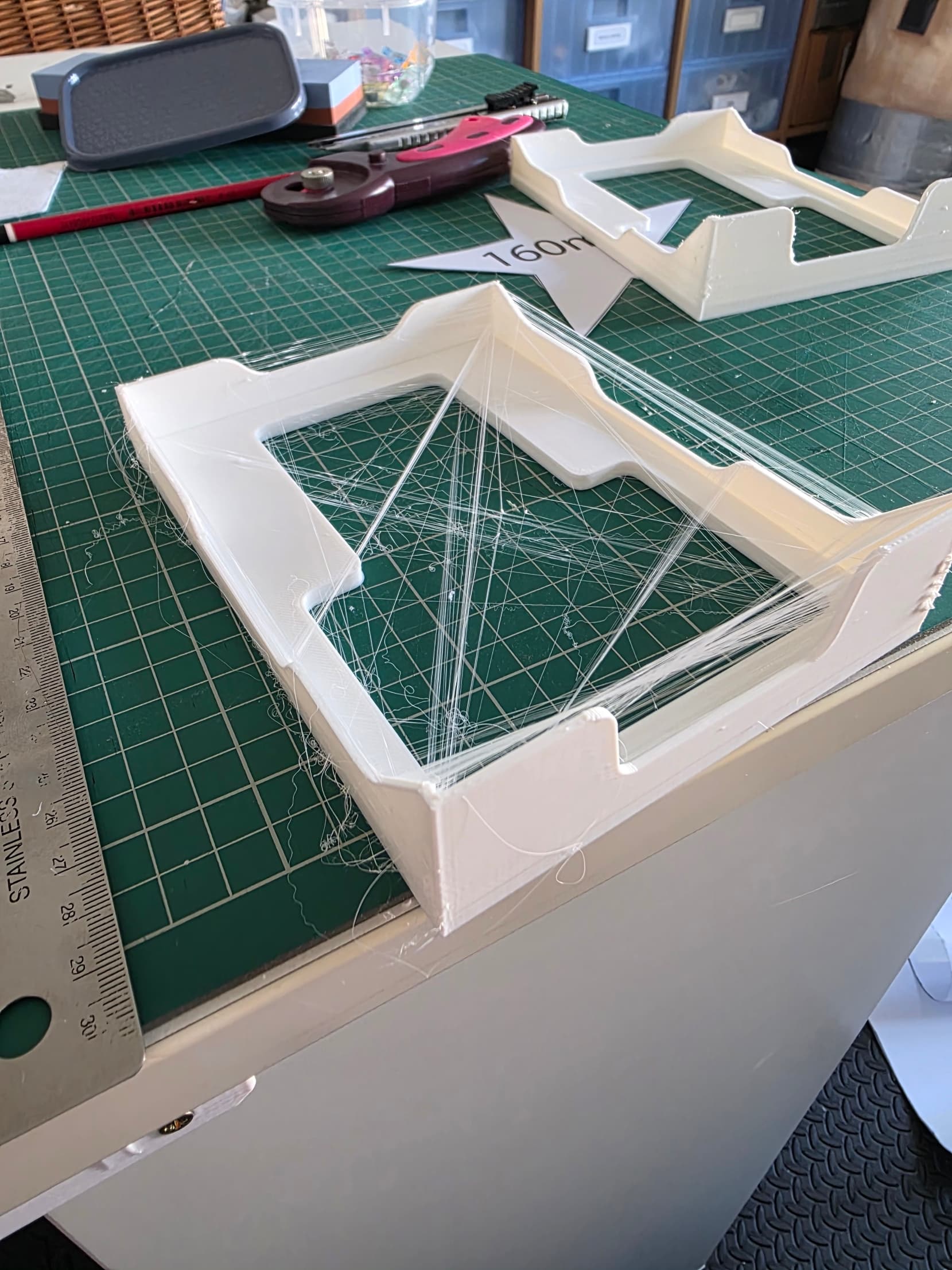
Ender 3 V3 SE Suddenly Stringing

Printer: Ender 3 V3 SE
Firmware: 1.1.0
Filament: Elegoo Rapid PLA+
Slicer: OrcaSlicer

Calibrated settings;

  • Nozzle Temp: 220C

  • Retraction Length: 0.3mm

  • Flow Ratio: No change (0.98)

Other calibrated settings:

  • Bridge flow ratio: 1.3

  • Bridge speed: 4mm/s

  • Wall generator: Arachne

A short while ago, I had to reset my OrcaSlicer settings to start over. I have no backups, I have no cloud syncs, these are brand new profiles.

I relevelled the bed, changed the nozzle and continued.

Using a tutorial from Factorian Designs I ran through early calibration tests.

https://youtu.be/gVU5If1VsAM?si=UBpNWn4EpZq1MyvO

I have made very few settings changes from the default set, but as you will see from the photo, when I print I get horrendous stringing. Something I never had before with this same model, on the same printer, with the same filament.

So, I’ve done the following with no change;

  • Dried my filament (it was a new roll anyway, I live in the UK, not too humid)

  • Nozzle temp from 220 to 195

  • Retraction length up to 0.6mm dropped to 0.4mm

  • Z-hop height: 0.4mm (on and off)

  • Z-hop type: Slope (on and off)

  • Retraction speed: 40mm (on and off)

Other settings I think I had before were;

  • Retract on layer change

  • Wipe while retracting

I know the two models are vastly different sizes, but the OrcaSlicer Stringing Hell model only has stringing on one side as you’ll see, so I’m confused.

I’ve ordered more of the same filament to continue testing with everything the same, but any other settings I could take a look at?

Thanks

Matt

1 Like

Looks like the minimum nozzle temp is 200c. So looks like you dropped to 195c? Was it still stringy at 195?

1 Like

as @3dprinting4educators mentioned, too high temperature……but might be related to fan speed too low/ turned off fan, it has some effect on filament stringing

I would do few small test towers which are far apart, and change nozzle temperature, flow ratio, and fan speed.
Fan speed and nozzle temperature will have the biggest effect on the outcome.

@Matt_Jukes the one side only thing is a good clue. Temp, retraction and wet filament can still string on one side because of how the travel moves go, but you’ve already worked through all three with no change, so I’d look hard at cooling next like Kris said. On the V3 SE the part fan blows from one side of the nozzle, so it’s a one-sided input.

Since the profiles were rebuilt from scratch, check what the new filament profile actually sets for the part fan, the min/max speed and which layer it starts on, and compare with what you remember running before.

Then the hardware: watch the fan during a print to make sure it spins up properly, and check the duct didn’t get knocked out of line when you changed the nozzle. Even a few mm off and it’ll cool one side of the model and not the other.

if all that looks right, print the test rotated 90 degrees on the bed. If the strings move with the model its the model or the travel path, if they stay on the same side of the printer it’s the cooling.