Good morning everyone, is anyone having purging problems with the K2 line? I have a K2 Plus and it purges 3 to 5 times with each filament change, and even Creality support isn’t able to help me with this problem.
I am surprised that Creality support was unable to provide support. Here’s an AI summary.
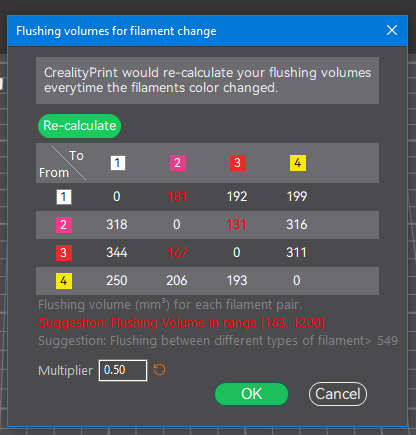
“To adjust Creality purge settings, find the “Flush Amount” or “Purge Volume” table, and change the cubic millimeters (mm³) for each color transition to balance waste vs. color purity.”
It is possible to even dial in transition purge volumes from a particular color filament to another color to prevent bleeding of colors in the final print.
1 Like
I really appreciate the tip. Where do I find this? on the printer or in the Creality Print Software?
Hello @Israel_Fernandes & @ElCid 
Welcome to the Creality Forum…! 
In Creality Print:
Click on the faucet icon.
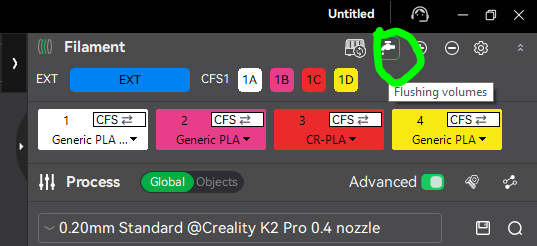
This little chart will pop up. You can change most of the numbers. Be careful, because if you don’t flush enough the colors might bleed. For example, it takes more to flush going from a darker color to a lighter one.
3 Likes
Thank you so much. That helped a lot!
1 Like
The real problem lies in the gcode. Even if I set the purge volume to 0, the printer would still purge. This is because the firmware bypasses the volume flow multiplier. This is a BIG PROBLEM for multicolor Creality with CFS.
Hi. I’m having the same problem. I printed the same model with different multipliers, from 1.2 to 0, and it seems I’m always getting the same amount of purge.
If anyone knows how to solve or work around this, please let me know.

1 Like
You must enable this option in the printer settings; if left unset, it will ignore your flush configuration

Thanks for the advice. However, it doesn’t seem to be working. It’s even worse than before. Now it’s not changing colors… It’s not loading any colors at all, as if it’s no longer handling the CFS.
I don’t think I’ve changed any other settings, apart from the one you suggested.
If you have any other suggestions…
It works perfectly fine here. Maybe you need to reinstall Creality Print to reset the settings, check the flush volumes, and adjust them as needed.