If you live in a desert you could be fine. I live by the sea, in a woodland, by a stream in England, I might as well be printing Jacque Cousteaus’ aqualung whilst he was testing it.
1 Like
Are you sure that is a K2 plus extruder. Here is a picture of both my halves.
principle is the same.
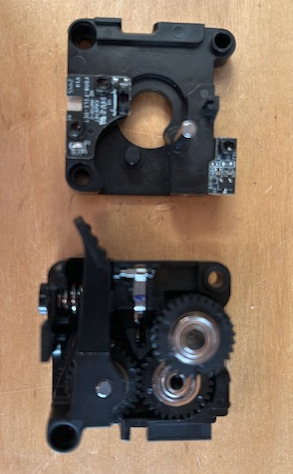
I think that I have highjacked the thread in order to get advice on printing TPU. I have a K1C and not a K2. Apologies for the confusion
Whichever the printer I would print a temperature calibration, the temperature window for TPU (well the ones I have used) are quite narrow outside which TPU strings badly.
So invested in a Creality Dryer. Printed TPU perfectly now. Another lesson learned
2 Likes
Once you find a brand of TPU that you find prints perfectly probably best to stick with that brand, they can vary quite a bit.
Thanks. I am using Formfutura’s Flexifil
Try this one on reddit some people use it with suc6 https://www.printables.com/model/1152328-k2-plus-extruder-manual-tensioner
And FWIW, I have a PEI plate with Magigoo glue so I can get the print off!
Why do you need glue? I did when I first started and learned it was due to bed strain gauge and since replacement don’t use it. For TPU,ABS,PA,PLA and PEtg
When printing TPU on a PEI build plate glue is a good idea as a release agent, it sticks so well to PEI that you can destroy the buildplate, the glue saves it from sticking too strongly.
I have a spare build plate I’ll try it with and without tonight I need print some tires
Hi everyone,
I also experienced this issue with TPU on my K2 Plus (filament looped out the side of the extruder mid-print). After testing and digging around, I can confirm this is a known issue related to extruder design and filament path.
Creality has published an official troubleshooting page with clear recommendations: https://wiki.creality.com/en/k2-flagship-series/k2-plus/print-tpu-filament
- Remove the PTFE tube, insert the TPU directly into the extruder.
- Drastically reduce retraction (0.2–0.5 mm) and lower speed (20–30 mm/s).
Use TPU ≥ 90A, avoid softer grades (75A/80A).
Disable automatic calibration (PA and Flow) which may cause jams during startup.
2 Likes
I came across this video by a YouTuber named Stay Ready To 3D Print who claims he has solved the TPU problem on the K2 Plus by swapping out the spring and a few other mods:
My Secret To Printing TPU on The K2 Plus (100+ hours No Fails)
1 Like
That’s a pretty interesting video-easily making the spring tension user-adjustable on the extruder is huge!
I really wish there was a repository somewhere listing all the hacks users have come up with to overcome all the issues with the K2+. Not a thread with back-and-forth, but just a chart. It’s hard to keep up with all these fixes!
2 Likes
+1 to a repository of fixes… sadly I’ve needed quite a number of them to date…
1 Like
@Chris.S_NZ
NICE WORK!!! One stop shopping for many of the issues/fixes on the K2 forum, along with a bunch of bonus info—Thanks!