I am having issues getting the camera to correctly align. I have done the camera wizard several times. I have even done the dots several times. When i use the tool to the left “set laser position” on the 4 corners they are pretty accurate. Inside the middle it is not. As well as anywhere else in the work area. Please help i have been struggling with this for longer than i would like to admit. I have this issue both in falcon creative spaceas well as ligjtburn. I love doing stuff with the laser it seems super fun. But this issue is making me wish i had bought a different laser. Please tell me i’m doing something dumb and its an easy fix. I did just buy a honey comb for it. But this issued existed before I had it.
I had exactly the same problem. I found that the lighting inside the case was very “shadowed” so what i did was:
- I removed everything from inside the bed (the honeycomb and steel plate.
- I vacuumed the inside to make sure there were no bits.
- I covered the whole inside base with white paper (I think it took 5 or 6 sheets of A4)
- I glued my dot card to a piece of basswood cut to the exact size.
- I then calibrated it in the 9 locations in the bed, BUT…
- I used a bright external handheld light to illuminate the dot pattern, making sure the gantry was not casting shadows over it.
- To make sure the middle was as accurate as the edges, I measured to make sure it was EXACTLY in the middle of the baseplate.
Now my camera is accurately calibrated. I hope this helps?
If you’re doing it in Creality’s program it doesn’t tell you to face the calibration card to the camera either
Center photo goes flat (look at the to left camera/card angle
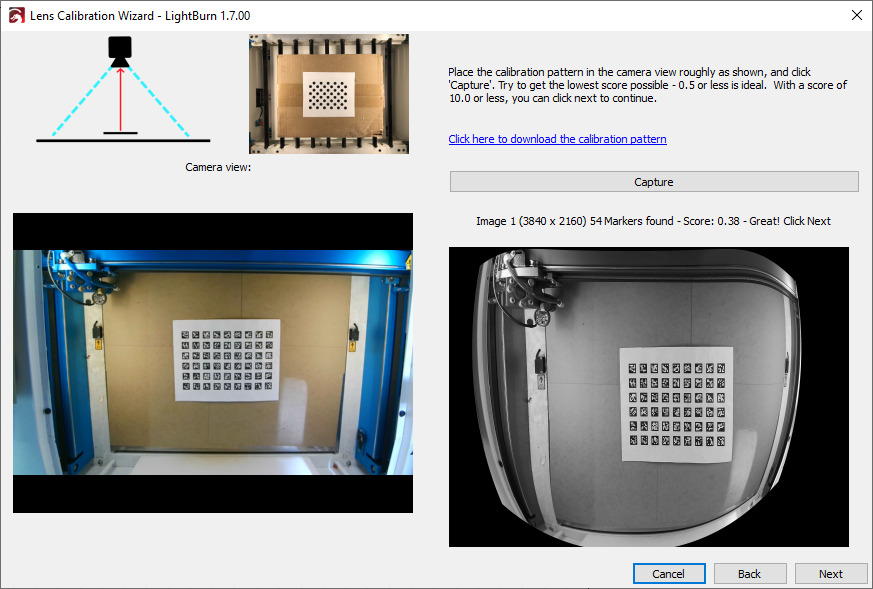
then for the surrounding images around the edges, face the card toward the camera (again check the top left of the below image)

Falcon design studio is pretty rubbish at explaining this
Are you using lightburn to calibrate the camera? I didn’t think lightburn had access to camera.
I have the Falcon A1 and have the same issues. I have done the same process steps and the camera still has distortion in the front and doesn’t align.
If I get to the settings, what are the measurements. It is set to the factory now.