hello to you all,
i have just setup my K1 Max which i purchased after my cr10 S5 died and its a great machine, could someone please help me with a problem?
a lot of my prints require a color change during printing, would anyone be able to talk me through this process.
in the past i have used Cura and it has a add script tab to do this Creality print has not got this function that i can find.
i have been printing and designing my own things for several years now but i have trouble understanding G-Code.
3 Likes
Hi @Oodna and welcome to the forums.
To do colour changes mid-print you would need to implement the pause command.
In your slicer you would usually set the filament change gcode to PAUSE and this would prompt the printer to pause on the layer you wish and allow you to swap filament, purge and resume.
I would recommend trying out OrcaSlicer, they have a profile built in for the K1 series printers and it also works with the PAUSE command unlike Creality Print.
Hope that helps.
2 Likes
Using Cura to slice, should I just edit the GCODE and add PAUSE to the layer I want, or is there a more automatic way to do it?
In prussaslicer when you slice it, you can easily add pauses from the layers bar, you can add your printer to prussaslicer, just with the measurements and type of software,
Hi
My son and I are learning about all of this; I found a thread similar to this in the Ender section. Most of what I’ve found recommends manually editing the g-code with a PAUSE command.
While this probably works, I couldn’t find the same “;layer:##” that people mentioned in that (and other threads). Also, when I went to do this in another slicer (Prusa), I ran into problems because the K1C (and K1 series in general) is not profiled there and I was entering a dark hole of manually entering parameters, etc.
A long intro to this: we figured out a solution.
In CrealityPrint, once you go to “Preview” you can scroll through the layers on the side (up and down). When you get to the layer where you would do a color change, you can RIGHT Click and “Add Pause”.
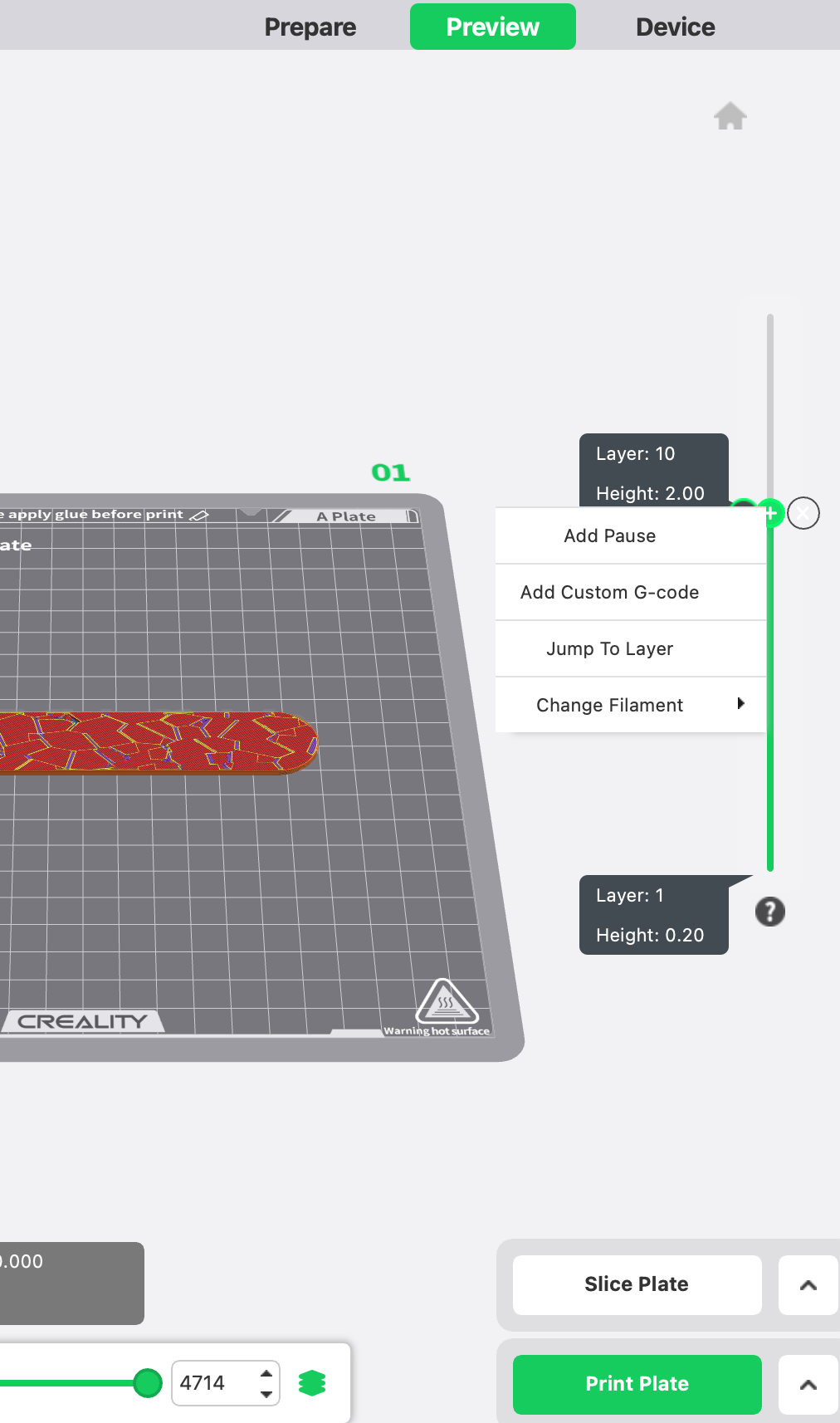
I noted there is also a feature there for “Change Filament”–that might work, but I’m assuming this is for machines with multicolor already setup? Not sure but this inserted into my bed a block purging the old filament and seemed to create more problems than just having it stop and then we changed the filament.
I hope this is helpful for any of you trying to do this.
Thanks!
Very helpful and worked a treat! Thank you.