HI All,
Very new to 3D Printing but enjoying my journey, I have printed a number of models only had one issue where the nozzle scraped the plate and destroyed the nozzle, but hey ho.
My real aim is to make my own items, but my first issue I am trying to solve and Creality Print isn’t showing how to do this, how to create a void inside my object halfway through so I can place a magnet inside and then let the remaining portion of the object to be printed, so in a way what I am asking is 3 questions:
- how to create the first portion of my design,
- how to create the void and to get the system to stop or pause.
- how to get the print job to continue once I have placed the magnets into the void.
Any help at all would be greatly appreciated.
Spud
This is a straightforward process. Below are a few precautions to help you avoid a common failure mode: collisions between a hard magnet and the nozzle.
Note: Even if the magnet is embedded below the top surface, it is still a magnet. Some nozzles contain enough ferrous material that the magnet can be pulled out of the cavity during printing. This does not happen with all nozzles, but you should plan for it.
Disclaimer: Accurate cavities are best created in CAD. Learning basic CAD pays off quickly, and there are several capable free tools available.
- There are multiple ways to do this, but the simplest is to create a negative solid matching the magnet dimensions, then position it where the cavity is required.
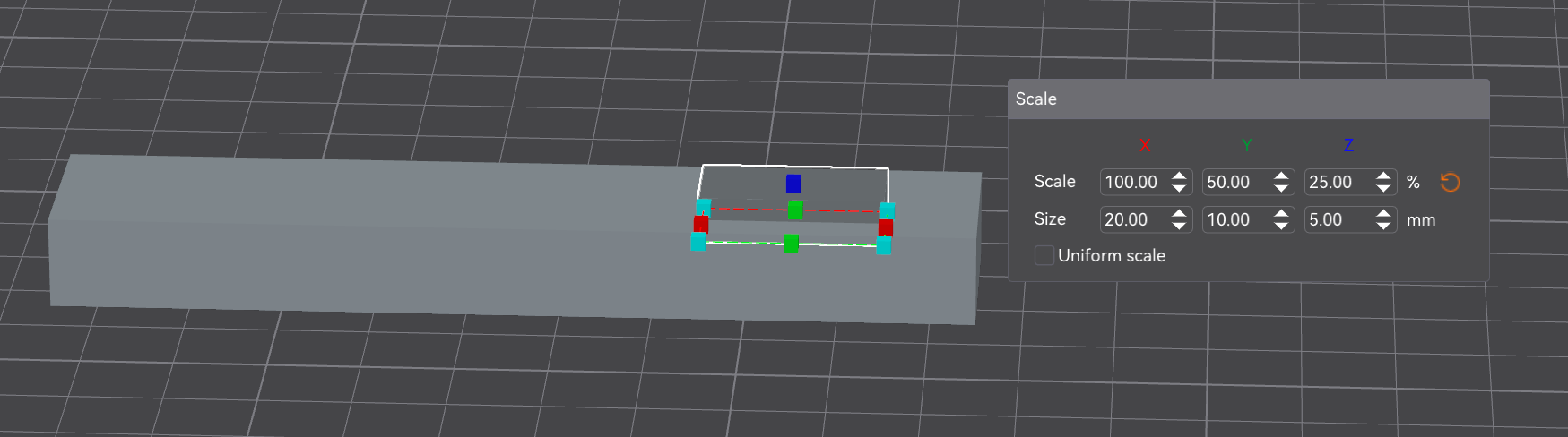
For this example, assume a 10 x 20 x 5 mm bar magnet. The same principle applies to cylindrical magnets.
a)
b)
c) Move the negative solid into position so it just intersects the layer above where you want the magnet to sit.
You can use the dialog box for precise placement; the arrows are fine for coarse positioning.

d) Slice the model. Using the layer slider, insert a pause at the last layer before the magnet will be fully covered.
The pause must occur after the cavity is printed but before the encapsulating layer is laid down.
Cautions and Tips
-
If the magnet is a press or friction fit, it can still be grabbed by the nozzle.
Tight tolerances help, but if there is any doubt, bond the magnet to the cavity floor with cyanoacrylate (gel works well) and allow it to set fully.
-
Practice on a test print using a plastic “dummy magnet” with identical dimensions.
If your pause height is wrong, it is better to crash into plastic than a hard magnet.
-
After inserting the magnet during the pause, clean the top surface before resuming.
A cotton swab with IPA works well. This improves layer adhesion.
If the next layer still struggles to stick, apply a thin smear of dried white glue using a damp cotton swab.
2 Likes
I do this in the slicer rather than in my modeler when it’s just a simple magnet I want to add (I do it in the modeler if it’s a box or something with magnetic fittings as part of the design).
Create the model you want to add a magnet to as normal. Import it into your slicer and slice.
On preview screen, figure out what layer you want the magnet to be into by using the layer slider on the right.
Back in prepare, right click on the model and add negative part. I use a disc for disc magnets. Make the negative disc very slightly larger than your magnet. Move it into position at the layer you want the magnet.
Reslice. On the preview tab, use the layer slider again to check the magnet void. Go to the layer just before it starts to add the top over the void. Right click on the + at the top of the slider and add pause at that layer.
Reslice.
When you print it, it will pause at the layer you set. Add the magnet, then resume the print from your main screen as normal.
2 Likes
JoeFriday,
Thank you so much I will take those things into consideration and I will definitely make sure about the nozzles and the magnets.
Truly Thank you
LoriAnne,
Thank you for your guidance, I haven’t used the slicer so far as I have just been using created models so far this is my first steps into designing so I guess I need to start playing with the slicer.
Thank you again for your advice.
1 Like