Hi all,
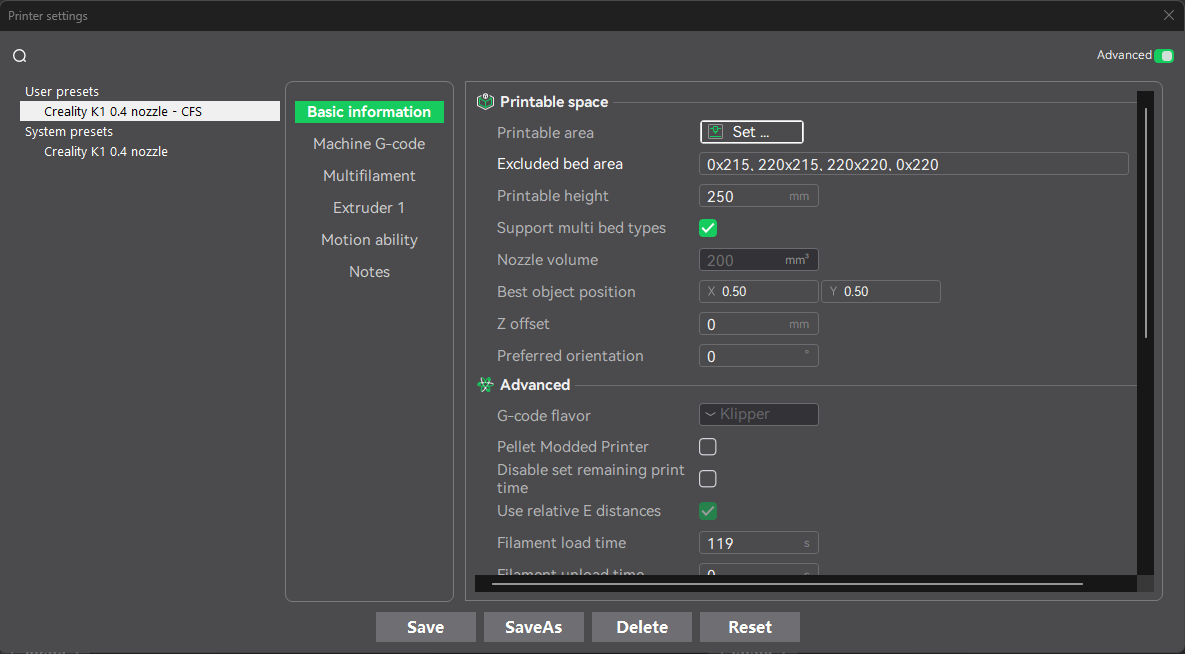
I putting this just in case anyone else is looking for a similar fix after upgrading their K1 to support the CFS and received error CY2586). I recently upgraded my K1 with the CFS upgrade kit and everything seemed to go okay until I tried a large print. I received Error CY2586 a couple times. I was trying to print a large print that used the K1’s entire bed width which is 220x220. It took me a little to realize where the issue was actually coming from. Ultimately, I think I have determined that the note for the upgrade kits indicates that the printing area has been decreased: “The molding size of multi-color printing will decrease by 5mm (Y-axis); K1/K1C/K1 SE is 220*215*250mm; K1 Max is 300*295*300mm”. I did know this when I moved forward, but I guess I didn’t put the dots together that the firmware/software wasn’t really addressing this in the slicer. Essentially the software doesn’t ‘know’ that the bed area has been reduced. I wish Creality built this into their software as an option. However, the fix I found was to modify the system presets in the Printer settings. I set the Excluded Bed Area to ‘0x215, 220x215, 220x220, 0x220’. This manually removes that back 5mm from being able to be printed to. Hope this helps someone else.