I’m relatively new to 3D printing but have been printing regularly since this spring and have had an ongoing issue with my K1 Max. Any time a print fails even if there’s nothing physically wrong, can just be an issue with a file or maybe the bed leveling, the nozzle is in the middle of the bar and the plate is stuck way up at the top. It’s like the machine has lost its bearings. I’ve tried self check, turning it on and off again. The only thing that has worked has been a factory reset. Today the factory reset worked to bring the plate back to where it’s supposed to be. Then I thought it would be a good idea to update the firmware in case there was some kind of fix and THAT pushed the plate back up to the top again. I’m in the process of yet another reset. Has anyone had this issue and found a solution? Or a reason why it’s failing maybe? I’ve not found any issues with any of the physical parts of the printer. I’m at a loss!
Find out why a print fails? lack of support? Bad bed adhesion? Failing filament? Using the right printersettings in Creality Print?
When a print fails this should not result in a problem with the Z-axis…
I just figured out that the failed print was caused by the filename having an apostrophe in it. To your point, my biggest issue is the plate getting stuck and the ONLY resolution I’ve found is doing a factory reset. It’s so frustrating.
Explain “stuck”… I’ve never seen this happen… can you rotate the z-axis rod manualy to lift or lower the buildplate?
After firmware update you need to do complete selftest…
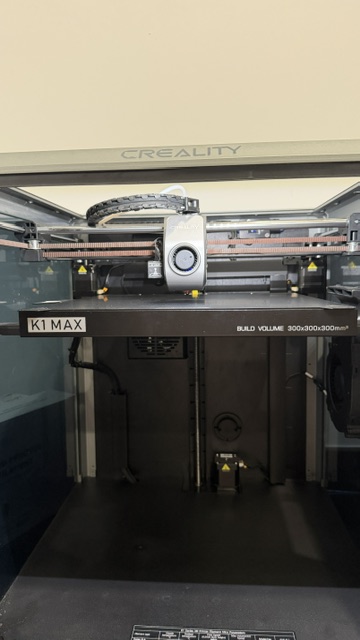
Here’s where the plate rests and you can see that the extruder also stays in the middle. Normally, the extruder is to the right when it’s not printing. I can use the touchscreen and manually lower the Z axis .01 at a time. One time when it did this, I just tried to print again and see if it would reset itself as it was homing and callibrating. It ended up gouging the plate with the nozzle. The only way I’ve been able to get it back to where it’s supposed to be is to factory reset and then run through the self check. When that’s done it prints just fine. It’s just really annoying to have to do all that any time a print fails. I’ve updated to the latest firmware and did the self check and it’s working fine now. I’m just trying to see if there’s anyway to fix it without the factory reset. (And I’ve tried turning off the power and waiting for a few minutes. I’ve tried running the self check before the factory reset and that doesn’t work.)