HI, I upgraded my K1C to CFS in December 2025 and since that time I’m struggling to use my printer. I’m more persuading printer to work properly than printing.
The whole experience can be characterised with one word: UNRELIABLE.
When it works it works. But almost always when I need to print something there is strike. Gazillion of confusing messages and I spend hours to make it working. Then it works. And then suddenly it does not again. And repeat.
Do you use K1C with CFS and it works well on daily basis? I’m seriously considering to sell the whole Creality thing and buy some other brand. I’m aware that I’ll lose money when selling it but I’ll stop losing my time.
Sharing a reply I gave to someone else recently that was having problems with extruder jamming. I finally discovered most of the problems I had originated from the CFS itself. Avoid cardboard spools, check for spools that jump out of track in the CFS, and / or filament getting tangled in the spool so it won’t come off the spool. You can also cap the top speed by adding one g-code command to your starting code in the print settings. Thes simple changes greatly improved my K1C with CFS experience.
If you have a CFS with your K1C, be advised that cardboard spools (even those from Creality) cause problems with the CFS function. There are models for printing rims that you place on the cardboard spools that help some but I found the best solution is to stay away from cardboard spools if you have CFS. Another fix that works is to buy 1.5” steel ball bearings (about $15 for a set of 5 of them on amazon) and put one of them in the hole inside the cardboard spool. This adds enough weight to the cardboard spool that the CFS always turns the spool, but if you get filament tangled on the spool it will pull the spool out its nest and up against the top cover. With regard to the feed problems, when it happens with CFS, open the lid, grab the filament you’re trying to feed and see if you can pull a little bit of the spool. I almost always found the spool got jammed in its nest and wouldn’t turn OR the filament got tangled and wouldn’t feed. Both are easy to fix.
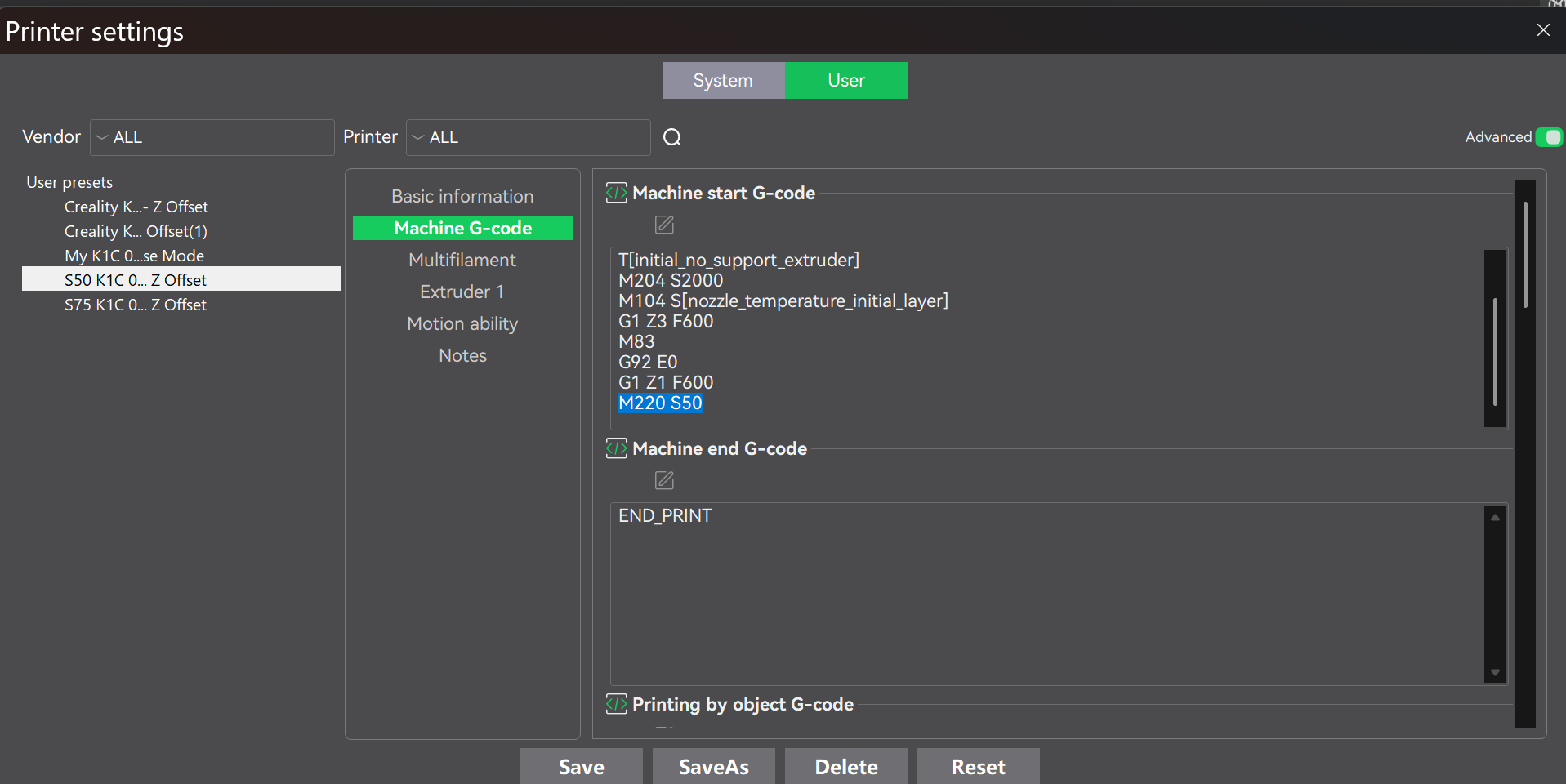
I also found that slowing your print down can nearly always fix most prints. On my printer, I set up two new printer settings that I title S50 K1C 0.4 nozzle and another I title S75 K1C 0.4 nozzle. All you have to do is create a copy of the printer setting you have been using then add the g-code at the end of the start string “M220 S(percent of normal top speed you want)”. I usually use 50 if I have a layer shift failure, and 75 if I am having other quality problems. Below is a screen shot of what the g-code change is that I’m talking about. By the way, this seems to just reduce top speeds, and it doesn’t increase print time all that much.
I hope this helps you some. I rarely get feed issues anymore, although I do sometimes get problems with the filament breaking or getting stuck in the buffer but they’re relatively infrequent and easy to fix and I haven’t been able to find a fool proof fix for that yet but I’m working on it.