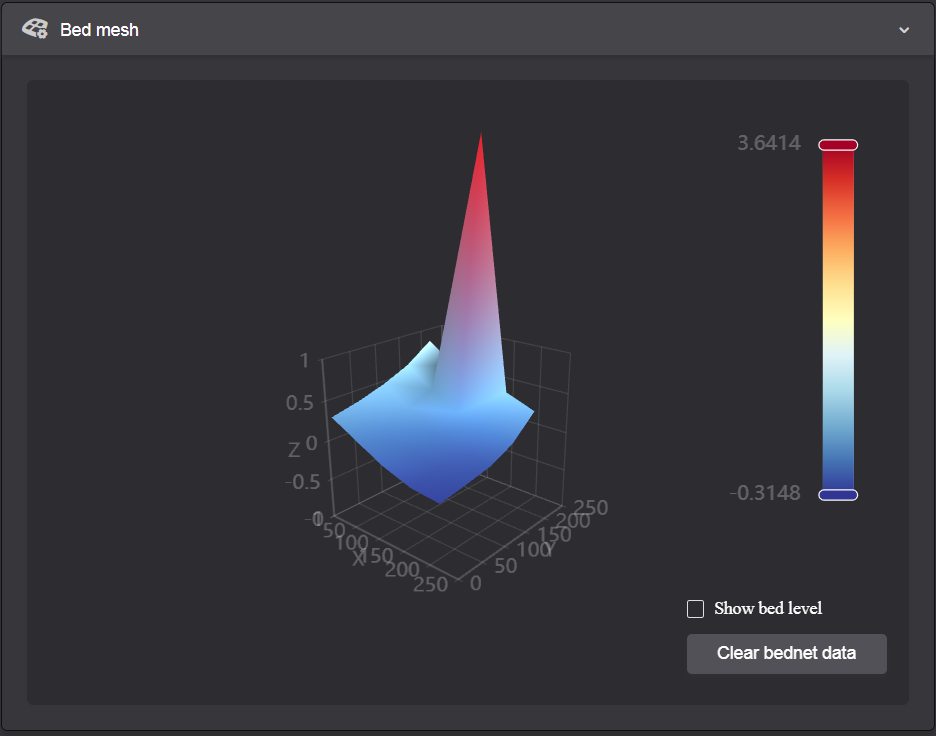
I have leveled my K1C as best I can and as you can see I managed to get it pretty level except for the strange spike that shows up at the back of the bed. It is not imaginary, as prints tend to have poor surface quality in that spot and tend to come off the bed also. I don’t know what is causing this and it is a big deviation, has anyone had this and been able to fix it?
Looks like a faulty sensor to me
Thanks for your reply Steve, that’s what I was thinking but it detects the rest of the bed accurately and this is happening exactly the same on my 2 K1Cs. I was hoping someone else had seen this specific behavior before.
Ive never seen it happen on mine ( two K1 SE’s ). Maybe something trapped between the removeable plate and bed ? Have you tried laying a steel ruler edge across it to see if there is a physical ‘lump’ there ?
Despite the rest being ok i would still guess at a faulty load cell.
I hope you manage to get it sorted
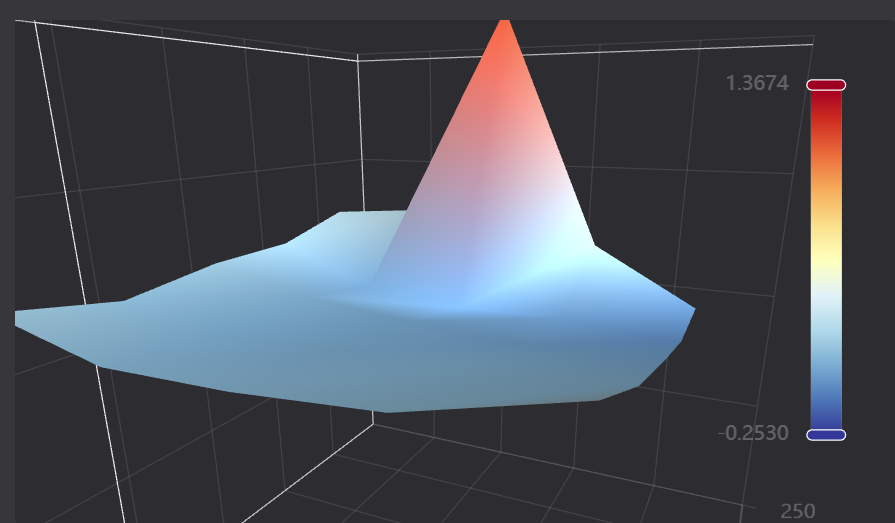
Have the same issue and evolution on my K1C non 2025, Since Mt Everest showed up right rear, near impossible to get good adhesion on full bed print attempts. Anyone figure this out yet.

Looking at pictures related to this problem some observations I think can be made.
(1)
Locations all appear near the same bed location that being right side rear maybe with some favoring center rear.
(2)
I have seen none located forward near the front.
(3)
The spike is anomalous meaning its not normally seen in conventional bed leveling examples; for this reason the auto leveling algorithm may have no usable solution.
(4)
The size of the spike dominates all 4 corners and their largest differential
SO WHATS UP?
The guy calling out load cell (LC) problem is spot on because all readings, corrections, are derived from these sensors with temperature coefficients mixed in. Reading some more on the 4 LCs I couldn’t determine if they are smart sensors or just resistance bridges. If bridge, a simple measurement should/may point to the culprit(s). LCs don’t like abuse and can be damaged if the force element is pushed beyond Young’s modulus of elasticity and permanently deformed. At best its at rest will be shifted and uncorrectable.
Awaiting load cells and will test and replace. I talked with creality support for about an hour and mixed feelings about help provided. They basically said check for bed flatness. I felt that was lame since no recent event would cover why it started. So onward I played.
Removed bed plate and looked at sensors and arrangement for upcoming replacement . BTW do not use the term load cells when searching for replacements. The chosen descriptor is strain gauges. The replacement is straight forward. 4 screws in and out for each SG. Creality kind of confirmed they were not smart so resistance bridges. Weirdness occured after replacing the bed and running another mesh…CLEAN… NEAR PERFECT… wtfo. I fixed it right? Wrong.
So what’s going on. After rechecking the 4 mounting screws, snug, I ran it again and Everest reappeared. Repeated several times what got it good once but never could get GOOD again. Checked sensor connectors wiring, nothing obvious. Sooo at this point SGs are prime suspect. My thinking being removal of the bed jared the SG enough to get it back temporarily.
QUESTION
Any good practices on lubrication of rodsd and lead screw? Grease or graphite wet or dry?…Prethanks
1 Like