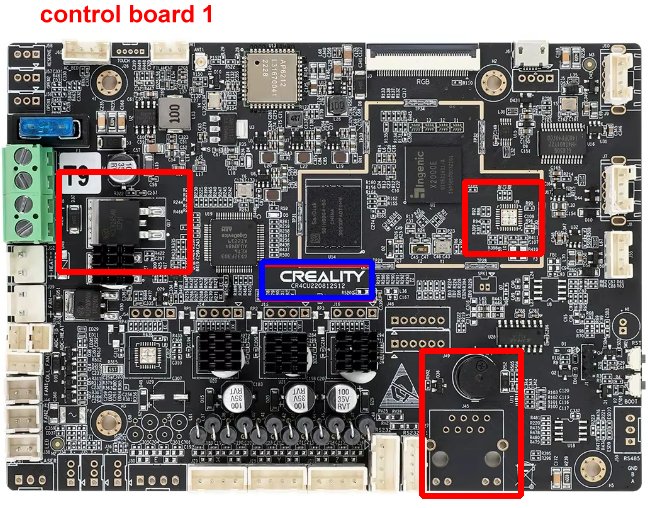
Hello everyone. Had a blob of death on my k1c. The hot end got damaged.
I bought a new hot end, but it is the new version. It burned when I turned the printer on.
Is there any hope to save the printer? The touch screen just says “waiting for printer to initialize“.
Did you change the connector to fit the old board? I thought the old toolhead PCB board and the newer one both had physically different connectors that made using the new hotend on the old toolhead impossible right out of the box. I haven’t seen it or experienced myself but my guess is the toolhead board is most likely dead, main board is probably fine - if the main board was gone the screen wouldn’t display anything and would only light up at best. Because it’s Klipper under the hood, it’s likely trying to establish the connection to all the controller boards inside the K1C - it probably just keeps trying indefinitely, expecting all the boards to respond eventually (which won’t happen if one of the boards is dead).
Swapped it, turned the printer on, and no smoke. But the touch screen just keeps saying the same thing.
I can send a picture from both PCBs, if it helps.
What model of K1c do you have? 2025 or the original K1c. The toolhead board is different on the two K1c as is the main control board. I do not know if the hot end is the same.
It still could be the main board. The board may appear to be working correctly but the CAM comms port could have been damaged. Therefore comms to the toolhead board could be compromised.
First try a system reboot - From main menu select “ Reset to default”.
Be careful if you decide to replace the main board, There are two different boards one for the K1 and a different one for the K1c. Check the board installed in your printer before ordering a new one.
Hello @Bill.b . Thanks a lot for your replies. And sorry for taking so long to follow. Could not spend time on it during the week.
I could not find the reset option on the screen menu. I tried to unplug the head pcb at all. To check if the main board would show some other error. Maybe something like “Unable to connect with XYZ“. But I am seeing the same message.
I am guessing it is safe to assume some parts of the mains board got damaged. Do you agree?
Also, could you help me find a safe place to get a replacement? I have found in Amazon UK, but they do not deliver it in Ireland.
Scared to buy at some not so trustworthy place.
From what I know there are 3 different versions of K1C, the old pre-2025 versions are:
Mainboard Version: CR4CU220812S11
Mainboard Version: CR4CU220812S12
And the 2025 version (which has different connectors) is Mainboard Version: CR4SU200382C13
And, from what I’ve seen - the 2025 K1C version has a different menu GUI compared to the older pre-2025 K1C models.
You could try to connect a USB flash memory stick and get diagnostics exported, the process is intended for getting diagnostics data exported to hand to Creality support. It would gather all the information, including logs into an Archive and you could be able to see any error codes in there.
They have error code meanings explained here: K1 Flagship Series | Creality Wiki under Troubleshooting area. But those only list errors for which they have added fault alert messages, you might find more detailed errors only in the Klipper.log from the export.
Older pre-2025 versions of K1C (2025 version lacks root access) you can enable root access and connect to the machine via SSH to access Klipper logs. I have a 2025 version so I can’t give you the exact steps on how to get the diagnostics export or how to enable root access (it’s a bit of tinkering - I’d recommend trying to get logs out via diagnostics).