I just upgraded to version 1.1.7.0, and ran the suggested calibrations. I have never had any issues with my printer (which i use daily), but now all of a sudden ALL prints look ugly!!! Stringing, poor wall quality with a bad looking pattern, bad seams and………. USELESS!!! Please roll back to the previous version ASAP!!!
Welcome to the community.
Let’s see if we can help here.
-
Like so many other forums, this one is supported primarily by users. Creality employees rarely weigh in unless it’s to announce some future prematurely released and barely tested product they want you to buy next, despite never fixing the deficiencies in their previous flagship products. So if you’re expecting a direct answer from Creality here on a product that they released 18 months ago, that’s unlikely.
-
Once the product ships, Creality does not control which firmware version you have installed. You do. Here’s the Wiki page explaining how to upgrade or roll back the firmware. It’s essentially the same process you just used for the upgrade:
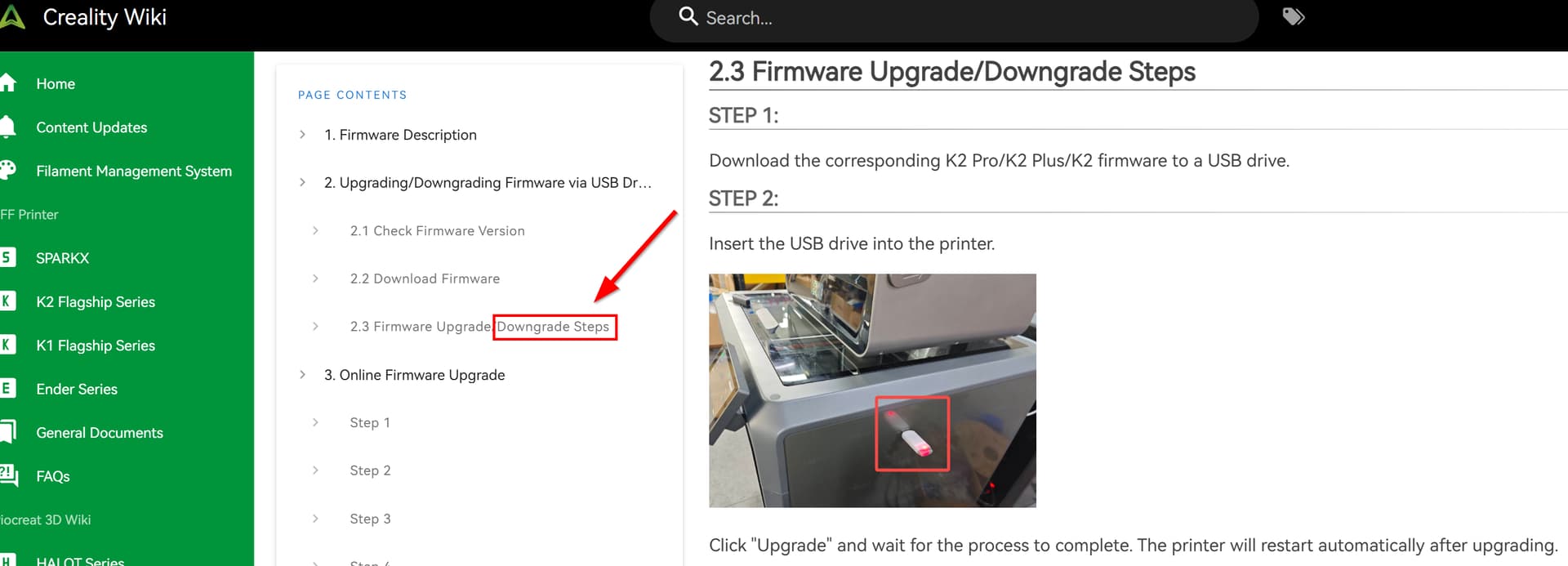
- While I understand why the deterioration in print quality and the timing of the firmware upgrade appear related, sometimes that timing is coincidental and the two problems are unrelated. The only reliable way to determine whether the firmware is actually the root cause is to roll back to your previous version and see whether the problem disappears.
- If this does fix the issue, please post your results here. That would be strong evidence of yet another poorly tested firmware release, and documenting it will help future community members experiencing the same problem.
- Last but not least, this forum works because members contribute their experience and help each other. If you want help diagnosing the print-quality problem, post clear pictures of the results. There are plenty of knowledgeable and helpful community members here who will try to help. That’s why forums like this exist in the first place.
Hi there. I rest my case. I realize it was a bit too quick to blame the firmware. I didnt try to downgrade, as its way to complicated (sadly) for me to do.
However, i just want to comment on “Creality does not control which firmware version you have installed. You do” - That’s correct, but when a new firmware pops up on the screen on the printer, telling you that a lot of bugs has been fixed, you do have a smoking gun pointed to your head to upgrade! - Otherwise it should be “bug fixes only” vs “new features”. I recall when i bought my printers ( i bought two, a K2 and a K2 Pro at the the same time), i saw in a forum that people said never to install new firmwares as they often introduced more bugs than they fiexed. Howver, i took the risk and upgraded a few times because it told me that a lot of bug fixes was included. And at some point the UI got updated (for the better), and im glad i upgraded. I think Creality does a great job trying to keep up and develop the software for the printer (both firmware and pc software). Thanks.
こんにちは。
K2Proを使用してます。
ファームウエアやCreality Printは最新版を必ずインストールしてます。

今日こんなものをプリントしてみました。
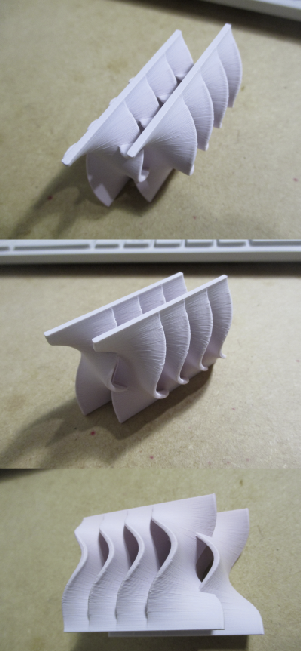
デジカメで見ると積層線は確認できます。
肉眼で見る限り表面にはまずいと感じる所は無かったです。
素材はPLAのマットレインボーです。
今後、これをテストピースサンプルに加えエラーで部品交換した時にプリントして比較してみたいと思います。
ベッドメッシュはこんな状態です。
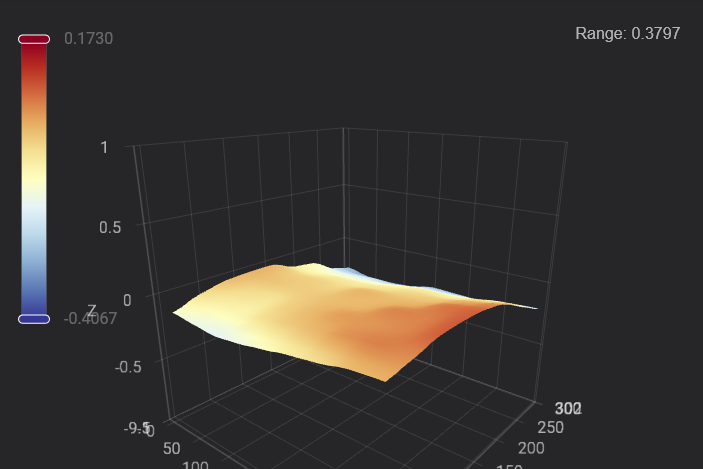
The bed mesh looks almost perfect; I believe the irregularities in the printed parts are due to over-extrusion or poor extrusion, possibly a nozzle clog (such as a buildup of particles). You could try performing a “cold pull” or replacing the nozzle. Also, check the extruder to ensure the gears are in good condition; if everything looks fine, then you need to adjust the PA (Pressure Advance) and flow ratio.
1 Like
Your recent experience with the firmware, and your initial caution about upgrading, is warranted.
On the question of whether “Creality does a great job” with firmware, though, I think their documented track record with the K2 series points in the opposite direction. There have been numerous firmware releases discussed on this forum that fixed some problems while introducing others, along with hardware and software issues that have remained unresolved through multiple revisions.
That is really my criticism of Creality. I don’t question whether they are continuing to develop the product. I question the consistency of their testing before releasing those changes to customers.
I posted about this recently in a thread where a new owner described both the features he liked and the problems he encountered within only a few hours of ownership: Experience so far - #2 by JoeFriday
I keep a troubleshooting log for my printers, including my Bambu P1P, documenting problems, fixes, workarounds, and firmware changes. That post contains only some of the K2 items in that log.
Here’s one practice I’ve found useful: I disable the firmware-update notification because, for essentially the reasons you described, I don’t automatically trust a new release.
Instead, I periodically review the K2 firmware release notes and have AI compare the listed fixes and enhancements against my troubleshooting log. Unless the release fixes a problem I’ve actually experienced, or adds something I specifically need, I leave the working firmware alone.
For me, Creality’s firmware history has made the risk of upgrading simply because a new version exists not worth it.
_________________________
My principal grievance with 3D-printer manufacturers, and Creality in particular
For years, much of consumer 3D printing was built around open-source hardware and software, and Creality became enormously successful by commercializing inexpensive, ready-to-use printers based heavily on those established concepts. I don’t consider that a criticism. It was extremely useful for those of us who wanted the benefits of that technology without building a printer from a kit.
But the market has changed.
Machines such as the Bambu X1C pushed consumer 3D printing toward something much closer to an appliance: load filament, send the job, and reasonably expect it to work. Nobody has completely achieved the inkjet- or laser-printer level of reliability yet, but that is clearly the direction the industry is moving.
Creality answered that change with the K1 series and later the K2. My problem is that too much of the old development philosophy appears to have remained:
“Release it, let the users find the problems, and let the forums develop the workarounds.”
That is my characterization, not a literal Creality policy, but it describes my experience with these machines remarkably well.
That approach may have been tolerated when consumer 3D printing was largely an enthusiast hobby where modification and troubleshooting were expected parts of ownership. It is not good enough for a product being marketed as a modern flagship appliance.
The K2 Plus is a good example. I have encountered a number of issues that should, in my view, have been caught during product validation.
One of my particular annoyances is the poop chute when printing multicolor with a 0.2 mm nozzle. The finer purge material repeatedly hangs up rather than falling cleanly through the chute. Based on my testing, the geometry of the chute appears to be the problem: it is long, relatively shallow, and poorly suited to that type of purge waste.
The more aggravating part is that the original K2 Plus chute design was subsequently changed. Even so, with the redesigned parts they did not address the geometry failure just changed up the mounting holes. This made replacement parts for my version impossible for me to obtain.
I ultimately had to design and 3D-print my own workarounds.
That is exactly the sort of problem I don’t expect to be solving myself on a product sold as the company’s flagship printer.
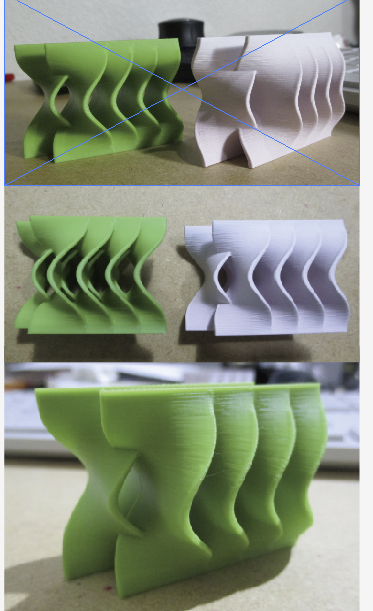
こんにちは。
Creality Print 7.3.0にUPデートしました。
今の所プリント出来てます。
AIモードBETAなら一緒にしない方がありがたい。 
もしくは、削除できるとありがたい。
My experience with the latest firmware update
I sympathize with the firmware update issues. After updating, my printer’s automatic bed leveling repeatedly drove the nozzle into the bed and dragged it across the surface, damaging both the nozzle and bed. Resetting the machine and replacing the strain gauge didn’t solve it. I also found forum posts suggesting that overtightened bolts on the extruder heating block can prevent the strain gauge from working properly, so I loosened mine slightly—but the problem continued.
After contacting Creality, I received and replaced the extruder heater and nozzle, strain gauge, main extruder cable, related hardware, and print bed. I also rolled back to the previous firmware. On the first leveling attempt, the nozzle still made contact with the old bed, but the printer then completed the leveling sequence successfully. I installed the new bed and ran the included Benchy test print, which came out successfully—and better than my earlier prints.
I haven’t updated the printer firmware again, though I did update Creality Print and encountered a few minor issues. Based on my experience and reports from others, I’d wait for a later firmware release—hopefully version 1.1.8—if you don’t need to update right away.
That’s what worked for me. Good luck troubleshooting, and happy printing!
1 Like
i have had firmware issues with this update and cant seem to downgrade it with the USB trick and Creality isnt responding to my ticket. I’m very disappointed in the brand