Are you sure you haven’t run DnG-Crafts ‘workaround’ on your printer at some point? What you are describing seems an awful lot like the after effect of that patch.
If so, it’s nice to get confirmation that that patch still works on firmware 1.1.5.5, which makes it a suitable workaround for folk like me, who can (will) not use Creality Cloud or Creality Print.
I did a long time ago, but lost it somewhere along a few firmware update as I did not reapply it after the last 3 firmware updates. But I clearly remember it stopped working and I never really checked back after that since I was using port 8000.
leave it to creality to fukc up a wet dream…
just like with moving the FAN CONTROLS OFF the Home Screen in 1.1.5.2 – seriously?? WHY !!!..oh. bcuz…
Spoke too soon. Camera is not workind in fluidd today 
1 Like
Shame. You could try and run the DnG-crafts patch again and see if it works…
It might be helpful for others to know. It sure would be for me.
The other way to fix this for you is to roll back to firmware 1.1.5.2.
1 Like
Firmware 1.1.5.5 updated on 28-05-2026.
The camera stopped transmitting video in Creality Print and http://***.***.***.***:4408/#/ after approximately 1 hour, exact time unknown.
The next day (929-05-2026) the image was back.
With a new print job, after a few minutes there was no video image at http://***.***.***.***:4408/#/, although there was still an image at http://***.***.***.***/camera.html and in Creality Print.
But that also stopped transmitting the video after a few minutes.
This firmware update has apparently not been properly tested.
1 Like
Yea, If you sift through a few other posts, it becomes clear, security is not creality’s strong suit.
In powershell run this but add your printers ip address, replace the x’s $ip = “192.168.1.xxx”
80,443,7125,8000,8080,9999,22 | ForEach-Object {
Test-NetConnection $ip -Port $_
}
O.K.
PS > 80,443,7125,8000,8080,9999,22 | ForEach-Object {
Test-NetConnection 10.42.57.107 -Port $_
}
ComputerName : xxx.xxx.xxx.xxx
RemoteAddress : xxx.xxx.xxx.xxx
RemotePort : 80
InterfaceAlias : Wi-Fi
SourceAddress : yyy.yyy.yyy.yyy
TcpTestSucceeded : True
ComputerName : xxx.xxx.xxx.xxx
RemoteAddress : xxx.xxx.xxx.xxx
RemotePort : 443
InterfaceAlias : Wi-Fi
SourceAddress : yyy.yyy.yyy.yyy
TcpTestSucceeded : True
ComputerName : xxx.xxx.xxx.xxx
RemoteAddress : xxx.xxx.xxx.xxx
RemotePort : 7125
InterfaceAlias : Wi-Fi
SourceAddress : yyy.yyy.yyy.yyy
TcpTestSucceeded : True
ComputerName : xxx.xxx.xxx.xxx
RemoteAddress : xxx.xxx.xxx.xxx
RemotePort : 8000
InterfaceAlias : Wi-Fi
SourceAddress : yyy.yyy.yyy.yyy
TcpTestSucceeded : True
WARNING: TCP connect to (xxx.xxx.xxx.xxx : 8080) failed
ComputerName : xxx.xxx.xxx.xxx
RemoteAddress : xxx.xxx.xxx.xxx
RemotePort : 8080
InterfaceAlias : Wi-Fi
SourceAddress : yyy.yyy.yyy.yyy
PingSucceeded : True
PingReplyDetails (RTT) : 4 ms
TcpTestSucceeded : False
ComputerName : xxx.xxx.xxx.xxx
RemoteAddress : xxx.xxx.xxx.xxx
RemotePort : 9999
InterfaceAlias : Wi-Fi
SourceAddress : yyy.yyy.yyy.yyy
TcpTestSucceeded : True
ComputerName : xxx.xxx.xxx.xxx
RemoteAddress : xxx.xxx.xxx.xxx
RemotePort : 22
InterfaceAlias : Wi-Fi
SourceAddress : yyy.yyy.yyy.yyy
TcpTestSucceeded : True
So, all the ports are available except 8080. I think this is deeper than open network ports. I found this explanation convincing:
What security? Every router is a firewall.
Who cares if somebody hacks your camera and watches it print?
If you want to look video then just write to your browser: http://”K2 IP”/camera.html
That no longer works. Kind of what the thread is about.
The problem is, once you hack the Camera, you can access the rest of the network too (depending on your configuration).
Is Creality setting up to charge subscription fees in order to use the video feed?
Did we pick the wrong brand now?
The problem is a technical one, not a deliberate one. There is a fix here: Camera Support for Fluidd and Mainsail - Creality K2 Plus — Helper Script Wiki
But honestly, I will settle for camera in Print app only rather than patching the OS.
I don’t buy it and Creality admitted it in tech support to a poster here.
With a tech error they could have fixed it since it was reported over two months ago.
No patch needed..just install the v1.1.4 4 again and refuse to update again
I did some local probing on my Creality K2.
The old camera URLs are no longer working for me:
-
http://:8080/?action=stream → connection refused
-
http://:8000/ → blank / empty response
-
http://:8000/?action=stream → empty response
-
http:///camera.html → 404
However, the printer still advertises video support. This endpoint works:
http:///info
It returns:
{
"mac": "...",

"model": "F021",

"sn": "...",

"version": "1.0.0",

"videoPort": 443,

"wssPort": 443
}
So it looks like Creality has moved away from the old MJPEG/browser stream and is now using the app-facing WebRTC/WSS path
on port 443.
I also found the local WebRTC signalling endpoint still exists:
http://:8000/call/webrtc_local
That matches the behaviour in Creality Print: the app can still show the camera, but the old browser-accessible stream URL
is broken/disabled.
You can add this line if useful:
In short: the camera is not dead; the old public MJPEG endpoint appears to have been removed/disabled, while Creality Print
uses WebRTC instead. Here, ive created this so it can be used to view the stream
5 Likes
I endorse this product. Thanks for the code.
1 Like
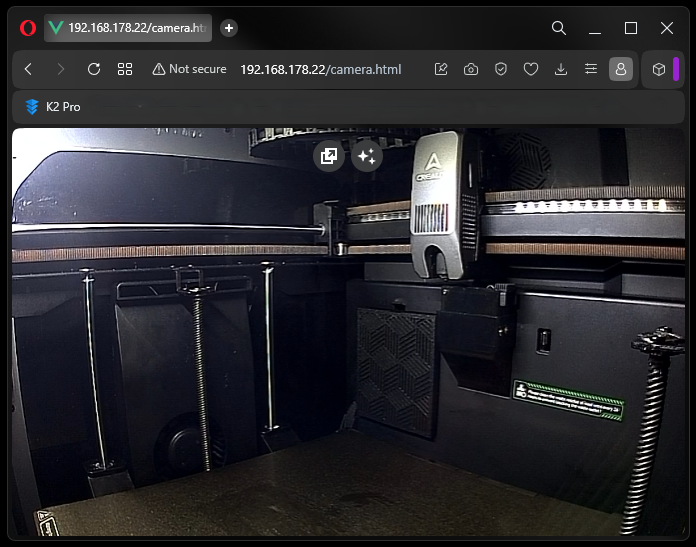
it is little slow to start streaming about 1 minute delay, but it works, however can you add functional “enter” key, and history so we can choose already entered ip’s from input dropdown.
Thanks