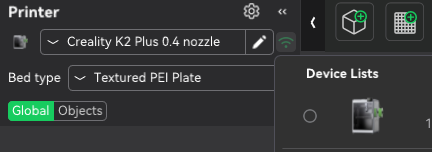
Title says it all. K2 Plus with CFS Auto Mapping not functional with latest update. If I press the auto map button nothing happens.

This was the latest CrealityPrint_6.2.0.2827.
I rolled back to CrealityPrint_6.1.2.2458 and it works fine again.
Title says it all. K2 Plus with CFS Auto Mapping not functional with latest update. If I press the auto map button nothing happens.
This was the latest CrealityPrint_6.2.0.2827.
I rolled back to CrealityPrint_6.1.2.2458 and it works fine again.
I had the same on my K1 MAX when upgrading CP, so might be the same issue , I had to click the WiFi icon on the top left of the screen at “printer”, it showed my printer & a tick box, I selected the box & all the filiments then auto mapped from the cfs.
Hopefully it’s the same for you.
Regards
Bart…
I also had this problem. I’ve now selected the printer on the device list and it appears to have sync’d.
Except: It’s ignoring the side spool. On the Prepare screen, it shows EXTERNAL and then the CFS, but I cannot change to the filament on the External spool.
On the Device screen everything shows correctly. External spool, CFS, all correct.
The problem has always been on the Prepare screen. How do I get it to recognize what the external spool contains (as defined on the printer - and device screen) so I can select it for generation (it’s a different type PCTG).
I’m no expert but the ‘gear icon’ for setting filaments to use should be what shows up in the change filament options. You should be able to define your inventory of filament and assign that filament whether it’s in the printer or not.
You definitely can use the filament + button and then via the new filament drop-down select any filament profile, system or user, to assign to an object in the prepare screen… regardless of what is in the printer CFS or side spool…
That is basic CR functionality… Getting CR to sync with the printer is separate from loading,.assigning, slicing…
Back to the side spool, I’ve found having multiple instances of CR software running really confuses it… i.e watching the video feed after sending to print, and starting a second copy of CR to load / create a new project…
This seems to get the sync completely out of wack, and I need to sometimes go as far as log out of Cloud and log back in, to force a CR - printer sync
6.2.1.3044 seems to have resolved some of this stuff…