Hello,
I have an Ender-3 V3 (latest model with dual Z belt system and integrated gantry).
I am experiencing a problem during auto-leveling:
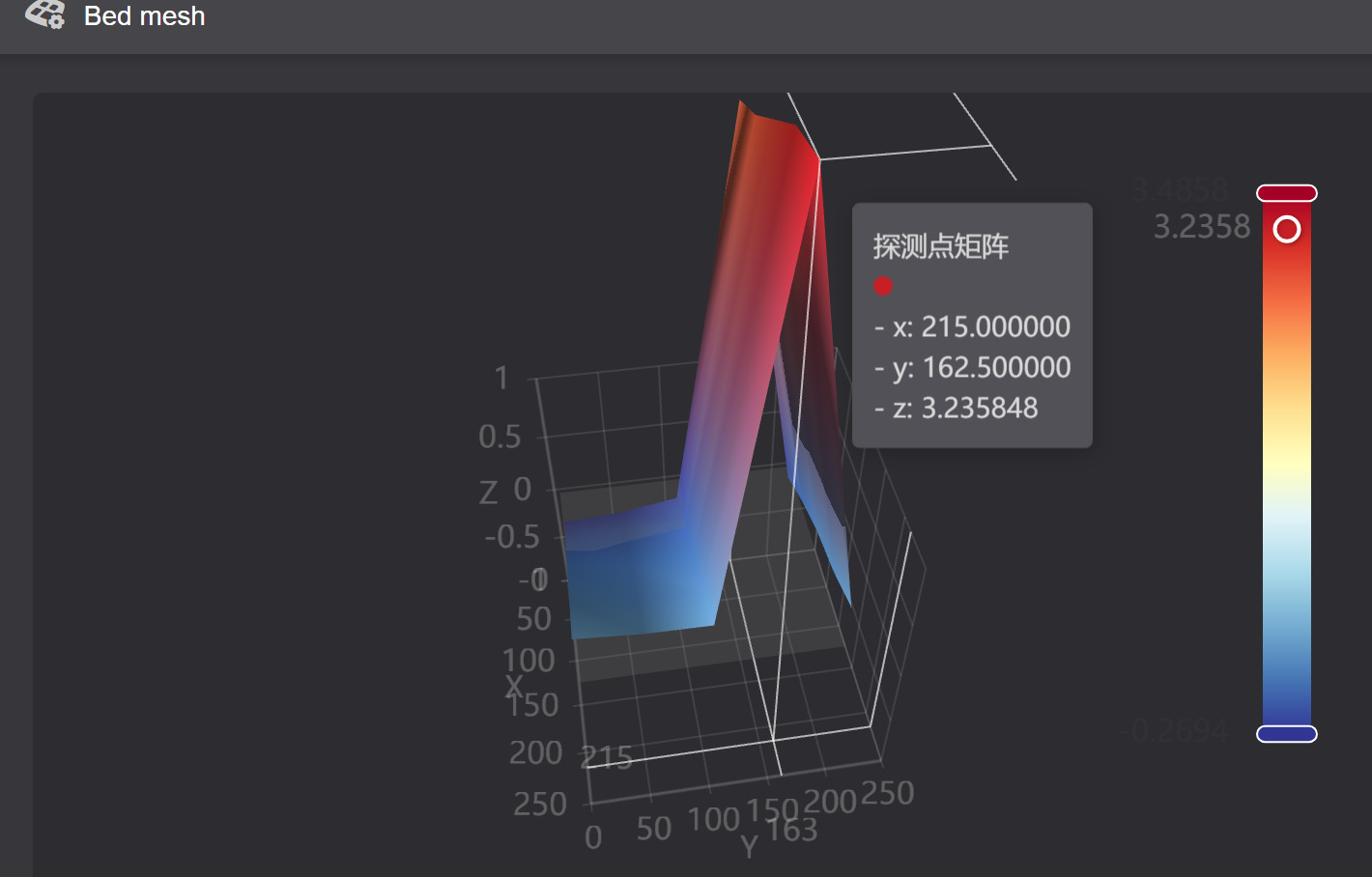
At Y ≈ 162.5mm the nozzle never touches the bed.
The head moves up/down as if probing, but it stays about 3mm above the surface and immediately “thinks” it has triggered.
This happens only on that Y line.
Everywhere else the probing works normally.
I have attached my bed mesh generated via Fluidd.
You can clearly see a large anomaly along that row.
Troubleshooting already performed:
-
Confirmed the gantry is slightly tilted at that row
-
Verified belt tension (one Z belt sounded lower initially)
-
Ensured smooth movement of both Z sides when powered off
-
Ran auto-home and auto-level multiple times
-
Performed a hard reset / restore-factory-settings
-
Tried gently pressing the nozzle during probe at that point — no effect
-
The issue persists after re-aligning Z belts and leveling the frame
Any guidance from users or Creality engineers familiar with the V3 gantry belt Z system would be appreciated. Thank you!
Pier Luigi