So this is my 2nd laser ever, if I am just doing something dumb feel free to point it out. But I am trying to do a batch engrave of some coasters and the camera seems pretty useless but I honestly dont see how else to attempt a perfect line up…i know theres the framing option but really that cant line up things any better. But if you see the attached image I took after the engrave without touching anything after its done…the laser went down on one, then left, right and up…like what the heck?
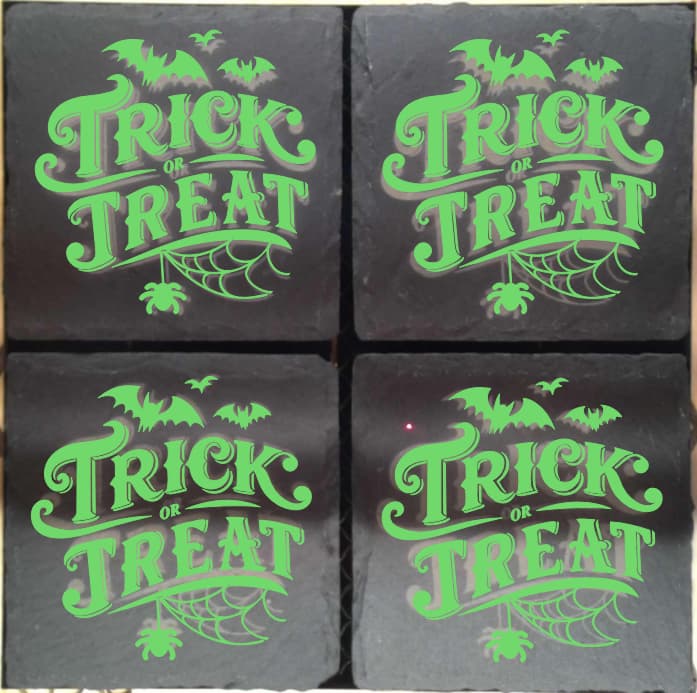
- Hey, totally get where you’re coming from — that’s actually a really common frustration when batch-engraving cup coasters (or anything small and repetitive). The camera alignment on many laser machines tends to be off by a few millimeters, so it’s not just you!
A couple of things you can try:
-
Use a physical jig — cut out a simple template on cardboard or scrap wood to hold your coasters in the exact same position each time. It makes repeat runs way easier and more consistent.
-
Manually test the frame — even though framing feels old-school, it’s still the most reliable way to confirm placement before engraving.
-
Check your focus height and bed calibration — sometimes small warps or uneven surfaces throw off the camera accuracy.
If the laser went in that “down, left, right, up” pattern, it might also be the job order or vector path sequence in your file. Check the order in your software (e.g., LightBurn, xTool Creative Space, etc.) to make sure it’s engraving in the intended direction.
You’re definitely not doing anything dumb — this is just one of those “learn by doing” quirks of laser engraving. Once you dial in your setup, your batch jobs will line up perfectly every time.