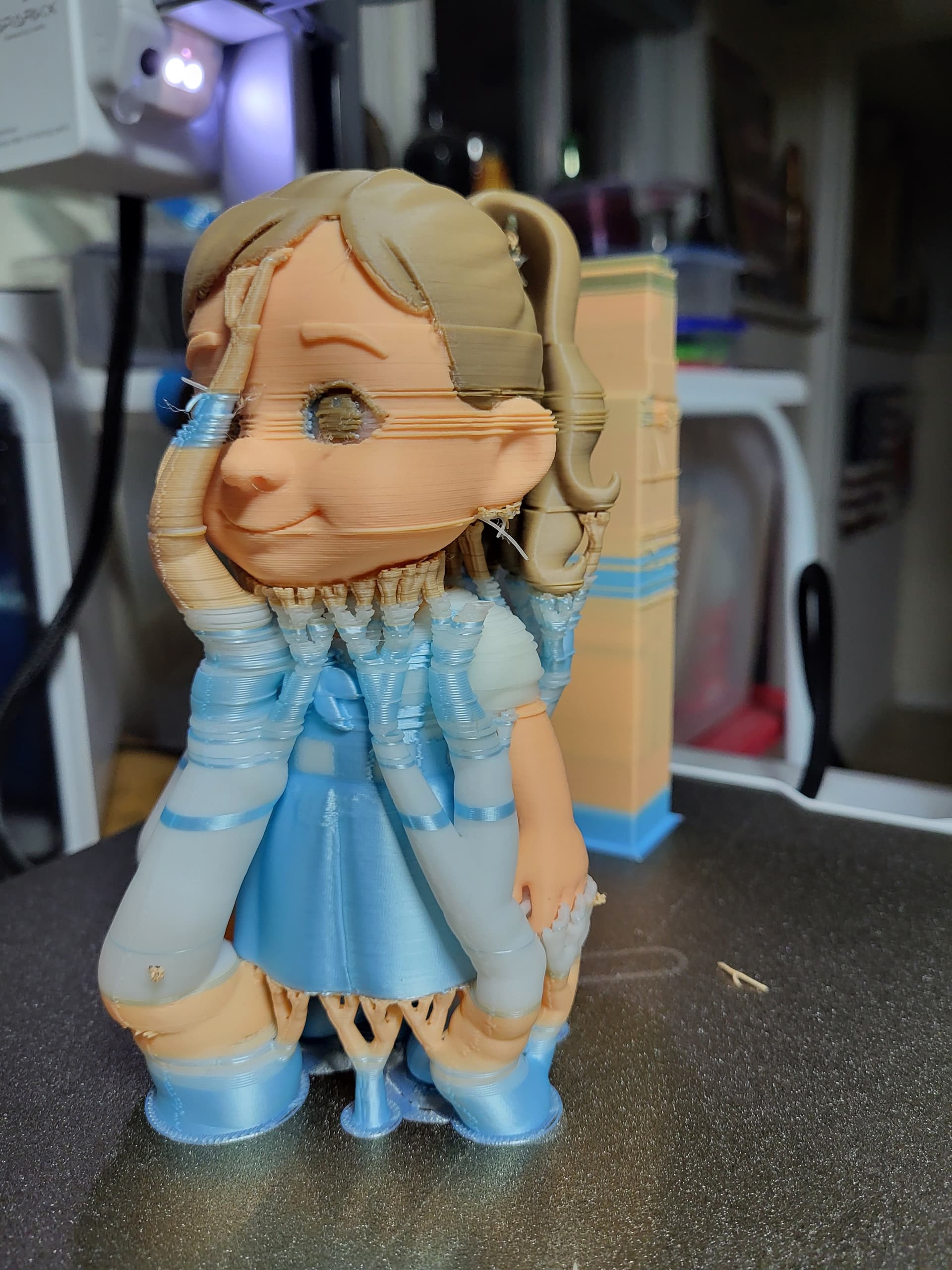
Brand New and this is my first print on this printer and I am very disappointed in the Quality it started out great then it jumped left then corrected itself and kept doing it.
That looks like layer shifts, have you used the Creality Print 7 profile for the Sparkx i7?
I wonder why it did that though, maybe you can check the belt tension if the belts are completely loose on the X axis. Otherwise it would have either needed to stall the motors or get caught in something for this to happen. Best candidate for that is the default grid infill (not sure why they chose this, that sometimes causes issues when the nozzle gets caught by the print), change the infill to cross hatch, maybe that helps if there are no obvious hardware defects.
1 Like
I haven’t experienced this with mine. I would check your lead screws and make sure they are clean and lubricated and check the tension on the belts as well.
1 Like
Check the belt tension. Clean and lube the lead screws and rods / rails. Another though you uploading the file to the printer or using the memory card? Possible the file or the model is corrupted? Is there any error messages pop up at the slicer?
Try to reslice the file again and preview it see there any abnormal with the model.
I’m having the EXACT same issue.
Any solid color prints are perfect.
Were you able to solve your problem? Thought I’d ask before trying the above possible solutions.
Jim
If your spools are cardboard then take electrical tape and wrap it around the spool edges. Then take out the cutter and hot end then check for tiny pieces of filament. What i found was the cutter wasn’t get all the way through the filament and I noticed the end being retracted looked like it pulled out of the hot end and not a clean cut.
After trying all of the above solutions, none helped. Thank you all for your suggestions, all were worthy candidates.
I believe my issue was the cutting of the filament. SOMETIMES, when cutting, it would make a louder than normal sound and I believe was getting off a mm or 2 then, then when the Hotend assemby would move to the poop chute it wouldn’t go all the way to the right (just shy about 1-2 mm), I believe that’s the origin of shifting the layer.
I was able to solve the layer problem, by re-homing x after each filament change. it adds a couple of second after each one, but when you consider 2 minutes+ for each filament change another 2 seconds isn’t bad. (Not sure why it’s shifting though, so I suppose I’m treating the symptom and not the cause.)
This is on Creality Print 7.0
Altering the Printer g-code should go in the printer settings (upper left), then machine settings, then look for the filament change G-code section . Add the below plus a few other lines at the bottom of the filament change G-Code.
G28 X (you can also add Y without affect layer).
You might want to also lift the z axis before and return to previous level after if part of your model might be near the poop chute.
Can’t remember all the code, but G28 X (and also Y, if wanted) was the crucial piece.
Good luck,
did you ever come across a fix? mine was running fine then suddenly decided to start crashing into the cutter push rod. after that it would crash to the other side of the gantry thus causing it to layer shift
I will try to take out the little cutting blade and see is there any sign of wear and tear. I used a knife sharpener to sharper it up. The i7 accessories kit is not available in Canada yet until sometime in May.
Also sometime when the dirt build up around the cutter it will cause issues.