I’ve searched over and over but can’t seem to find it.
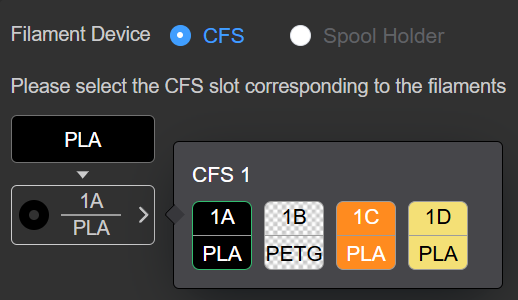
I’ve added a new filament, PETG, and assigned it to a slot in the CFS as I’m used to with PLA. That seems to go like always. When I send a print I get this:
PETG is just not selectable. It seems that it expects to have PLA, I assume that because of the big PLA button left top. It makes me wonder if I need to make a decicated section for PETG to be able to select it but I can’t find any guide on how to do that.
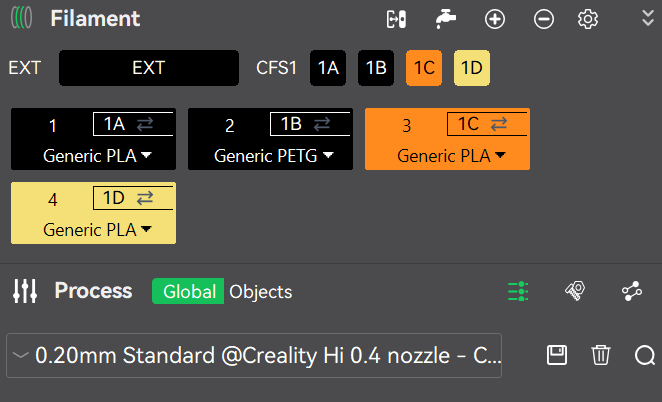
This is how it looks in the filament section in the slicer:
I’ve done it manually and just now I did an auto mapping and it came out like this. It seems correct but I still get a greyed out slot B where the PETG is when I try to send a print.
Also send ony and trying to start a print manually doesn’t let me select it from the filament selection on screen.
As a last resort I tried it with the spool holder which I actually rather not use as I find removing the tube all the time too cumbersome.
I have the same problem. The filament type (not necessarily colour) must be selected before slicing. There seems to be no way to do that and the slicer uses whatever is in slot 1. The print screen allows for selection of colour but only the same filament type as was used to slice.
The question is why the slicer uses slot 1 to determine the filament type, not a user choice?
At least now I have a workaround.
I set slot A of the CFS as PETG filament, now I can select any slot with PETG assigned to it to print from that slot. The remaining slots that have PLA assigned to it are immediatly greyed out. So all I have to do is assign the right filament to slot A of the CFS and I can print it.
I guess it’s a bug in the software, hopefully Creality is reading this.
I tried chatting with a person at the support chat but that is more or less useless, I stopped when they wanted me to clear the filament paths of the CFS for blockage and chech the filament sensor and I had to send a photo of de PCB while it’s clearly a software error.
It’s a pity Orca doesn’t support the CFS otherwise I would ditch this buggy software.
I initially thought I was having the same issue. But it was simply user error. The filament type needs to be correctly set before you slice it. If you are using PLA set it to PLA then slice. Or PETG or whatever BEFORE slicing. If you messed up and sent it to print before setting the correct type and you use the app on your phone you can actually switch it once the print starts. I was printing a set of 3 Benchies and had it sliced with PETG-CF and then started the printer and walked away. Realized the mistake later while watching remote and switched to my 3 color Soleyin PLA and it swapped over and did a purge. Actually looks kinda cool in the end. Now if I can figure out how to correct the printing issues with quality I will be happy.
I know this is a bit late but when using creality print on the left hand side of the screen under the printer selection, you need to change from “global” to “object” and then you can select which color/slot for the specific model you are printing before slicing, instead of having to change the spools all the time.
Then you click on the number/color and you will get a drop down with the same colors as per the cfs, simply select the color wanted/needed and when you slice your file it will be sliced with the correct filament.
Hi thanks for the tip, and yes it works, but I believe thee is a software issue to resolve to allow us to select PETG from the standard icons, because selecting PETG it greys out the selection box, and you can not get the printer to use the PETG, as of all the others using PLA.