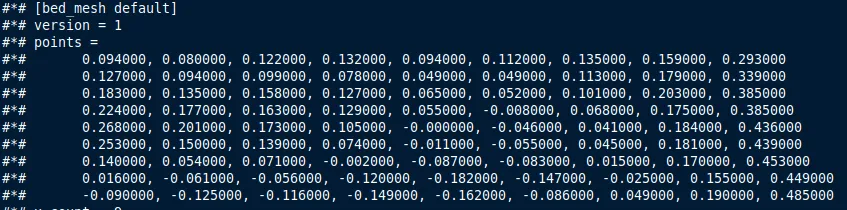
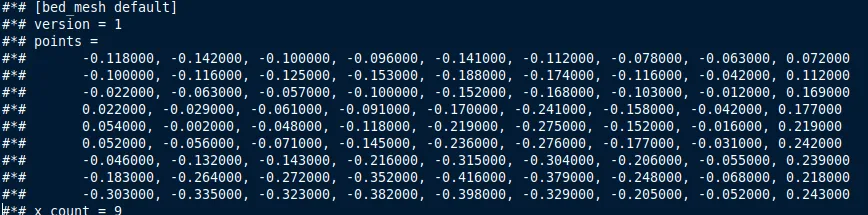
I had firmware V1.1.0.48, it was working perfectly. August 29 I have updated to V1.1.0.50, then I launched Autoleveling (after firmware update). And now it feels like the hotend is clinging to the plate. The first layer is smeared, even the logo on the plate is scratched. I ran the calibration again, the result is the same. Compared the printer.cfg file before and after - All values in levels became on average 0.218 smaller.
I look on my “flat plane” in fluidd (4408), and it looks like almost all points below the surface (I don’t have a perfectly flat table), but before update I had only a small hole.
For the experiment, I’ll raise the z-offset, and maybe play with the foil (recommendations from Z offset not saving - #9 by Teddy_G_Limanto ). But, in reality, a new good firmware is needed. Today I rolled back to “Factory settings” - did not help. Downgraded to the 44th firmware - did not help.
Maybe reason in “5. Update step-servo motor system firmware and parameters.“ (from description of 50th firmware). Because sounds of motors had changed after update. And interesting, that they don’t returned back after downgrade of firmware.
I am sorry I don’t have a solution for you. I cant remember what firmware I update to (maybe v47, not sure) and then I got scratching on my build plate as well, It managed to damage two brand new build plates even after a factory reset and calibration.
I pulled it all apart, and retighten everything, factory reset and calibration before each print and that seemed to fix it, but then a new software update came out and I updated…. I still not sure what caused it or what really fixed it, but I have been doing calibration before each p;rint and it has not happened again since then.
I did update to V1.1.0.50 and am I getting lots of bed adhesion issues, I am now drying my PETG to make sure that is not the issue, however, I have washed my print plate before each print and still having lots of issues. (Once again, likely moisture in the petg) but only reporting it just in case it is happening to someone else.
Have to say it. Had a lot of Creality Printers..The Hi is my most unreliable one
With the .48 update, I had issues with the X-limit… I checked everything, and suddenly it was fixed with the .49
I don’t think I will try the .50 then
No trying to hijack the the thread, however I did wanted to update that my adhesion issue was NOT related to the update to v50. My issue was that the ceramic part where the nozzle goes into was loose, I have now tighten it and that has fixed my adhesion issues.
I am still doing a calibration prior to any print, so far no scrapping for me.
I have downgraded to 1.1.0.38 and waiting 1.1.0.51 or bigger. Maybe there are some problems on it, but I didn’t see them. I only noticed that in creality print the current layer is not calculated correctly when printing.
My issue was that the ceramic part where the nozzle goes into was loose
The part where the nozzle screws into… there are two screws that secure it, you can get to them by putting the head at the very top and going from below, make sure to take the from cover off the head so you can see more easily.
I used 1.1.0.38. Yesterday I have updated to 1.1.0.56. Bed leveling was good, but model fan doesn’t works. Then I have reseted to factory defaults. Fan started works but leveling not correct again.
I compared configs. Problem with leveling was in gcode_macro.cfg in “[gcode_macro G29]“
Old (which works):
  SET_ADJUSTMENTS_FLAG VALUE=1

  G28 Z
  BED_MESH_CLEAR
  Z_TILT_ADJUST
  SET_PIN PIN=fan0 VALUE=127
  M109 S45
  SET_PIN PIN=fan0 VALUE=0
  ZDOWN_SWITCH ENABLE=0
  G28 Z

  SET_ADJUSTMENTS_FLAG VALUE=0
New (with bad offset):
  SET_ADJUSTMENTS_FLAG VALUE=1

  G28 Z
  BED_MESH_CLEAR
  Z_TILT_ADJUST

  SET_ADJUSTMENTS_FLAG VALUE=0
It seems to me, that problem was because of absent: ZDOWN_SWITCH ENABLE=0