One last try here, after even more money thrown at this...I'll be nice..printer [k2 plus]

Are support saying that the slicer offset’s are totally ignored ? i’ve been adjusting via fluidd for a while now as soon as a print starts… because I suspect its ignoring my saved profiles…

that is rubbish, but should be fixable va a FW update… if they choose to…

With all of the hardware changes you have made all at once on your machine you are in for a nightmare for sure. On top of that you are attempting to make Z offset changes as well. All of this just to get it to print a benchy? Or to print anything at all successfully? You really should not have to do any of that at all. The machine is designed, and is heavily marketed, as having a very accurate and reliable bed self-leveling system. I have found this to be true on my own K2 plus, but only after learning alot more about my machine. For example, there are many people who claim they can adjust their bed level by turning the 4 knobs at the bottom of the build plate. They don’t. They are fully tightened and are there to hold the build plate on - that is all. Don’t loosen thos up, or try to forcibly tighten them. Then, there is the hot end. That’s where the pressure sensing plate is for the auto leveling. If the screws that hold the hot end on are loose at all, or if the nozzle is loose at all, you will have a poor first layer like on any machine. Keep all your mechanicals tight and installed correctly and you should not have an issue. I have watched my own printer compensate for height differences during a print, and it is capable of a lot of vertical compensation (like well over 1mm). I would suggest putting all of the original hardware back on the machine and resetting the firmware back to original default programming, do a full calibration and then print a benchy (the one provided with your printer). If you are still having a problem, please identify if it’s in the hot end, the build plate, the z axis motion, x axis carriage, or other mechanical condition before throwing parts at multiple systems and then wondering if it needs a firmware overhaul. Maybe you got a bad machine - if so, start with fewer unknowns and put it back the way it was from the factory. Or, maybe it’s an extruder jamming issue (those are well-documented) and needs some investigation. CFS spring tension is too tight, PTFE tubes wear through, buffer get jammed, extruder cover PTFE tube inlet teeth break off and clog nozzles, filament spools that are too small, deformed, etc, etc. Eliminate the CFS as a possible culprit as well - print off the side spool. I have found that arming myself with a lot of info from other users’ personal experience is very valuable and has saved me a lot of headaches. Adding custom parts is great when done one-at-a-time andnwhen the machine is working well. Otherwise, it just tends to add more unknowns to the existing problem.

3 Likes

Thanks a lot for the detailed response. I’m not using the CFS here at all and the sensor isn’t in the actual hotend, but the toolhead (which I didn’t replace). Those 4 knobs are not to be used at all for calibrating the bed? That’s interesting news to me and it would see a ton of people have been using them wrong then which is possible, but I’m wondering why this hasn’t come to light until now. @frankjoke have you heard of this? I’m going to see about resetting to factory and finding the original sliced benchy from the USB as I do not currently have mine unfortunately. I really do appreciate you taking the time to share this knowledge and respond!

All the file’s from the usb stick are on the wiki
https://wiki.creality.com/products/fully-enclosed/k2plus/14min_3dbenchy.3mf

I would definitely reset back to factory settings and if you messed with the bed at all try to put it back how it was. Not to be rude but your issues are user error. It happens. And can be frustrating for sure. Had a guy in our discord server who had a k2 paper weight. He had done so much wrong that the machine couldn’t do anything without an error. But after some help and getting it back to normal we got his machine printing as it should before he messed it up. So it can def be saved very easily. If you need help feel free to join our discord and we can help ya live in a chat or via text. You can msg me for the info if you like. Not sure if it’s allowed here.

Thanks a lot! I sent you a message.

This is a frustrated user with a Creality K2 Plus who is facing Z-offset calibration and firmware issues. The core problem:

  1. Z-offset behavior is inverted or mis-saved in Klipper (saving -5.85 became +5.85).

  2. The printer now errors due to PR3 Touch probe max value (likely a safety check triggered by an invalid offset).

  3. They’ve already upgraded hardware and firmware with no success.

Here’s a solution plan that’s both practical and innovative to salvage the printer:


Step 1: Reset Z-Probe Limits

Power off the printer and connect via USB or web interface (Mainsail/Fluidd).

Edit printer.cfg to temporarily relax the probe limit:

[safe_z_home]
home_xy_position: 150,150 # adjust for your bed center
z_hop: 10
z_hop_speed: 5

Then in [stepper_z] or [probe] section:

z_offset: 0

Save and restart firmware. This clears the catastrophic error.


Step 2: Manual Z-Offset Calibration

Do NOT rely on auto-save first. Instead:

  1. Home all axes.

  2. Move Z down until a 0.2mm feeler gauge/paper drags slightly.

  3. Note the displayed Z-value (e.g., -5.85).

  4. Manually edit printer.cfg → z_offset = -5.85.

  5. Save and restart.

Test PROBE_ACCURACY in Klipper to verify repeatable results.


Step 3: Force Firmware to Correct Sign Error

In Klipper, inverted Z-saves often happen because of:

position_min / position_max mismatch

Inverted probe definition (z_virtual_endstop)

Add to [stepper_z]:

position_min: -10

This allows negative offsets without flipping them positive.


Step 4: Validation Print

Use a 150×150 mm single-layer square to confirm adhesion.

Tune live_z if necessary in real-time using BABYSTEP_Z.


Step 5: Optional Safety Net

Enable Z-offset auto-backup in Klipper:

[save_variables]
filename: ~/klipper_config/variables.cfg

This keeps your offset persistent even after crashes.
1 Like

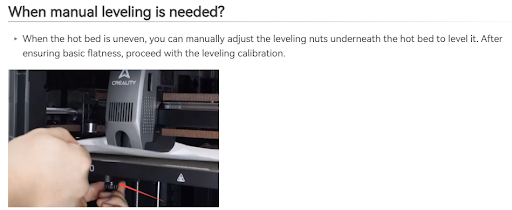
I’m sorry but this is incorrect. Creality’s Wiki page clearly indicates that manual bed level is possible on the K2 Plus, when/if necessary.

Troubleshooting for K2 & K2 Pro First Layer Adhesion and Layer Compression | Creality Wiki

OK, you are right. I have tried adjusting the knobs on my own machine when my prints were failing and the knobs did not move the bed whatsoever. They did not get any looser or tighter and did not change the distance between the bed and the nozzle at any point on the build plate. I concluded that the automatic bed leveling had solved that problem that was so much of a nightmare on the Ender 3’s, etc. I guess not then. Back to the old paper trick : (

At least on mine, hex flat-head screws were used, so the screws themselves are free to rotate in the bed. Solution was to remove each one and add some high-temp adhesive. Then re-tightened and allowed to dry. Now it works as intended / expected.

On discord or here? I didn’t see it