Hello team,
I bought a CR-Scan Otter and tried to calibrate it.
Calibration process is OK, but the progress bar stops at 85% and Creality Scan 4 crashes.
I tried to :
- Change scanner firmware to 1.1.8
- move to Creality scan 3.3.48
- change USB port
- Open all firewall rules
Nothing changes, same problem.
After that, I checked in Windows Events and saw something related to mx6600_depth_engine.dll : “Error : Impossible to access to file mx6600_depth_engine.dll”
However, I checked this file and it is in the right directory. All rigths are opened on it.
@CREALITY, are you able to help me please ?
Thank you .
Cyril
1 Like
Hi Cyril,
Have you gotten anywhere with fixing your concerns?
Hi Sam,
No… no answer from Creality support.
The only information on it is on Reddit, somebody talking about computer lack of performance but only one guy affirm that.
I quite sure it’s not this reason, my PC is a multimedia laptop on Win10 upgraded to 16Gb RAM.
It seems try to reach .dll but not possible.
I’m really sorry to hear that.
I soured on Creality after I purchased the scan otter and never achieved the scans I watched other people produce on many videos. I exhausted every learning avenue I could travel, including getting help from several individuals on this forum. Many thanks to them.
I tried it on different pc’s more than powerful enough by creality’s specs.
All Creality wanted was a video and a detailed description of my concerns (details were given) but never gave me any type of help.
The scan otter is now a paper weight sitting in a comfy bag.
I will eventually give it away to someone, or trade it for something.
No more Creality purchases for me.
All the best to you Cyril.
I am having the same problem. Support sent me a link to the tutorial on calibration. Even though I explained that I had been through it several times. Today was attempt #26 (I wish I was joking). Exactly the same results. Changed graphics setting, read/write permissions, everything I can imagine might be hindering it’s completion. Still crashes at 85%. I hope we can get this issue resolved very soon.
Hi Sam,
Thank you for your kindness !
I have no troubles with my scans but calibration is asked every time…
What is the impact between my actual situation or a recently calibrated scanner ? this will improve my scans quality ? and I think also about the future : will I can calibrate when it will be needed ?
All my 3D printers are Creality and the quality is pretty good. I have also a Falcon A1, easy to use and good work.
But there, I agree to you about softwares quality and the support which is totally inefficient.
They ask me more than 20 informations, says me “we will recontact you soon”. Now, we are 5 months after… and surprise ! : no more contact !
I’m sure the Otter is a good scanner, but what a f**** software !
Totally disappointed about a 700$ scanner. Next time I’ll go to Revopoint or 3dMaker for sure.
Take care and keep the Otter as a paper weight, hoping working software update 
Hi Froedge,
I’m “happy” to know I’m not alone in this situation.
Same as you for the tutorial, if you didn’t understood the totally guided calibration process in the software… -_-’
I tried today with the recent Creality scan 4 update, but no changes.
I think this impacted *.dll is developped by Creality because when you search it on Google, it’s unknown.
It’s clearly the @CREALITY responsibility to solve this software issue ! @CREALITY @Creality_3D_Scanner WHAT DO YOU DO ?!
How can you sell a 700$ scanner on worldwide market without test it without the dedicated software ?
Sorry but I’m really angry about this situation.  . I bought this as a tool to improve my company. I’m losing time and money every day .
I have tried everything I know to fix this on my own. Changing graphics settings, permissions, etc. This morning I even attempted a complete uninstall, removing registry keys, deleting directory, and reinstall only the newest version of Creality scan. It still failed at exactly 85%. I’ve sent log files and screenshots to support and have not been given so much as a “try this”. All I’ve gotten from @CREALITY was “We greatly appreciate your patience in providing these two logs. Our R&D engineers are currently analyzing the content, and we will share the results with you as soon as possible and provide you with a solution.” I am VERY close to returning this scanner.
2 Likes
Same as you.
Chat for the 3rd time with support : “we apologize for it and open a ticket. Service will contact you soon.”
No answers, since 2 days… AGAIN.
I’m close to contact a French distributor and stop useless discutions with service
same thing, crashes at 85 centers
1 Like
Was this ever fixed? I just got mine today and I am having the same issue. It’s a lot of money to have these types of issues. I’ll give it a day or two then send it back.
1 Like
welcome. managed solve the problem?
If you still have the issue with the latest version (make sure Firmware and Creality Scan are up to date), please contact the technical support. I asked them yesterday about the issue since several people here seem to have it.
Please contact them directly, mention the 85% calibration issue and include the serial number of the scanner and the log files to the email address mentioned here:
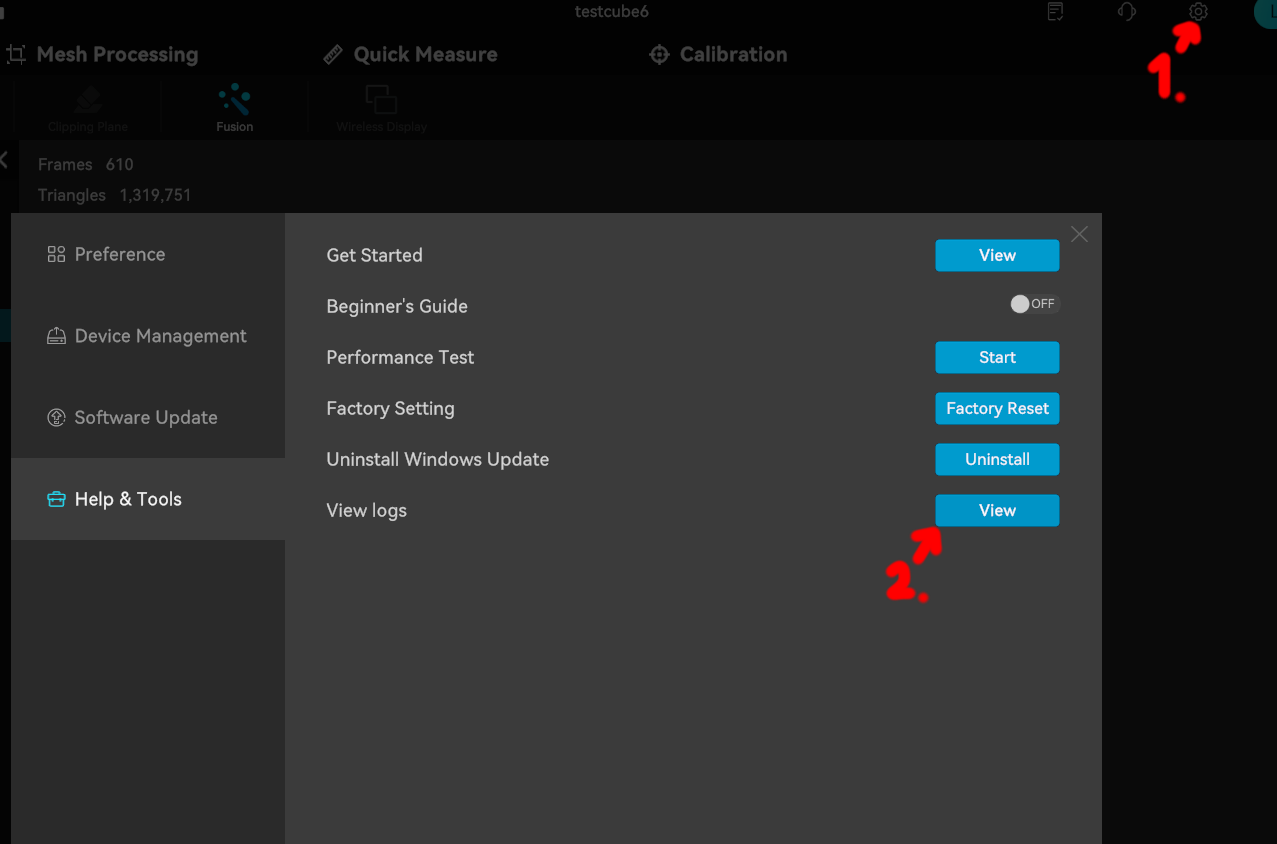
The folder with the log files opens when you click here in the settings, make sure you send it from a session where the error occurred and then select that log file:
I was told a damaged (scratched / damaged markers) calibration board can also cause this issue, so maybe inspect if your calibration board looks flawless (maybe take a clear photo of it and include it as well if you write an email).
Also to notify the others here in this thread, in case you still have the issue:
@user2333589632
@Ярослав_Квартиркин
@misel73
@Froedge
@Sam_Migliori
Hi Sebastian,
Thank you for the tips !
Message with all details sent to the mail address you gave us. Now, wait and see.
FYI, I updated Software and Firmware => Nothing better…
Bye !
Hi, I’ve the same issue … I’ve you found any solution ?