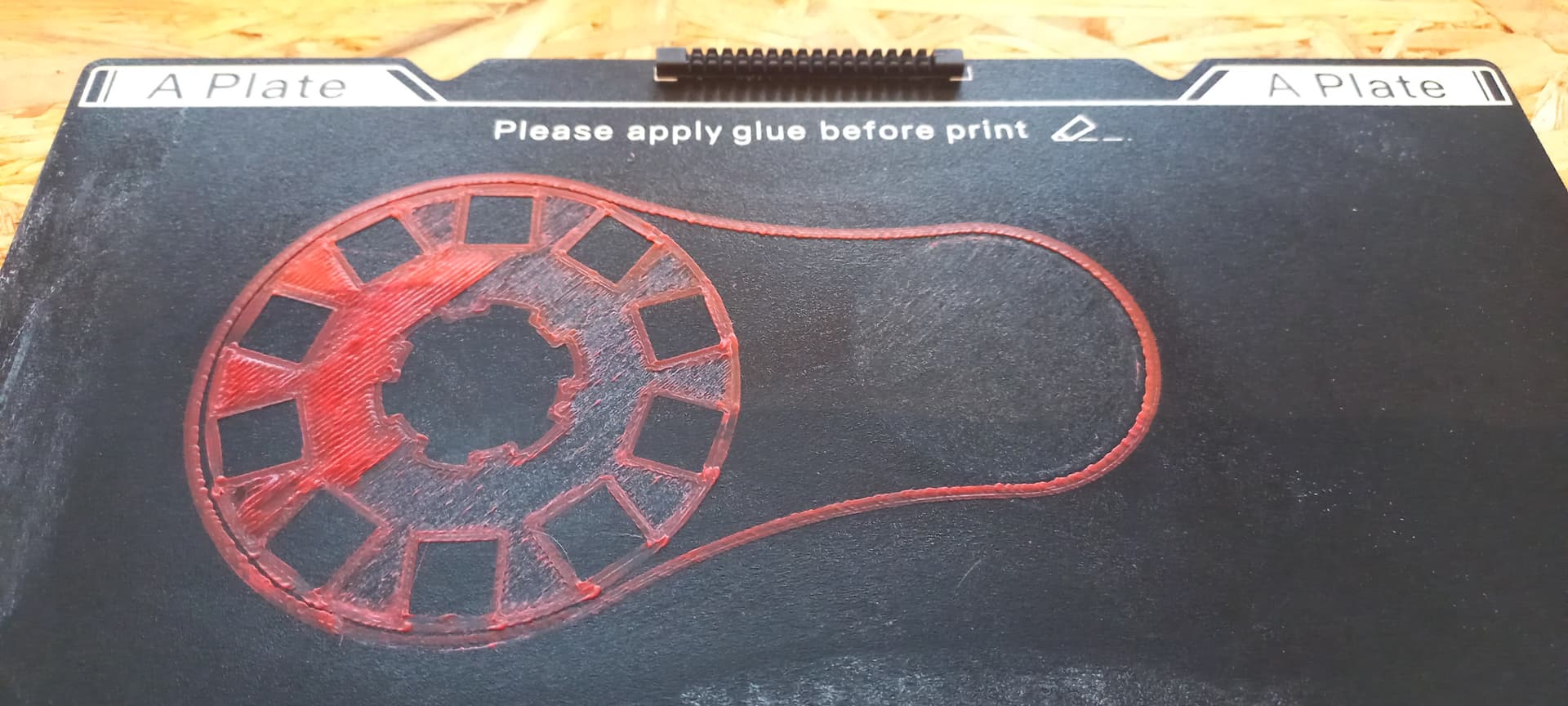
Hi- total noob in 3D printing and have only printed a few parts. Have a part that I want to print for a project, and have been guite successful with ASA, but ran into problems with filament not extruding. Had an idea that i could be due to moisture in the filament, so switched to PLA+. But i get strange results. When printing a temperature tower, it looks really nice, but when trying to print my part right after, the printer won’t extrude right. First part of the print is somewhat okay - for some reason no filament is printed to the right, where only a shadow of the object is seen. Also I hear the extrude stepper motor “clicking” and have had to retract and start over several times, never getting past what’s shown on the picture below.
Printing at bed temperature 50 deg.c., nozzle 230 deg.c.. Originally started with print speed of 60mm/s, but went up to 150mm/s in later prints. Always same result. However, going back to printing the temperature tower right after worked fine again. So somehow I think that it’s something in my model ?
Also found out that i kind’a screwed up - used a metal spatula to get my prints of the bed - realizing that this wasn’t the way,
I managed to print a good piece by moving to a previously unused part of the bed, but that also only worked once. lately I keep the Top cover off, to allow for better cooling (read that somewhere in here). But even my latest print I again only get partial extrusion, and in some places nothing comes out - but again I hear the extrusion stepper motor clicking. Top left on this picture, the full size of the part i visible, but only that tiny blob of PLA came out…? On the right side, same problem, where it looks like the printer is forgetting to extrude. I have attached the STL file for the upper left part on below picture - if someone can spot what I’m doing wrong it could really help me along (Couldn’t figure out how to attach the GCode file).
CenterWheel-v2-SizeTest.stl (77.2 KB)
It sounds to me as if there is a piece of filament still stuck in there! It happens, and there are solutions.
1st off, don’t heat PLA over 220 for an extended period of time, I use a 5 minute rule. This is because PLA turns into concrete after that.
If it’s clicking, and not advancing the filament, it’s being blocked.
You need to remove the extruder to clear whatever is lodged in there. Don’t worry, it’s a pretty simple process. The whole thing is in the wiki https://wiki.creality.com/
Hope it helps!
1 Like
Hi Zerquetch 
Thank you for your speedy reply. First time the problem occured I actually took apart the extruder and cleaned it. But the last few times, i just stopped my print, and set the printer to extrude manually - which it has done every time - and that is kinda confusing me - if it can extrude without problems when not printing - then why won’t it do it when printing,- and why only sometimes.
I just autolevelled the printer again, coz i got the idea that the bed could be too close to the extruder - but then it wouldn’t print at all… And the first two lines,- the ones printed to the far left on the bed always come out fine.
I will try with a lower temperature as you suggested Have a nice day and happy new year
Okay - for whatever it’s worth - I got some help from a friends friend and he suggested that my Z-offset was to low,- i was way too close to the print bed.
Which i honestly don’t get, coz i haven’t changed anything, but did a print of a part that had failed a dozen times - with the first layer starting at 0.3mm instead of the 0.2mm i had used previously.
And that did the job…
So now i will try and figure out why i couldn’t start at 0.2mm which had worked fine for the first many print - but for now - i can just change first layer height to 0.3mm and keep layer height at 0.2mm.
It was, eh?
See, i come from “Old School” 3D printing, i still use a piece of paper! A bit harder with the newer printers cuz I had to add in some custom gcode so it would let me do it. So I do take for granted a few things.
Glad it was a simple fix!
I went through a period where I had to keep manually adjusting the z every few layers or strange things would happen. That was about 30+ hrs of troubleshooting that I don’t wish on anyone!
Cheers and Happy New Year!