Hey!
Last friday I recieved K2 pro combo, and i have had a blast with it.
I got 3 questions I would like to ask;
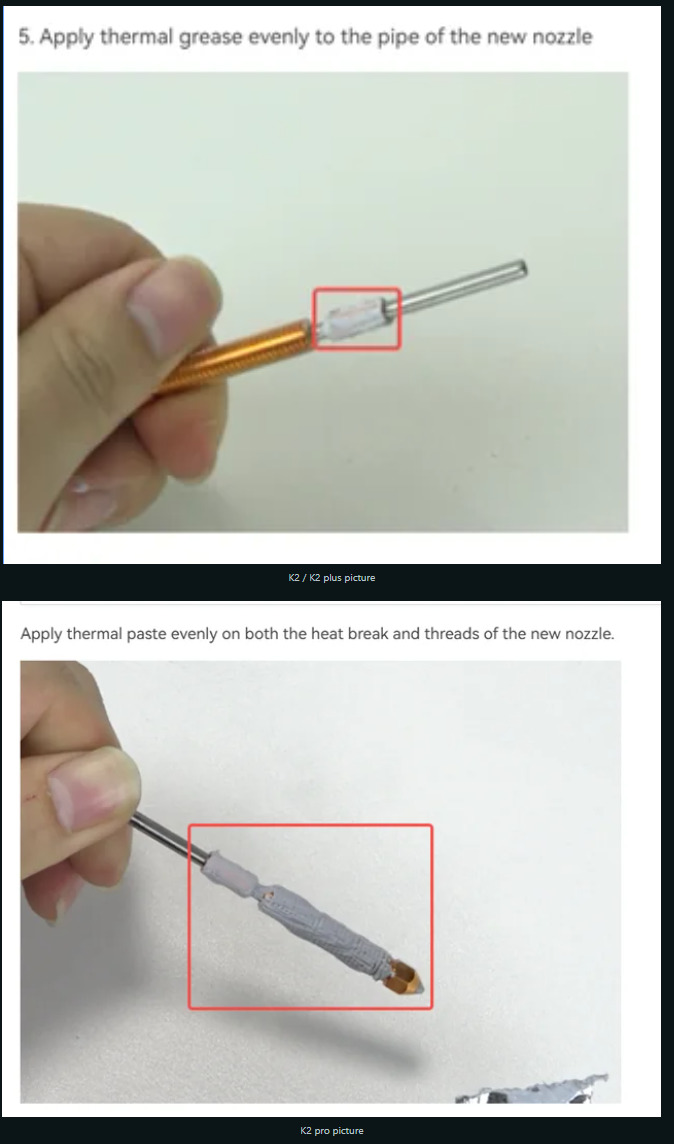
- When I swap nozzle there is some miscommunication in wiki guide, K2 plus and K2 standard show process of putting thermal grease only on clynder part and nowhere else, while K2 pro shows absurd amount of thermal paste troughout whole nozzle,
-
I swapped stock nozzle for silicon carbide, do i need to change nozzle type in slicer or ? I have done all calibrations in UI of printer and in slicer, but i know in orca you can change nozzle type while creality print does not let me. There is no option at all.
-
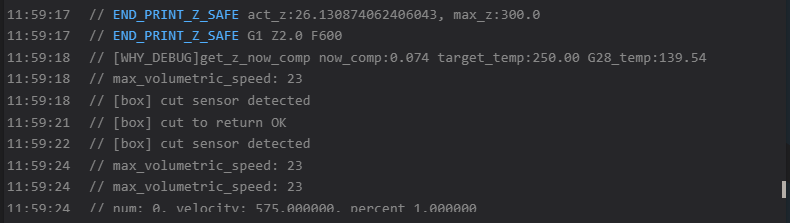
Regarding max volumetric flow settings ,since i have swapped my nozzle, i wanted to achieve higher volumetric flow, but sadly I can’t because my fluid ui console shows max voluemtric flow 23, I have set 27 in my filament profile, but every time it shows 23 in UI.

Thanks in advance!
1 Like
Hello Aleksander, I have a K2 Pro Combo as well and took the nozzle just to check it out, I’ve put the thermal paste just on the cylinder, like seen in many videos and tutorials. I’m printing almost 24/7 and have never had any problem with extrusion or heat creep. I don’t recommend that you put thermal paste on the entire nozzle because thermal paste doesn’t last forever, it hardens after a few heat/cold sessions. You will have a lot of problems when you need to unscrew the nozzle in the near future, if you add thermal paste to the part where it screws into the hot end, you can even break it. Merry Christmas!
1 Like
Hello mister, thank you for replying, I appreciate it.
Yeah that makes a lot of sense, I do agree with you, only reason I asked was cause It didn’t seem like healthy amount of thermal grease being applied, in the end it’s better safe than sorry ^^.
—
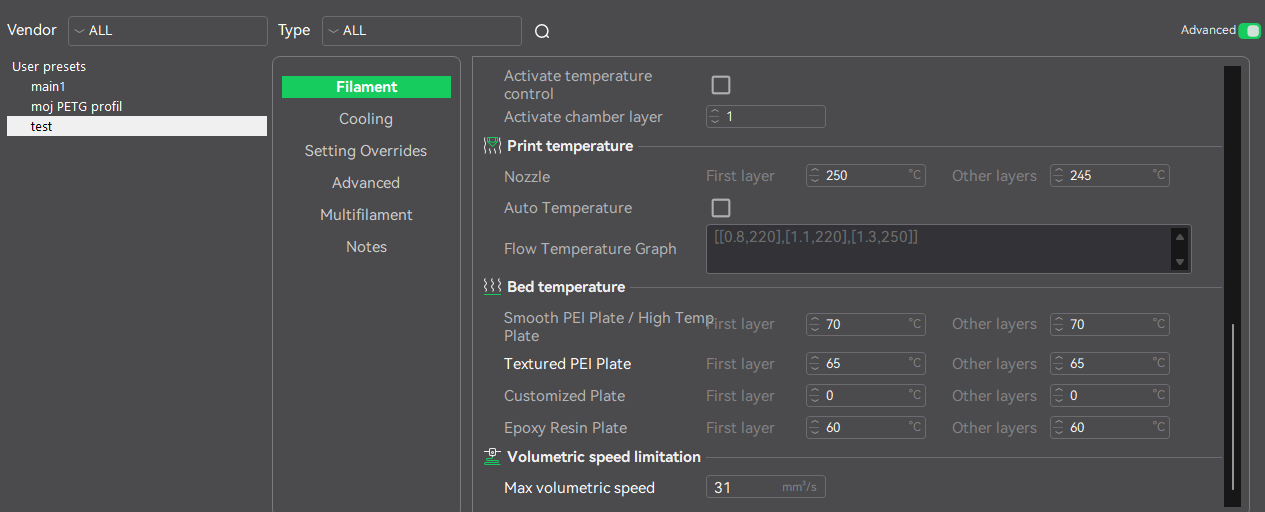
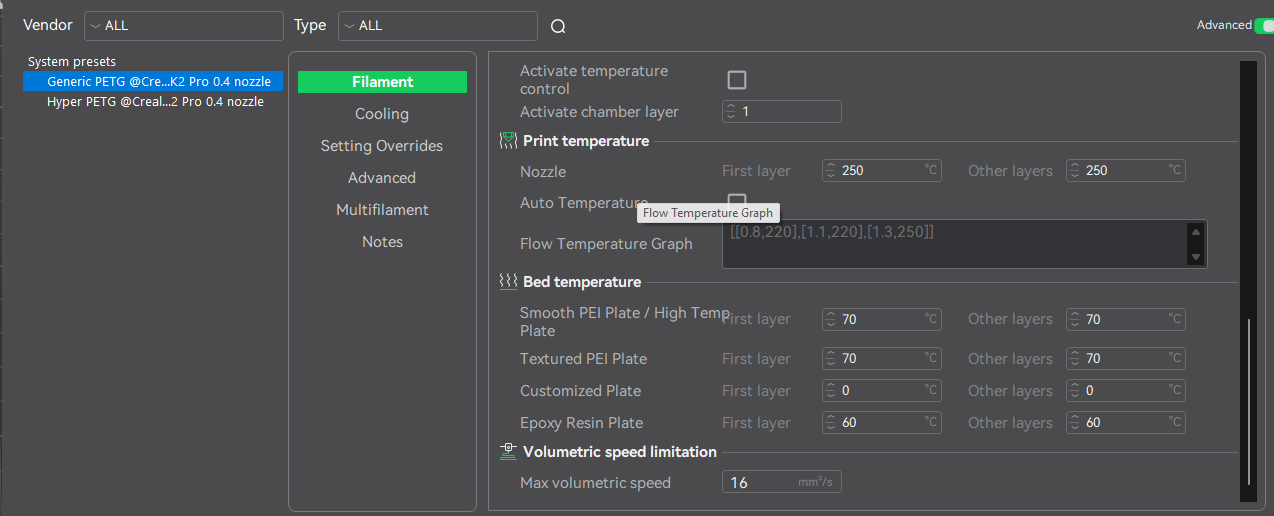
Update regarding max volumetric flow, I have tried some different settings, what I noticed was that if i set CFS unit filaments to generic PETG, than every print my volumetric flow rate is limited to 16, like it is on system preset. IF i set creality hyper petg my max volumetric flow is set to 23 every time. Sadly only those 2 options are available in CFS settings on my printer display / creality print interface).
I have tried making new filament settings, reinstalling whole creality print, checking settings but i can’t seem to figure out why my printer is locked to that low volumetric flow.
^ PIC1 : My new test filament
^ PIC2: Generic PETG
^ PIC4: ( TEST filament profile choosen in creality print), when print starts it sets volumetric speed based on system preset and not user preset I am using.
I fully agree with that ! By putting the thermal paste all over it, it will break the screwing and tapping of the nozzle/hotend !! (I wonder what Creality thought by doing this wiki !)
2 Likes
From my understanding, the max volumetric flow doesn’t change anything concerning the CFS. It is only important for the speed calculated by the slicer.
And 16/23 is already a lot of PETG !! Most classic PETG are generally at 11 or 12mm3/s.
PLA, however, can reach 30mm3/s
1 Like
Sorry for not specifying before, I am using HS MATTE Petg, which should in theory be able to achieve higher volumetric flow than 23mm^3.
I have used same filament on my old printer ( Centauri Carbon) at 27mm3s easily without any issues.
But no matter what setting i choose on k2 pro, fluidd ALWAYS shows max volumetric flow 23 or 16 based on what CFS has picked. There is no option other than Creality / Generic PETG, and based on what I see, printer uses System preset volumetric flow and not user preset one.
For example here i choose Hyper PETG from creality in my CFS, then i choose my own filament setting preset in my Creality Print( I had set it at 31) but when print started, it’s again limited to 23.
Even when doing max volumetric flow calibration, system automatically puts 200 as limit in my filament settings,but when i start the print console still shows either max volumetric flow 23 or 16, based on what i choose in my CFS.
When i did max volumetric flow calibration I have put calibration from 20mm3 to 50mm3s but after inspecting print its perfect from bottom to top, so im 99% procent sure it’s capped somehow, somewhere.