I’m using a Creality Hi combo with CFS. Is it possible to tell the printer to select a spool when starting a print? There is a screen that allows you to select a spool but then the selection is overridden by the gcode. I know how to tell the slicer which spool to use, but I have an item I want to make in multiple colours, and I don’t really want to have to slice it multiple times and then keep track of all the different colour versions. Alternatively I can keep moving the spools around but then I have to keep telling the slicer and printer what is where to avoid confusion.
Hello there, If you use the printer’s screen or Creality Print «Device» interface to start the printing, you can select the correspondent spool slot for each color.
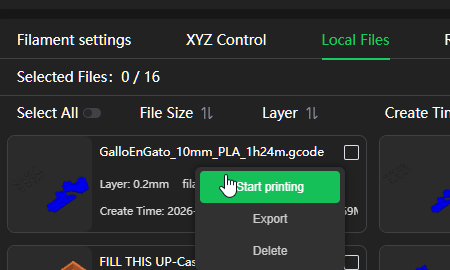
By example, on Creality print, go to the device, then to «Local Files» tab, upload or select a file to print, right click on the name and select «start printing»
A new dialog is shown and you can select the origin as «CFS» then for each color you can click on the « > » symbol at right of the color. a dialog showing the current spool slots is shown and you can select the one you like, then if the material is compatible you can start the printing by clicking «Start printing»
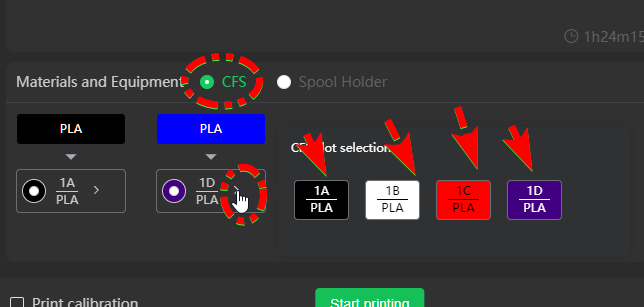
The interface on the printer’s screen is very similar.
So far, you can not change the spool CFS slot on Fluidd interface.
Thank you for your reply. Sorry for the delayed response but it has taken me this long to understand what you meant. A lot of messing around later and I finally get it, for the software - I choose the colour along the top that is the colour of the model as shown in the picture, and select below it the filament I want to use. I’m still not getting it to work on the printer but I’ll keep trying!
1 Like
sorry, I know, English is not my native language and sometimes I am difficult to understand.
regards mate.