Hello,
I’m using Creality Print 6.1.0 and have found an annoying problem. I am trying to dial in a TPU filament that I have using one of the objects from the flow calibration as my print sample. I was trying to nail down the flow rate, but the filament kept jamming in the print head. When I do a nozzle purge, there is no problem whatsoever, so I know the issue is with the flow rate calculated by the slicer.
Anyway, I have disabled retraction and have been adjusting Max Volumetric Speed. I was able to finally get a complete print, but with problems. When I go to the preview, I can see where the flow is staying below my set point, but I noticed that speeds were wonky (ie one layer at 66mm/s with an 11.63 flow and another layer at 46mm/s with an 11.61 flow rate). This led me to look at line widths where I noticed that there were some that were well above my set line widths. This is where my problem comes in.
I decided to set all line widths to the size of my nozzle (0.6mm), but when I slice, it still gives me line widths up to 0.85mm (see image below)
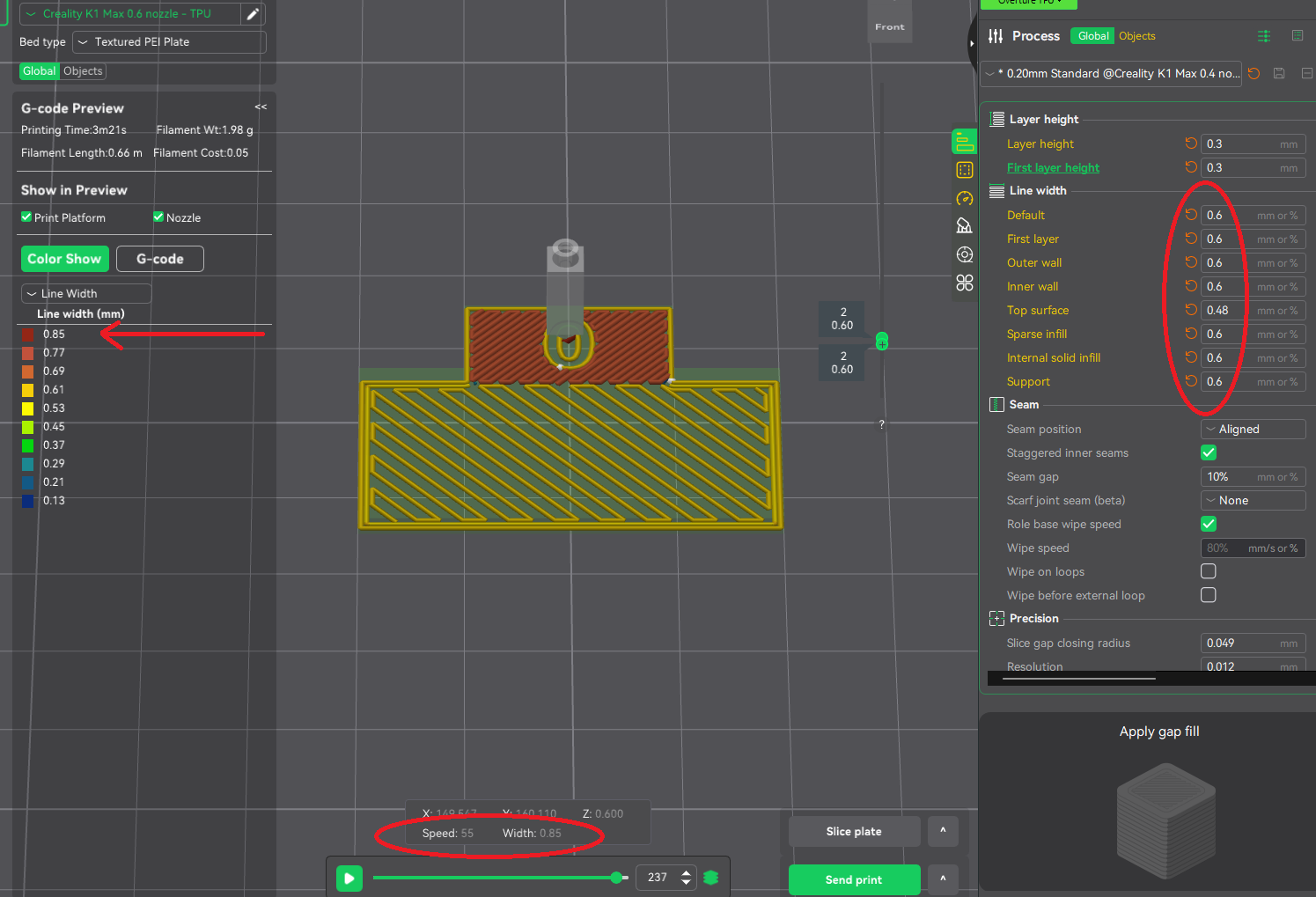
This is a top surface layer, and no matter what I try (short of lowering my Max Volumetric Speed) I can’t change this line width. I thought maybe there might be a min/max line width number somewhere or something to do with top surface widths elsewhere, but I cannot find anything. Does anyone have a suggestion as to where I can look to fix the setting that is causing this? (Please note: I am aware there are other slicers better than this one out there, but I have a K1 Max and I need the ability to be able to send my prints straight from the slicer to the printer - I am also aware of this ( Any slicer like Creality Print with printer connection capability? ), but I don’t care for that option). I actually want to understand what is going on with the slicer software to cause it to create the G Code in this manner so that I can get better at dialing in filament and printing better models.
Thanks in advance for any help, Dave.