T2761 Error and nozzel ran into pei sheet - stuck with a K2-"brick"?

Hi,

my 2 month old K2-Pro (Combo) with only 50 hours of printing ran the nozzle into the pei sheet today while nivelling the bed prior print-job. Right before another printjob had finished an went totally fine.

The printer also shows error T2761 now.
Checkd the firmware, it’s latest available version.
Belt tension is totally ok.

I tried to contact support. The Chatbot told me to power cycle and to run calibration again. Power cycled and tried to run the calibration. The Error shows again. Power cycled again and tried to calibrate → Nozzle ran again into the bed.

I can not create a ticket at the support system (Says “Submit ticket error” after filling out the form and hitting send).

Hopefully somebody can tell me what to do next? Read somewhere that the cable between print head and the lower controllers might be damaged as this often happens?

1 Like

K2 SE WARNING – Firmware 2.3.6.49 can cause head crash / Z slam (FIX FOUND)

Printer: K2 SE
Firmware that caused issue: 2.3.6.49
Working firmware: 2.3.6.43

Symptoms:

  • At print start it moves to front-right
  • Bed (Z) rises into the nozzle
  • Loud clicking / skipping
  • Sometimes then drives into the right wall
  • Manual moves and leveling seem fine

What DIDN’T fix it (don’t waste money like I did):

  • Replacing parts (nozzle, bed, etc.)
  • Re-leveling / Z-offset tweaks
  • Belt checks / mechanical adjustments
  • Changing slicer profiles or start G-code

Actual cause:

  • Firmware 2.3.6.49 sending bad motion commands during print start

Fix:

  • Downgrade to 2.3.6.43 firmware
  • After flashing:
    1. Factory reset
    2. Power cycle
    3. Run full calibration

Result:

  • No more front-right crash
  • No Z slam
  • Normal print start restored

Posting this because I spent a week chasing it and ~$100 in parts. If your K2 SE is doing this, check your firmware before tearing the machine apart.

Hope this saves someone else the headache.

1 Like

@CREALITY are you looking on this?

My K2 Pro did the same out of a sudden. Firmwareversions for K2 Pro are different i think? Mine told me 1.4.1.1 (latest). Still waiting for an answer by creality support.
1 Like

Quick Update:

  • Support opened a ticket, but i never recieve an email as soon as they update something at the ticket
  • Contacted Support by Chat now 3 times and asked for changing the email address (checked SPAM etc.)
  • Support told me to check the plugs of the sensor at the nozzle which checks for contact nozzle ←→ bed
  • Dismounted the whole machine following the video they’ve sent me
  • All plugs are glued into, and all the wires looked fine
  • put everything backwards into place and then followed the next step to recalibrate

Same problem again:

  • Bed lifts upwards during calibration

  • Bed hits nozzle, stops and goes downwards

  • Then Bed lifts up again and pushes the whole gantry really hard

  • then the Y-Axis moves backward trying to move to the waste-box and scratches the whole pei-bed

Stuck again waiting in the queue for creality support. This is not what i expect buying a “Flagship”-product.

こんにちは。
昨年8月に初めてのプリンターとしてK2Proを購入しました。
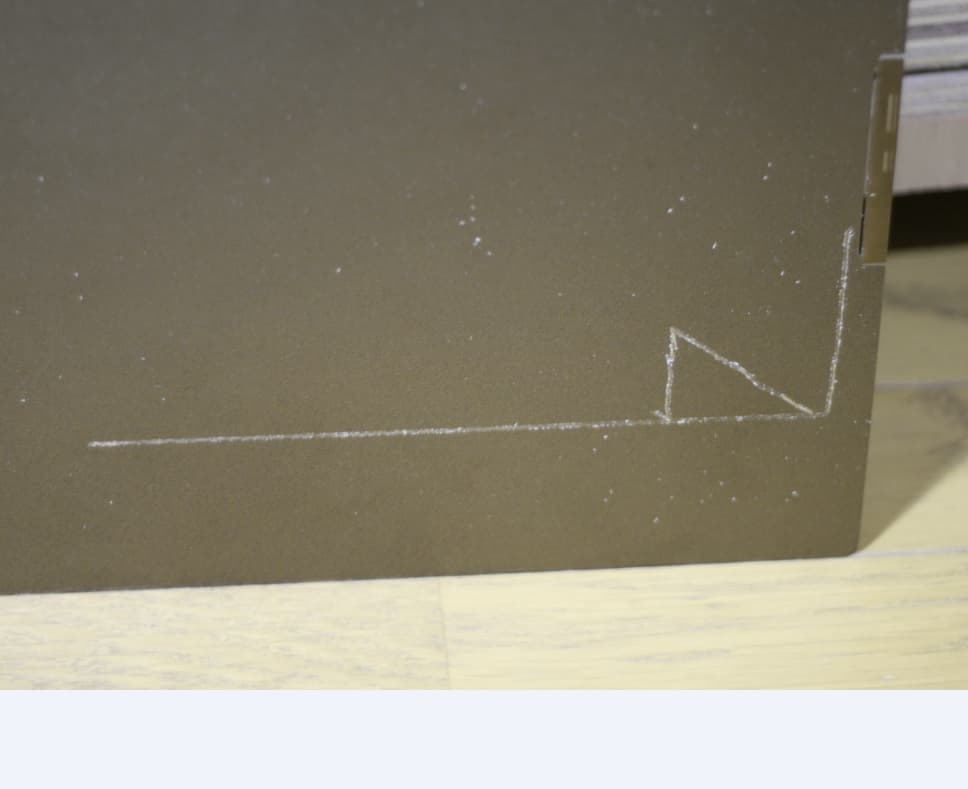
2ケ月後エラーが起き、ビルドプレートをノズルが傷つけました。(写真下がプレート右側)

ヒューマンチャットサポートから歪みセンサーエラーと言われ
写真・注文票など送り、歪みセンサー・ホットエンド・プレートが交換品として届きました。
交換してから大きなエラーは無く順調にプリント出来てます。
(ちいさな?エラーは3~4回ありました)

初心者の私は3Ⅾプリンターはエラーが起き、その度にエラーを克服して
楽しむ道具と思うようになりました。
焦らず、辛抱強くサポートと連絡を取りプリントが出来る事を願っています。