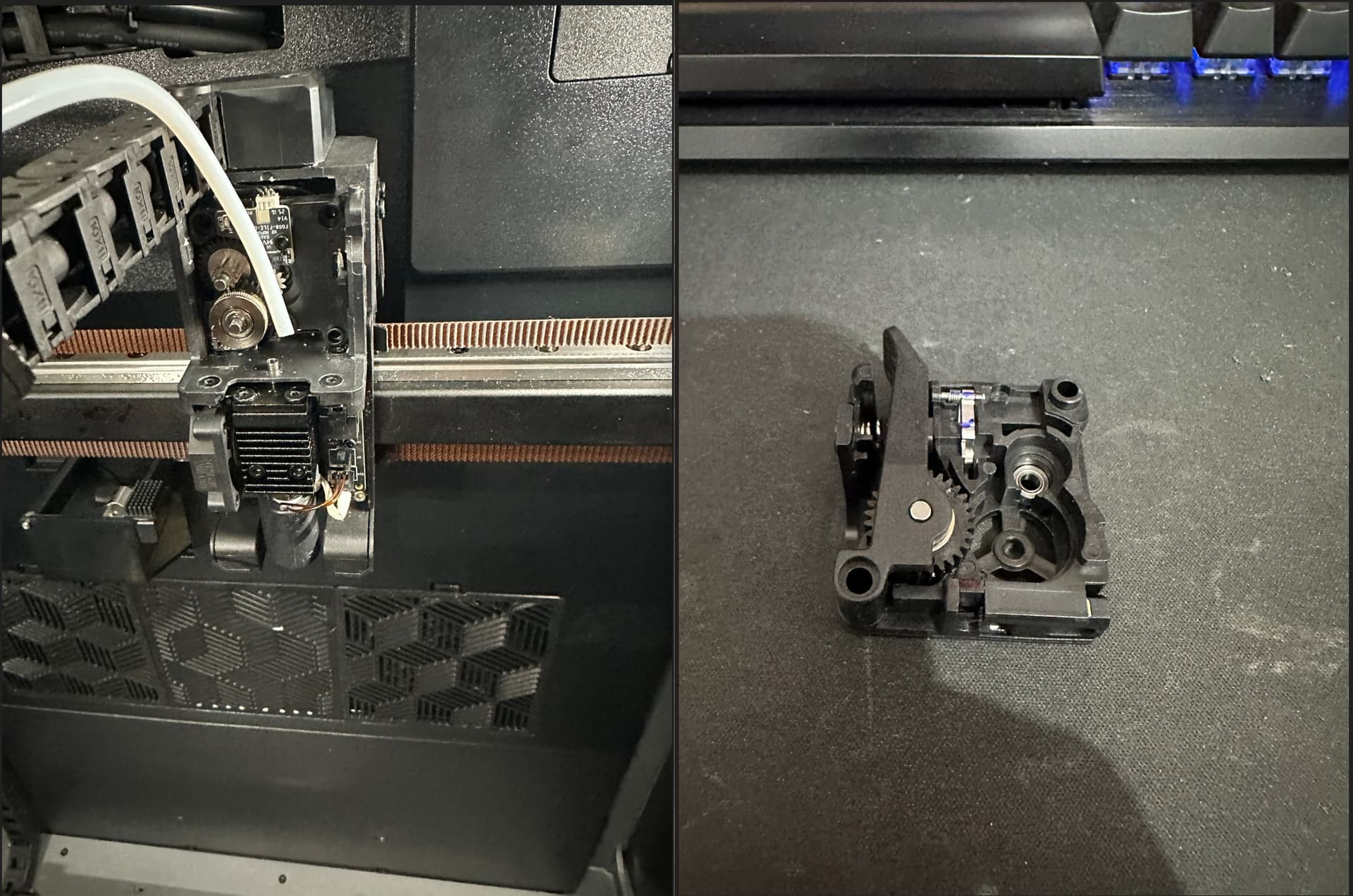
URGENT: Problem with k2 plus combo "Filament detected in extruder; please unload before calibration."

Hi,

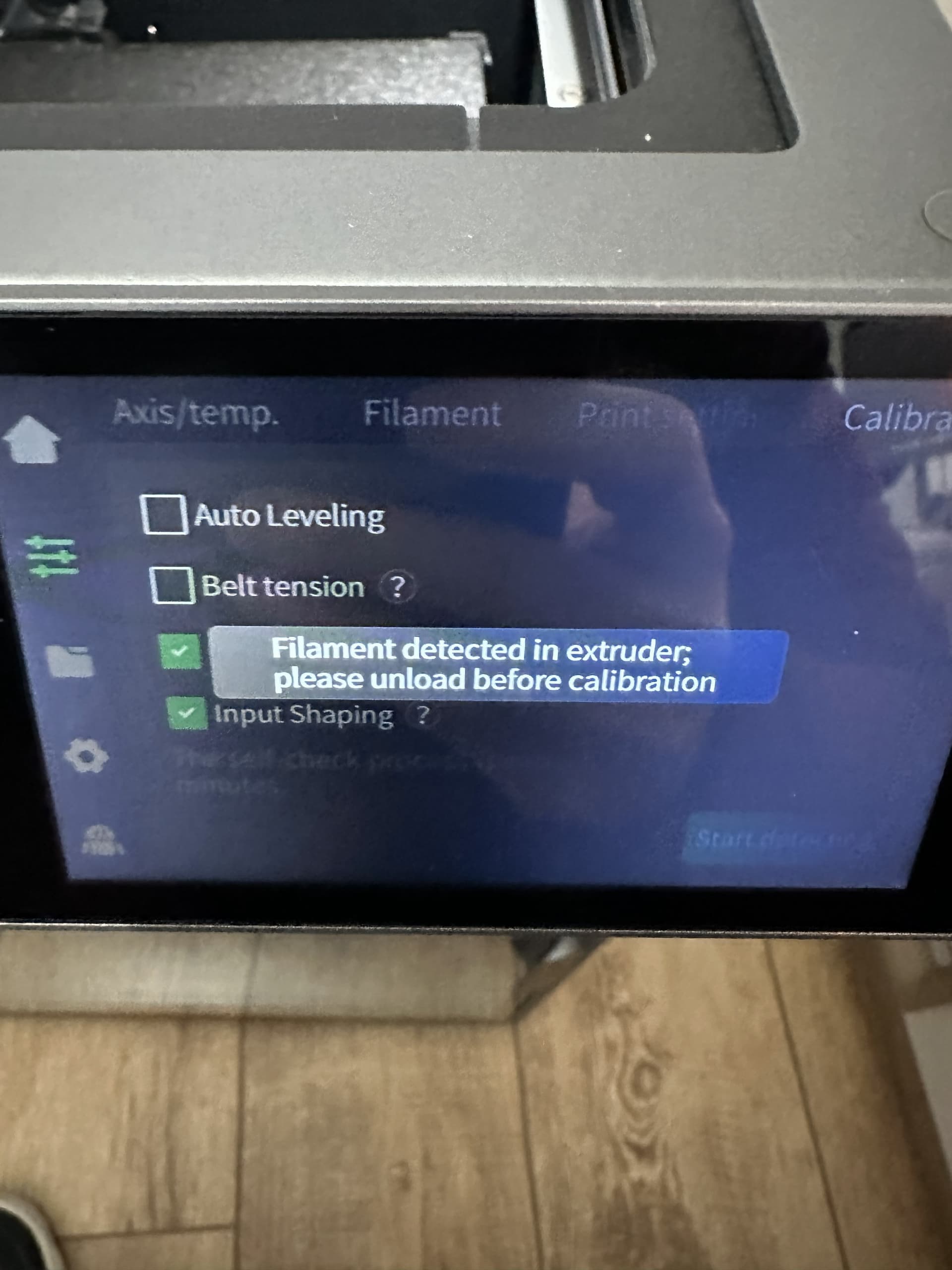
For a few days now, I’ve been having a problem with the K2 Plus, which I purchased on Amazon on December 3rd and received on December 10th. For a few days now, when I try to calibrate the cutter, I get the message “Filament detected in extruder; unload before calibration,” which I’ve attached in the image. I can’t print at all with the CFS. I get errors on the display, but from what I understand, it’s not due to the CFS but rather to a problem with the printer.
Without the CFS connected, I can print, but the printer won’t let me adjust the belt tension, calibrate the cutter, or restore factory settings because it always displays the same message: “Filament detected in extruder; unload before calibration,” which is very strange; it shouldn’t display this message.
I purchased a new extruder for the K2 Plus and a new hotend for the K2 Plus on Amazon and replaced both of them following the instructions on the wiki, but the problem persists.
The extruder has no filament inside (the blue light indicating the presence of filament in the extruder is off, but if I insert PLA filament, it turns on correctly).
I’ve tried removing the filament several times, both before and after replacing the entire extruder, but the problem persists.
I’ve tried removing and replacing the cutter, following the instructions on the wiki, but the problem persists. The printer has firmware 1.1.4.8, is new, and has 140 hours of printing.
I need to fix this; the printer is unusable due to this issue. Could you help me or give me some advice on how to fix it?
I’m posting some photos of the error message, of the open extruder with no filament inside, and of the new extruder I just purchased and replaced.

Kind regards
I had a similar problem and a full wipe_all reset was needed before the firmware was in a good state again. A normal factory reset from the menu wasn’t enough.

K2 Plus Factory Reset: USB Drive Method Guide | Creality Wiki

Possibly unreleated but I found that after replacing an extruder motor I had to recalibrate it before it seemed to actually fix things. It’s not part of the “replace extruder motor” step by step instructions but when I asked Creality help sent me this: https://www.youtube.com/watch?v=glCAg5x8rk8

Doing both seemed to resolve my CFS gone crazy / failed extruder motor problems.

Thanks for your reply.
I did a “wipe_all” from USB and the cutter calibration failed, so I followed the YouTube video to calibrate the K2 Plus extrusion servo motor.
The value of the last command is this:
15:45:06 $ MOTOR_ELEC_OFFSET_CALIBRATE NUM=1 EXTRUDER=True
15:45:28 // data_send:b’\xf7\x81\x04\x00\x04\x00\x0c’ result:{‘oid’: 1, ‘read’: b’\xf7\x81\x0c\x00\x04\x01\xf5m\x8f@/, D\xee’, ‘#name’: ‘transparent_response’, ‘#sent_time’: 126.12543930966666, ‘#receive_time’: 126.57331933711112}
15:45:28 // 电零位一键校准 status:校准成功, 校准结果的最大偏差:4.48217248916626°,校准结果均值:640.6903686523438pulse

so from what I read the calibration occurred correctly because according to the documentation it is less than 15°.

Unfortunately, when I try to calibrate the cutter again, I still get the message: “Filament detected in extruder; please unload before calibration.”
I disassembled the extruder again and checked, but I have no filament inside and no filament coming out of the hotend.

Could the problem be in the PCB that controls the extruder and hotend? I also tried reinstalling the CFS, but with CFS, I can’t print, displaying the message:

“FR0122” Spool holder filament in use. If CFS filaments are required, retract the spool holder filament and restart.

In the wiki, at the following link:

It states that if the filament is missing, a yellow icon indicating broken filament should appear at the top of the screen, but I don’t see that yellow icon on my screen even though I have no filament in the extruder or hotend.
The documentation says:
“If the error persists after replacing the filament detection module, you need to replace the nozzle board.”

The filament detection module is present in the extruder; I’ve replaced the extruder twice with a new one.
Could the nozzle board be the problem?

Can you think of anything else that could be causing the problem?

Your problem seems a little different than mine. The toolhead board is fairly inexpensive so you could try replacing it. I think the initial spare parts kit comes with a spare filament detection module as well. When replacing the extruder you might have pinched some of the cabling so could inspect those. I also had a bunch of bizarre, different errors recently until I unplugged and replugged the main hotend cable.

If you haven’t reached out to Creality support yet you might want to get it started… the back and forth can be slow but they usually can recommend next steps and send free parts under warranty.

The FR0122 / bizarre hallucinating filament seems familiar. I don’t have a chat log but I think that’s where I received instructions to do a wipe_all and that resolved it for me 6-8 months ago. You could also try rolling back the firmware to 1.13 or earlier. I found 1.14 to be fairly unstable / doing bizarre things constantly but rolling back to 1.13 I’ve had no issues. It could be they didn’t expect me to try and reprint a job from before the FW upgrade but if that’s not something you should do maybe it could be mentioned somewhere…

Hi,

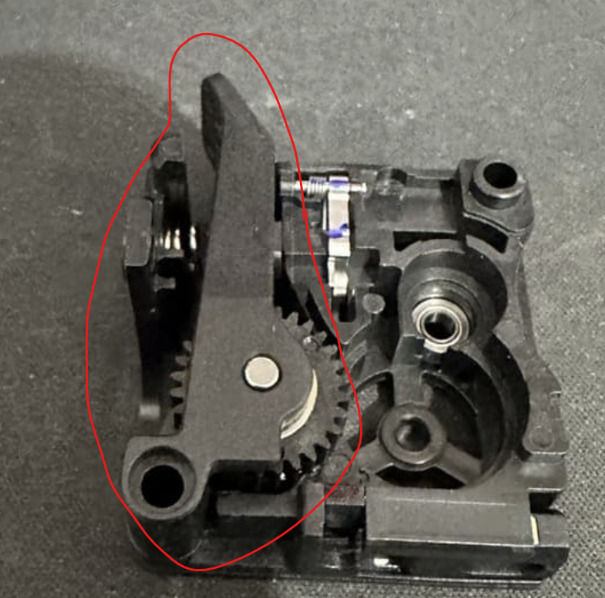
I had the same issue and i found some material behind the lever circled in red. Watch out for the spring when you take it out!

Hi,
I replaced the extruder again with a new original Creality brand one, but nothing, still the same problem. I restored the old Creality firmware, but nothing, same problem. I replaced the PCB, but nothing, still the same problem.
I contacted support, but it’s practically useless; I’d already done all the information they gave me and the steps I needed to take.
I give up, I’m within the return period and I’m returning it. I will never buy a Creality printer again.
It’s 30 days old, with about 138 hours of printing, and there’s no way to get it to work properly.
Thank you all for the support I’ve received.