Ok, so this is my first Creality, but what’s with the 5 minutes of printer self-checking before a print starts. I’ve got calibration turned off (CFS turned on), but it still goes through 5 minutes (timed) of moving the gantry and head around the place before it settles down to a) check filament then b) start printing.
If I turn calibration back on then it’s another few minutes while it does a multi-point check of bel height - at least that bit I understand (coming from a Prusa MK3S+)
This is both pre-sliced (poop-deflector) and newly-sliced in CP6.0.5.1840
I agree. I have the Hi Combo… Even on a single color print AND Calibration turned OFF… it takes 9 MINUTES for the print to even start. It seems to purge a couple of times even tho it is on a single color. It raises to the top 2 times.
This is ridiculous.
Once the print starts… it is FAST. But dang… waiting for it to start is beyond frustrating.
And although the auto leveling doesn’t work right. The nuzzle scratching the bed and damage it in my very first print. I’m so upset about it and very disappoint.
I honestly don’t know what to do anymore. Even adjusting the Z-offset doesn’t fix anything, and it doesn’t seem to save at all. The problem is that even after setting the Z-offset, the nozzle still crashes into the print bed and has completely scratched and damaged the bed surface around the edges.
If anyone has a solution, please let me know what I should do. I bought this machine expecting hassle-free printing, but so far my experience has been really bad.
from what i understand, the start up time is mostly due to bed/nozzle heating up`?
calibration is not needed unless the bed/nozzle has been swapped or removed.
….to keep the ‘start up’ sequence short, i would suggest to manually set the bed temperature to the same value as the filament setting.
Obviously, when the printer was not being used/turned off for many hours, the bed temperature will be at room temperature.
Going from room temperature to let’s say 100°C will take more than 5minutes.
Each time a print has been finished, the printer returns the bed/nozzle value to 0 - as the End Gcode commands.
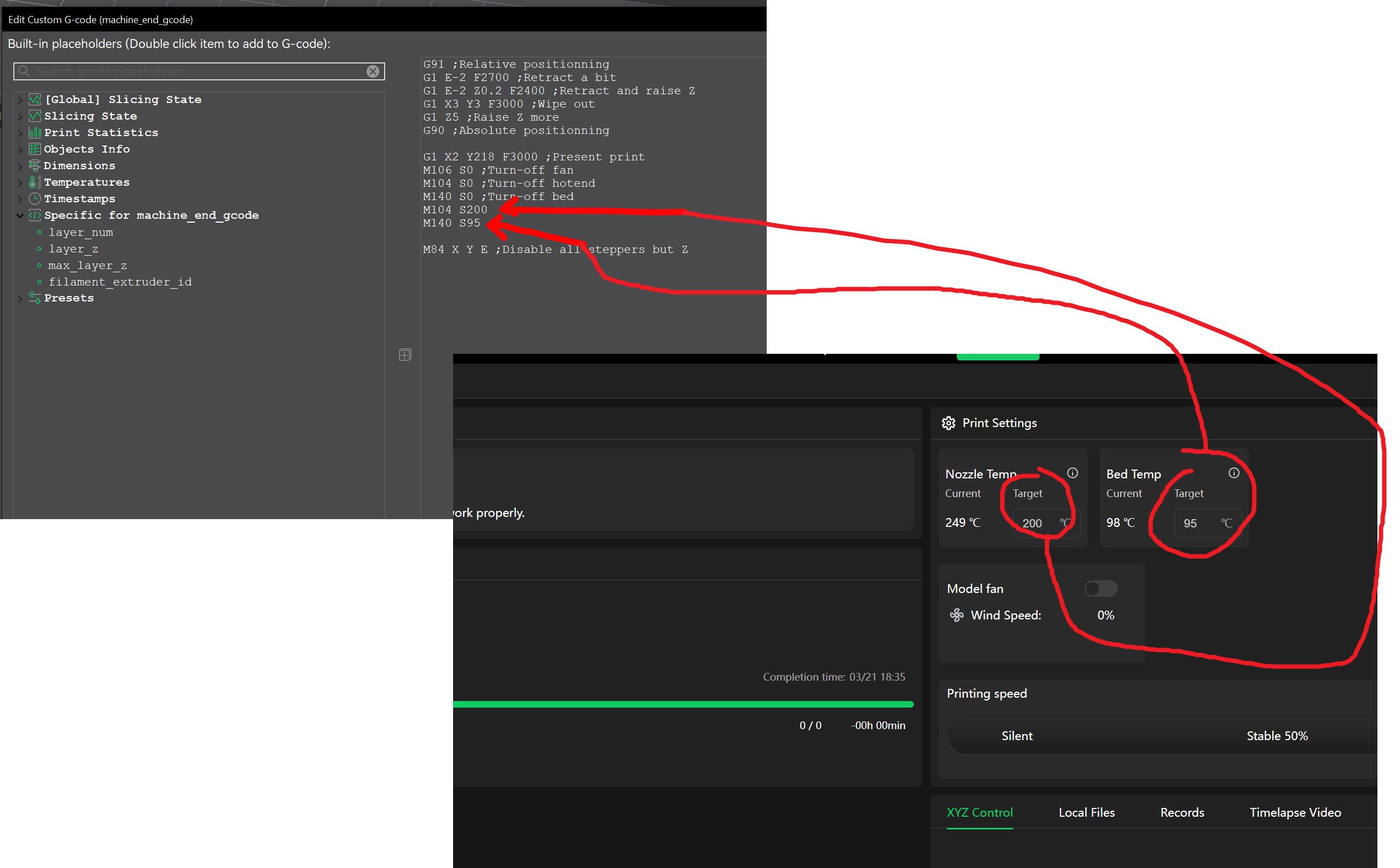
In order to escape that setting, you can edit the machine End Gcode, as seen in the screenshot, after the print the bed/nozzle will be turned off - and immediately after that, bed will be set to 95°C and nozzle to 200°C.
“M104 S200” value is 200—>200°C
”M140 S95“ value is 95—>95°C
This is my setting for ABS, ASA, PC-CF, PA12-CF as all of these filaments print best at bed temperature of 100°C.
This also means, the bed/nozzle will keep on being hot until the printer gets turned off
, or if the print gets aborted, then the values return to 0 as well.
Heating up the bed from 95 to 100°C takes like 10seconds, the nozzle may need less time to reach 260~280°C from the set temperature of 200°C.
I saved it as a custom preset, i got one for each type of filament.
That being said, first print will take 7~10 minutes of waiting time before the printing starts, after that, each consecutive print will have a waiting time of some 10seconds. Can set bed/nozzle temperatures higher, altho i would not go too high with the nozzle temperature as it may affect the filament.