Over the last six weeks (363 hours of printing) I came upon a problem where the filament would not extrude thru the nozzle. The extruder would pulse and then pop up with a CM2784 error.
On inspection it would appear that the top of the unicorn nozzle was not receiving enough heat to soften the filament within the nozzle. Therefore the extruder was pushing against a firm and solid filament that would not go anywhere.
Further inspection shows that the lower nozzle assembly would flex when changing a nozzle.
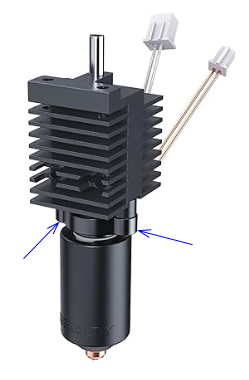
This was caused by the 2 screws (see picture) coming loose thereby not allowing the transference of heat from the nozzle upwards to soften the filament.
I tightened up the screws and all is well.
However given that the nozzle can be wiped about 5/6 times before each print it is well worth watching out for and checking weekly for these loose screws.
Just counted the number of passes of the nozzle over the spring wiper:-
Just @ temp 180 degrees 3 times
Just @ temp 170 degrees 3 times
Just @ temp 140 degrees 3 times
Just before actual print temp reached 230 degrees 3 times
12 times in total. Definitely something to think about.
I just needed to reach out and thank you for this post. I was having a nightmare trying to figure out why my K2 Plus stopped printing only after a couple of prints. I wasted about 6-8 hours of failed prints. I came across your post and gave it a try. To my amazement, my printer has worked flawlessly for the past 8 hours straight with such a simple correction. It was hard a bit tricky to get the allen wrench on the screw due to the rubber shield around the nozzle. I just can’t thank you enough for posting this fix and the clear instructions to show the screws that needed tightening. I don’t normally post in forums but had to in this case. Thank you so much!
I would urge others to check their nozzles. Especially those having Z height issues. You never know, so its worth a check just to eliminate the possibility.
Excellent, I have had problems with extruder clogs from time to time and have usually been able to clear them and carry on. This time I had no success. Cleared it, cleared the jam it had caused in the cfs hub. Cleaned and lubricated the rollers in the cfs, shortened the spring in the hub as I could see rough ares in the filament. Finally bought a new extruder. Still no success. I tried tightening the screws after reading this. One was very loose. When I tightened the nozzle I noticed that the part covered by the black insulated cover rotated a bit. I hadn’t noticed this ever in the past. Am I right in thinking the whole hot end needs replacing?
No it’s not just the sock moving it’s the white material it’s on whatever that is. It still keeps reporting an extruder problem but the filament can just be retracted and there is nothing in the extruder and if I heat the nozzle up I can force filament through manually by holding the release. Filament comes out of the nozzle as usual for about 5mm the a long piece of very file material followed by normal for about 5mm then very thin repeating. Checking the extruder afterwards shows no blockage in it.
I have taken the sock off a new hot end assembly and the white heater does turn slightly; however it is limited by the positioning of the wires.
I would load some filament and watch the hotend temperature reading to see if it reads correctly for the filament. If it is then and stable its likely a path or part blockage in nozzle.
Reading above I can’t see you have changed the nozzle. If you have a new nozzle then change it as being new its clear and therefore if nothing is extruded then its a path issue.
Ah, yes I didn’t mention that I had installed a new nozzle but I had. Anyway I have a complete new hotend coming tomorrow and if that doesn’t solve it then I guess it’s going to be a problem with one of the boards or cables. Which one is anybody’s guess. Electronics was a hobby for about 70 years but I have had 2 TIAs so my hands shake and my eyesight isn’t so good now so that could be a problem. My last job was as an analyst/programmer for a big international company but at 82 that’s a while ago although I do usually get called on by friends and family to fix their PC problems.
Did you check the stability of the temperature at hot end as you mention when extruding there are some skinny portions. This could be overheating (filament becoming runny). Worth checking again.
Also (if temp stable ) did you blow out the 4 way in the bottom of ams as that can harbour bits. Check and blow thru the PTFE tubes. Knowing all is clear is good.
Lastly check the filament sensor in the extruder. Blue light should come on everytime you manually push in retract. (sometimes that spring does not seat well)
I did blow out the tubes and all the other bits except checking the stability of the hot end temperature and the extruder sensor. It fails as soon as the extruder is used. When I get my next chance I’ll check the extruder light.
I suppose it’s possible the new extruder is a faulty one, I’ve only just installed it, and was getting frequent extruder blockages very soon after the start of a print not even getting the first layer completed even on a small object, before that.
After I had installed the new hotend which came with a nozzle installed I heated it up to 200°C it tightened it up and put everything back together. I then did a full calibration at the end of which it said there was a firmware update available. So I did the update and it’s now on version 1.1.5.2. After which another calibration. After that I picked a benchy to print and it did . It’s now printing an item I wanted it to print. So I hope that’s it sorted.
Not to hijack the thread, but I’d recommend, those whom have many hours on their nozzles and/or high temps, if mechanically-inclined and have fresh heatsink grease, go ahead and rebuild the entire nozzle assembly while here.
I print PETG and technically that’s above the rated grease temperature, so it tends to dry out quickly. When this one was rebuilt, the grease under the cylindrical heater was all but dust, leading to temperature overshoots, which clogged a nozzle. (The heater is retained by a reverse-threaded ring and secured with a setscrew.) Take it all apart and remove all traces of previous grease. Can be quite messy. Getting enough new grease underneath it is tricky. There was also a factory grease blob bridging the heat-brake area; oops. Be sure to run several heater PID auto-tunings afterwards with the filament installed: Klipper PID Tuning - How to Guide | Obico It did improve performance.
All of that type of gooey silicone grease has the same temperature limit. If you don’t want to replace grease frequently, Slice Engineering makes a boron-nitride heatsink paste which can go much higher. It contains water though, so must dry for a long time below 40 C. Leave sock off. If any water is present, it flashes to steam above 100 C and could leave voids. Used that, let dry over a weekend, ramped up temp to 110 C over a day, reinstalled sock, no issues since. * knocks on wood *


 . It’s now printing an item I wanted it to print. So I hope that’s it sorted.