The model’s geometry is distorted when printing.
If I print a 1mm height square the size of the plate, the left side will be 2 mm shorter than the right. The far right corner will be incorrect (obtuse), and all other angles will be 90°.
Is there a way to fix this?
Hello ! You should check your steps/mm ! 
Can you explain what you mean?
Print a 20x20x20 mm cube. You can find it on CrealityCloud like this one : 3D Printer Files | 3MF File | xyz 20 mm calibration cube | Creality Cloud
you can then measure this models dimensions against the expected dimensions.
Once this is done you are able to adjust your Steps per mm in your printers firmware.
if:
e= expected dimension
o = observed dimension
s = current number of steps per mm
then:
(e/o) x s = your new number of steps per mm
In the V3 SE, it should be Control => Motion => Steps. Put the new values there
Hello ! Is it fixed ?
The problem is that the size along the axis is not uniform.
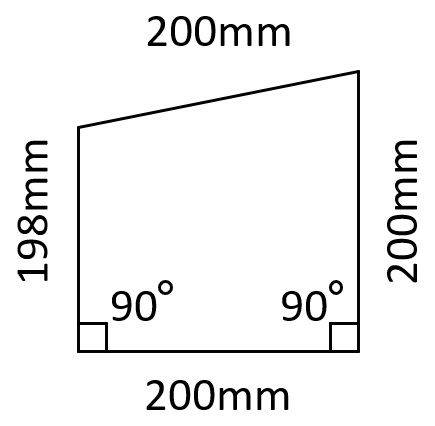
The far left corner is distorted.
On the 200x200 mm model, the left dimension along the Y axis is 2 mm smaller.
On the 100x100 mm model, the dimension is distorted by approximately 1 mm.
I don’t understand how adjusting the Steps will solve my problem.