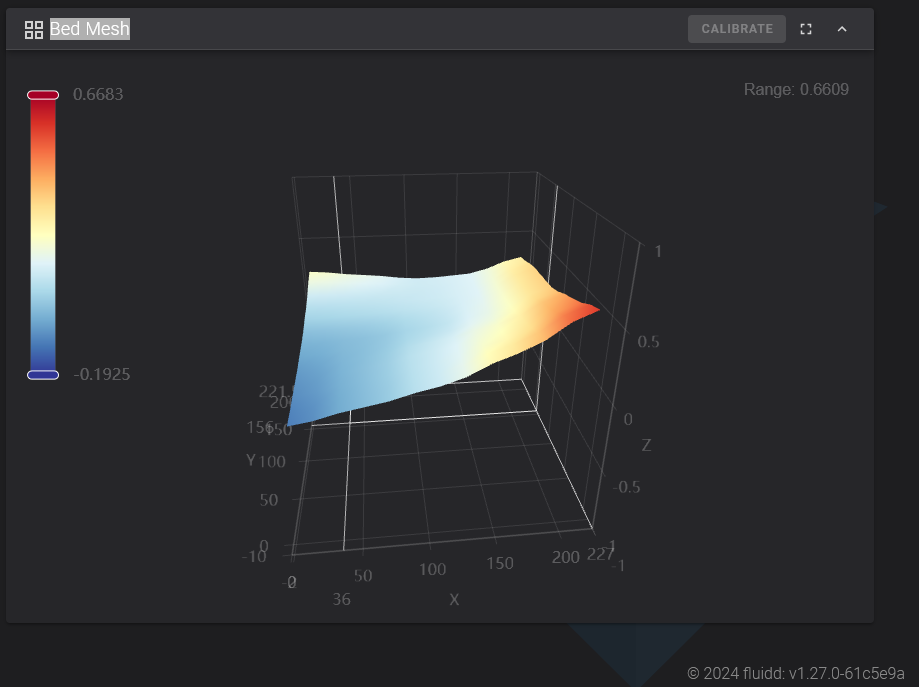
I doubt it’s a hardware issue. Everything indicates it’s a software problem, because when you set the Z offset correctly, everything works perfectly.
I also hope they provide a permanent solution and not a temporary one.
Greetings, mate.
I doubt it’s a hardware issue. Everything indicates it’s a software problem, because when you set the Z offset correctly, everything works perfectly.
I also hope they provide a permanent solution and not a temporary one.
Greetings, mate.
Thanks for starting this, i have to up my z height every print by .1mm . Its not a nusiance because im kind of old fashioned and like to watch the first few layers go down . A habit picked up after my s1pro destroyed my pei plate on the third print i ever made while i was answering a front door knock… not that .1mm is alot but its enough
Nope I think it very wise, I watch my first layers go down too, some days that first layer just needs a little tweak to work. Better to lose a couple of first layers than a whole print or worse some blob of death.
Ah i dread the blob of death !
Last night I removed the bed and checked its attachment to the strain gauges, check installation of print head and X linear rails for any movement, moved the printer to a counter incase slight table wobble had anything to do with it, and re-ran the calibration and input shaping. Same result… I got Creality print installed and will use the settings mentioned from that for now until a firmware update with what I need saves me.
I am half tempted to order a strain gauge replacement as maybe these require too much force to activate? I wonder if there is somewhere to tune those…
What does the mesh look like on your machine after calibration..?
Also what version Creality Print are you using now..
It seems V5 still has issues.
I just calibrated mine a few minutes ago. Ender-3 V3
Not flat but within the tolerances so the printer can compensate.
Unfortunately, if your auto calibration and Z is not “perfect” on the KE then nothing you do short of “fixing” the BL Touch is going to remedy it. I know because after 7 months of using the KE the Auto Calibration & Z still does not work as advertised. I ALWAYS have to -.05 or more to get the first layer to work. Bed level from X-Y is never compensated for and I never get a “perfect” first layer.
I would venture to guess it’s a BL Touch hardware (calibration?) issue.
I’ve been extremely patient with Creality Support but they rate in the top 10 of customer service companies. They even closed a case after THEY did not respond to my answers. 0 out of 10 stars.
I’m sure some KE owners have no issues at all but this is my second KE (replaced) and it most certainly does not print and behave as advertised.
All my printers KE, SE, 5+, Snapmaker A350T, all have to have that extra 0.05 or so to get the perfect first layer, but once dialled in they stay that way until I recalibrate and have to adjust again. I just accept it now, par for the course.
I don’t mind having to tweak that Z at all however not being able to level the bed x-y corner to corner is well beyond frustrating especially when there are no manual adjustments like the SE(?). Sadly, Auto Calibration in my case (as mentioned ad nauseam) does not correct for the bed perfections to an acceptable level.
Completely agree.
While printing, I see in Fluidd the height it is at, and I see it trying to compensate, but it’s not enough.
If I do a first layer test with 9 squares, each one is different. Some come out fine, others with too much height, and others with too little height.
I hope you do something about this.
It’s starting to disappoint me.
Thank you for verifying this! I have literally struggled for over 6 months trying to solve the issue. Sometimes it prints fine and then for no reason at all and with no changes on my end it will print and “Abstract Art” first layer. It is quite apparent even without using Fluidd (which I don’t have anyway). They need to fix this via a firmware update or something because it just plain doesn’t work. I’ve had two KE printers and neither auto calibrated correctly. The frustrating this is you get others saying it’s user error and it’s not. What’s more is that Creality does ZERO to help. I had a case with them and when they couldn’t figure out my issues they just stopped corresponding. I doubt I will every buy a Creality product again based on that.
You are right its not user error, my KE and SE both need adjusting 0.1mm thats every time I run autolevel. Not sure how it could be user error when it is completely automagic.
I’m starting to feel less incompetent now. 

I cannot get the Z offset to calibrate .1mm at a time on the Nebula pad. It’s lowest calibration allowance is .5mm per button press up or down. This is annoying all my prints are too far from the bed and if I press the down button just once it is too close to the bed! Do you also experience this?
I think the +/- up down buttons do 0.1mm but you can click the number and type a specific offset.
Yes as @Bonfireman has said: There are preset stops when pressing the +/- buttons (on the KE/Nebula). Instead, use number pad input remembering that -# is down and “normal”# (no minus) is up.
I strongly recommend doing very small increments until you get familiar and comfortable otherwise you may just damage your bed and nozzle.
After you “auto calibrate” and “auto Z”  I would start with -0.01 and not 0.1 using the paper method. This will allow you to get a feel for what height your printer needs to be at. Also, move your head along the X & Y when the paper is on the bed to see how much variance there is. It will better help you find a happy medium to allow your 1st layer to at least stick.
Make sure your bed is up to the temp you normally print at as that will certainly have an effect.
FYI:
My KE has never consistently printed a perfect 1st layer. Yes I’ve had a couple “very nice” ones but it’s a complete roll of the dice. There are usually spots too high or low. I’m resolved to accept that I will never be able to consistently print a perfect 1st layer but so long I can get it to lay down and stay then I’m happy because the subsequent layers usually mask any imperfections.
Just to be clear: This printer doesn’t seem to live up to all the hype by Creality for most users. Once you become OK with that fact then it takes the stress off.
Good Luck! 
When I click on the value window to type in a number it says -/~… I try typing in a number and it gives an error message that I need a range, so I tried to type in just -.01- -.02 and it just clears the screen and goes back to whatever value was in there. I feel like I can also hear a real tiny voice coming from the printer that says “dummy” and giggles at me. I got so frustrated I re-flashed the old CR pad
@Lensman
Do this and let me know how it went. I did it a couple of days ago and it improved a lot.
Do the following calibrations: Flow rate, Pressure advance (Method: PA Line), and VFA.
Then print a test across the entire bed (for example, 20x20cm and 0.20).
It helped me a lot to get an almost perfect first layer, maybe 95%.
Thanks. I’ve already attempted to do those however the Flow Rate presents a problem because the bed is so un-level so I can’t successfully print all 9 patches without 1-3 patches not sticking or being pushed into the bed (although I did do one Flow Rate successfully). The PA and VFA printed fine. I’ll try it again when I get a chance but I suspect the issue is with the actual BL Touch and the firmware/software ability to correctly calculate the slope of the bed.
Ok! First, let’s make this clear, you have the Ender 3 V3, right? We’re not talking about the KE or SE, because I’ve seen some confusion in this subforum.
If that’s the case, I’ll give you another trick to level the bed.
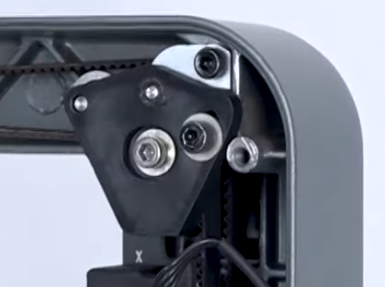
If the biggest unevenness on the bed is on the X axis, you can level it by using the belt tensioners.
Try first with the higher side by tightening or loosening the tensioner on that side.
Keep testing little by little with both sides.
In my case, I had an unevenness of almost 1mm, and I corrected it this way.
When you have it as level as possible, do the Flow rate and Pressure advance calibration again.
Once you have everything set, do another first layer test, but for the entire bed, not just squares.
Yes, I know it’s not the proper method, but until Creality deign to and decides to give us a solution, it’s what we’ve got.
Creality, do your work. We can’t be the users solving your problems.