As the title says, in printer settings of printer in Creality Print 6.2 there is tab “Machine G-code” and there is a box where “Change filament” action gcode can be edited, by default it is just PAUSE. Does anyone know how to run this code mid print. I knoww i can add pause or custom gcode to prints, but how to invoke this actions?
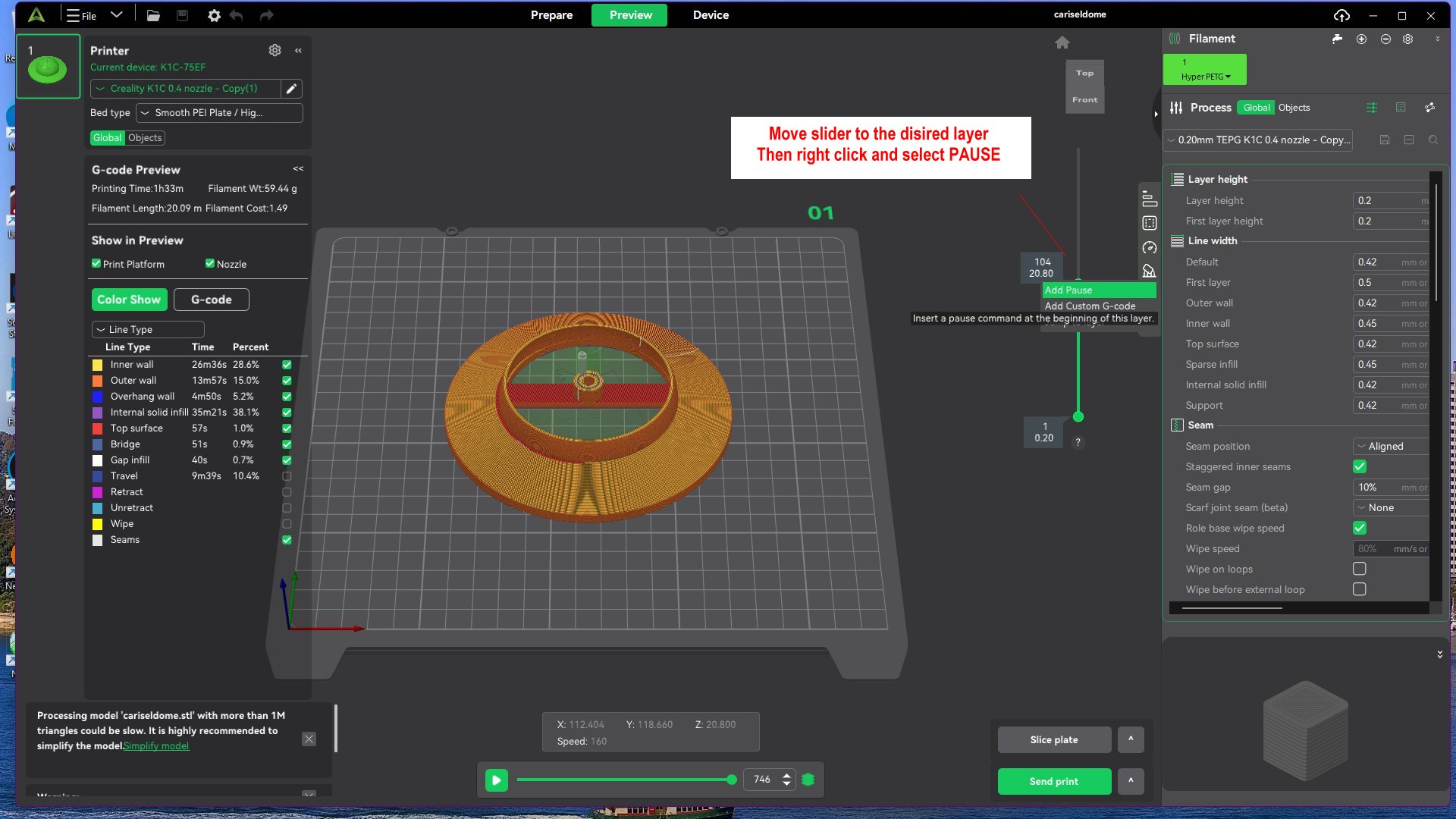
When printing the printer will pause at the selected layer. Use the retract / ecxtrude from the display to change the filament.
Bill
2 Likes
Solution for the Ender-3 V3 with side filament loading
The PAUSE command stops the head at a height just above where it is. If the filament change is made in the firsts layers, the process becomes difficult to load the new filament since the head and the end-of-filament sensor are too low. To work around this, I slightly modified the PAUSE command as follows:
Change these lines
{% if act_z < 48.0 %}
{% set z_safe = 50.0 - act_z %}
By
{% if act_z < 198.0 %}
{% set z_safe = 200.0 - act_z %}
I use “Add Custom G-Code” along with M600 X10 Y15 Z5 ;
I recommend trying it on a small print to see how your printer handles the pauses, but this works well for me.