K2 Pro DXC2 filament sensor issues

K2 Pro + DXC2 Thermal Investigation & Possible Filament Sensor Heat Issue

Just wanted to share some findings from my K2 Pro + DXC2 setup as I think I may have found part of the reason behind some of the heat-related issues people are seeing on these machines.

This is still a work in progress and NOT a confirmed permanent fix yet, but so far the results are looking promising.


Background

I mainly print enclosed ABS/engineering materials and regularly run the chamber at high temperatures for long periods.

Over time I started getting increasingly strange filament sensor behaviour:

  • sensor saying filament was still loaded when it wasn’t;

  • LED brightness changing randomly;

  • intermittent detection;

  • occasional false triggers;

  • eventually the sensor stayed permanently “on”.

Disconnecting the sensor instantly fixed the issue, so it looked local to the sensor/extruder area rather than the main board.


What I Found

After taking the DXC2 apart multiple times I noticed:

  • sticky/shiny residue around the rear magnet area;

  • signs of heat affecting the rear extruder cavity;

  • the rear section around the sensor getting VERY heat soaked;

  • almost no thermal isolation between the extruder motor and the extruder body.

My current theory is that prolonged chamber heat + extruder motor heat is saturating the rear cavity and affecting the filament sensor area over time.


What I’ve Changed So Far

Current Modifications

  • replaced the filament sensor;

  • added Kapton tape insulation between the sensor PCB and the extruder body;

  • added a 0.7 mm mica thermal barrier between the motor and extruder body;

  • cut airflow relief sections into the mica so airflow can still pass through;

  • currently designing/testing a vented rear cover to help the motor dump heat better.


What The Goal Is

The aim is basically to:

  • reduce heat transfer into the sensor area;

  • stop possible PCB contact with the rear magnet/body;

  • improve rear cavity airflow;

  • reduce heat soak around the sensor and rear extruder cavity.


Results So Far

So far the results are actually looking pretty good:

  • sensor now behaves properly;

  • no filament = LED fully off consistently;

  • loading/unloading works normally again;

  • nozzle PID is rock solid;

  • bed temperature stability is excellent;

  • MCU temperature is stable and tracking chamber temp normally;

  • no obvious thermal instability from the modifications.


Current Thermal Testing

I’ve currently been heat soaking the machine with:

  • 100°C bed

  • 140°C nozzle

  • 60°C chamber target

At idle the machine is sitting around the low 50s chamber temperature without anything going unstable.

So far:

  • nozzle temp stability is excellent;

  • bed temp stability is excellent;

  • MCU temps appear controlled;

  • no crazy temperature spikes or thermal runaway behaviour.


Next Steps

Next stage is:

  • finish the vented rear cover;

  • run longer-duration print testing;

  • perform proper ABS heat soak testing under real extrusion load;

  • monitor the rear cavity and sensor area over extended print durations.


My Current Thoughts

I honestly think the K2 can do high chamber temperatures, but some areas of the toolhead/extruder seem a bit thermally marginal once you start doing long engineering-material prints regularly.

The rear motor/sensor cavity specifically seems like a potential weak point under prolonged heat soak conditions.


Interested To Hear From Others

Would be interested to know if anyone else has seen:

  • sticky residue near the rear magnet/sensor area;

  • sensor weirdness after heat soak;

  • DXC2 heat creep;

  • FO0528/disengage type issues;

  • rear cavity getting extremely hot;

  • filament sensor failures after long ABS/ASA prints.

Hopefully this helps someone else chasing similar problems.
1 Like

Thanks keeping an eye on this. I found another issue today would not load filament. It would pull some through but then just not print. I took the DXC2 to bits and found the feed cogs would not turn properly and had stiff points. I took the main double cog out and under a magnifying light found loads of little bits of filament in the metal part. Cleaned it up and all is well again. The bits were very small. Could just make them out with the naked eye.

Update - Current Results

The printer is currently significantly more stable than before:

  • sensor now behaves consistently;

  • false filament detection appears resolved;

  • unload/load behaviour appears normal again;

  • no immediate repeat sensor faults observed;

  • toolhead MCU temperatures appear stable with the vented rear cover fitted.

At this stage, the Kapton insulation and mica barrier around the filament sensor appear to have resolved the original sensor instability issue.

The remaining concern is no longer the MCU temperature or the filament sensor behaviour directly, but the local heat behaviour inside the rear extruder cavity.

The current issue appears to be refinement of:

  • material choice;

  • mica paper shape and coverage;

  • trapped air pockets;

  • airflow path through the rear cavity;

  • and how heat escapes from around the motor/extruder body.

In other words, the fix appears to have protected the sensor, but it may also have changed the local airflow/thermal behaviour enough to create smaller heat pockets around the extruder.

Current Theory

At this stage I think the DXC2 setup needs a better balance between:

  • shielding the filament sensor from direct heat;

  • avoiding fully enclosing heat around the motor/magnet area;

  • maintaining stable airflow through the rear toolhead;

  • and allowing trapped heat to escape without exposing the sensor PCB again.

Current findings suggest:

  • the vented rear cover is helping keep the toolhead MCU temperature stable;

  • the Kapton/mica work appears to have resolved the sensor issue;

  • the next refinement is likely material selection and geometry rather than a complete redesign.

I’m now looking at whether the mica barrier needs reshaping, spacing, trimming, venting, or replacing with a different high-temperature material that shields the sensor without forming sealed heat pockets.

1 Like

That’s actually really interesting and could potentially tie into some of the behaviour I’ve been seeing as well.

One thing I’ve noticed with the DXC2 is that once the chamber temperature gets elevated for prolonged periods, the whole rear extruder assembly seems to retain heat far more than expected.

I’m wondering if prolonged heat soak could also be contributing to:

  • tighter tolerances internally;

  • slight expansion/distortion around the gear assemblies;

  • softened filament debris becoming embedded more easily;

  • or increased drag/resistance inside the dual gear system.

Especially if very small filament particles are getting compacted into the gear carrier over time.

Your description of “stiff points” on rotation is particularly interesting because that sounds more mechanical/friction related than an actual motor issue.

Definitely a good shout checking under magnification too — some of the debris inside these assemblies is almost invisible until you fully strip them down.

I’m starting to think the DXC2 may be extremely sensitive to cumulative heat soak + debris build up combined rather than one single isolated failure mode.

1 Like

Yes heat could do it. I have been printing with paht_cf which might be a bit more flaky but of course also a lot hotter. So heat soak a definite possibility. I have got back to pla and petg for other parts and all is well at the moment. Will keep an eye on it. I did use a little bit of graphite spray, not sticky, to keep things smooth.

This seriously upsets me. Like so many of us, based off increased performance with the original DXC on my K1M, I pre-ordered the DXC2 in hopes of improving my K2+’s performance. However, once it arrived, I was (thankfully) not immediately able to get it installed. I keep hearing issue after issue after issue with the DXC2, and now I’m afraid to install the thing…..especially after seeing this. I print primarily ABS, and this is a BIG issue for me. THANK YOU !!!

I have done lots and lots of prints since installing the DXC2. In fact for about 2 weeks the printer has hardly been silent. I think my issue was printing lots with PAHT-CF using a .8 nozzle. It is very abrasive filament. I am back to printing using petg and PLA. I friend bought a DUcati racer but wanted lots changing and I have been designing and printing loads of stuff for it. One think I have done is to print a riser for the top of the printer. I didnt like the way the PTFE bent with the higher extruder. SO I printed rails (25mm) high and put the lid and CFS back on top. The bed is not big enough to print complete sides so I printed 4 corners that go half way down the sides. I included thin overlaps that I have used self tapers to hold it all together. Originally I hadnt got bits sticking up to hold the lid firm and it tended to slip.

Thanks for the update. I don’t like the bend on PTFE with the stock hotend, lol. So I’ve already put a riser on it very similar to yours. I guess at some point I’ll get the nerve to install it. My son just gave me his Ender 5 Max that’s less than 3 months old. Somehow, he’s screwed up the firmware and bent up the hotend, and he’s just tired of messing with it. So he decided to buy an Anycubic thinking that will be more user friendly, lol. Either way, I just got a very nice printer that just needs a little TLC to get back running. It printed VERY nice before he started screwing with it. lol

Thank You for this analysis. I am having some of these issues at much lower temperatures. I work in PLA & PETG. Since installing the DXC2 I’ve noticed that on long prints (8Hr.+ ) the cutter doesn’t work and the filament seems to be melted all the way up to the cutter. I also get the occasional “Please load filament” when it is already loaded. I’ll start working through your research. I’ll report back if it tracks my problems.

I’ve been doing a lot more digging into this because it has been bugging me, and I’m starting to think this is not one single isolated issue.

My current view is that this may be where the difference starts to show between a lower/mid-range enclosed printer and a much more expensive machine that is specifically marketed around sustained high-temperature chamber control.

From what I’ve read, the K2 Pro/Plus is capable of running the chamber up to around 60°C, but Creality’s own guidance also seems to warn that long-term chamber-heater operation can affect service life or potentially cause damage. So I don’t think it’s as simple as “it can’t do 60°C”. It seems more like it can reach those temperatures, but sustained high-temp use may have more caveats than some people expect.

By comparison, some higher-end machines advertise active chamber heating/regulation as a core design feature, but then that is also partly reflected in the price.

I’ve fitted a diffuser for the hotend fan, and that does seem to be helping reduce heat rising back up towards the nozzle/extruder area. Since doing that, I’m getting far fewer extruder jam issues.

However, I still think the toolhead/extruder area needs better heat management, especially around the extruder motor and rear assembly. On my setup, the MCU temperature climbs very quickly when printing ABS, which is why I’ve added the vented rear cover and mica paper around the DXC2.

I’ve also noticed another issue which may be separate from the heat soak problem: the new/replacement toolhead cover itself seems capable of causing filament cutter problems.

With the cover fitted, I can get cutter-related issues where it seems like the mechanism either cannot hit hard enough, cannot complete its travel cleanly, or there is just enough flex/misalignment to cause cutter calibration problems. Without the cover fitted, the cutter works flawlessly.

So I’m now treating the cover as another variable rather than assuming every symptom is caused by the DXC2 or heat alone. It may be slightly altering the cutter geometry, restricting movement, adding flex, affecting rebound, or preventing the cutter from completing its stroke cleanly.

Based on my testing and the replies from others, I’m starting to think there are two possible failure paths happening here:

1. Mechanical/cutter issues

  • toolhead cover fitment;

  • cutter travel/rebound;

  • cover flex or alignment;

  • cutter calibration sensitivity;

  • possible restriction around the cutter mechanism.

2. Thermal/feed issues

  • cumulative heat soak in the rear extruder assembly;

  • increased drag as parts warm up and expand slightly;

  • filament dust/debris building up in the gear carrier;

  • abrasive/high-temp materials like PAHT-CF making the issue worse;

  • PTFE tube angle or resistance adding extra load;

  • filament softening higher up the path on long enclosed prints;

  • and general heat creep around the extruder/hotend area.

The comments about PAHT-CF are interesting because that material is abrasive and runs hotter, so it makes sense that it could accelerate debris build-up or heat-related resistance in the gear path.

The later comment about similar symptoms on PLA/PETG long prints is also interesting, especially the cutter not working properly after 8+ hour prints and the filament appearing softened/melted up towards the cutter. That suggests this may not only be an ABS/high-chamber-temperature issue, although ABS and PAHT-CF probably make it show up faster.

I don’t want to call the DXC2 “bad”, because plenty of people are getting good results from it, and when it works it does seem to improve extrusion consistency. But I do think the DXC2/K2 setup may be more sensitive to heat soak, filament path resistance, debris build-up, PTFE tube angle, and toolhead cover/cutter alignment than expected.

My current working theory is:

The DXC2 itself can work well, but on the K2 platform it may need better toolhead cooling, cleaner filament-path management, reduced PTFE bending, careful cutter-cover fitment, and regular inspection/cleaning if used for long enclosed prints or high-temperature materials.

For now I’m going to keep testing with:

  • the vented rear cover;

  • mica insulation;

  • the hotend fan diffuser;

  • a lid riser to reduce PTFE bend and help manage heat;

  • careful temperature/PID calibration;

  • and checking whether the cutter remains reliable with/without the toolhead cover fitted - If anyone else is seeing cutter issues, it may be worth testing the cutter movement with the cover removed, then with the cover fitted but screws/mounting pressure checked, before assuming it is a motor, sensor, firmware, or DXC2 fault.

If the issue reappears, I’ll strip the gear path and inspect it under magnification as well, because tiny debris in the gear carrier could easily be missed.

Still working through it, but I’ll post another update once I’ve got more evidence. Thanks for all the comments so far — they’re genuinely helping narrow this down and rule things in or out.

1 Like

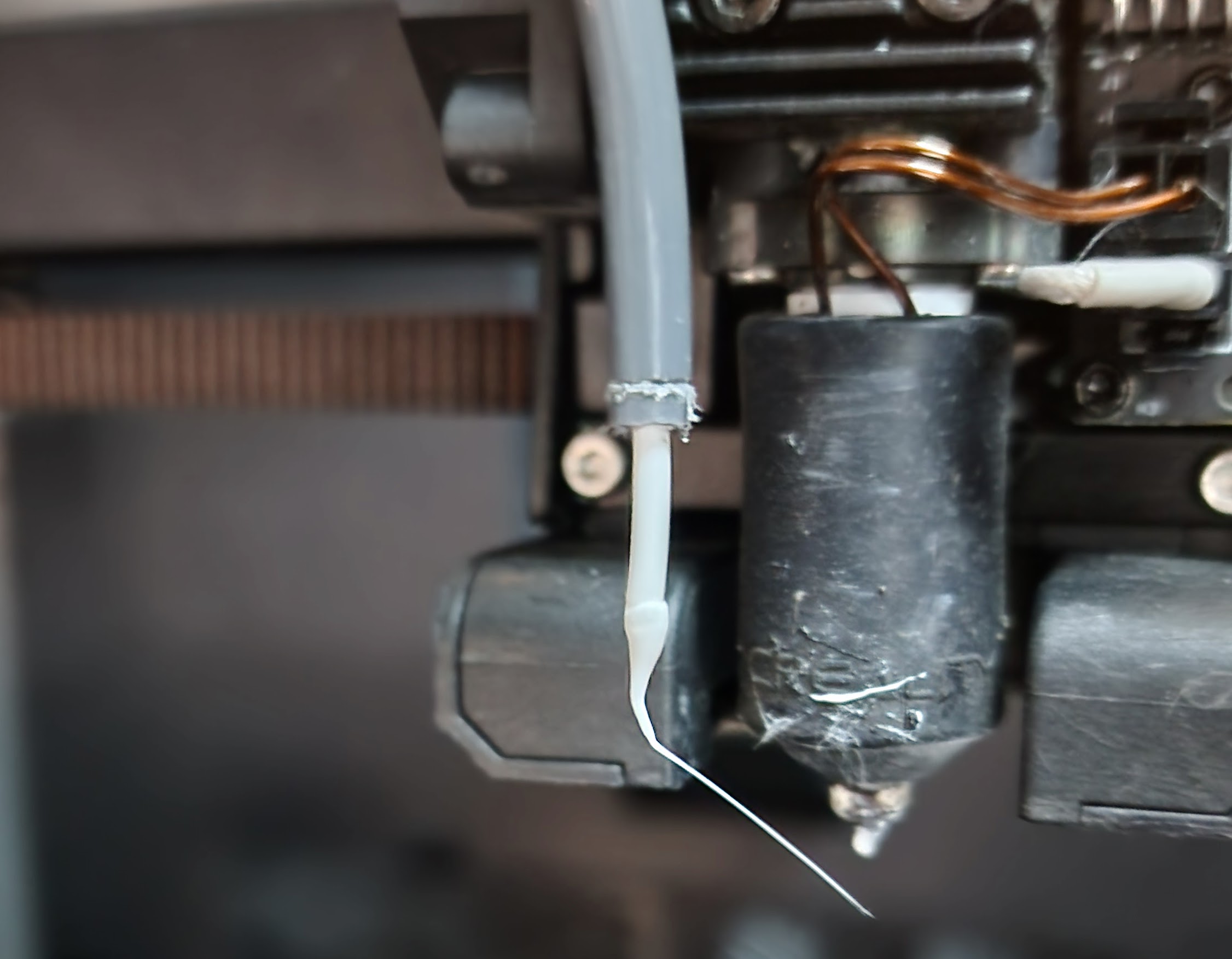
I have just resolved an issue with my DXC2 that maybe worth checking for some. I print ASA in preference to ABS and was having issues with nozzle blockages becoming too frequent. What I found was the cutting blade was not performing a clean cut and when the filament retracted it was leaving a tail instead of a clean cut. When the filament reloaded this tail was bunching up and eventually caused blockage. Long story short the fix for me was inserting a 2.3mm spacer behind the cutter operator. STL for this part is on creality cloud.

1 Like

@garrye061 Thanks for pointing me towards the spacer fix — it definitely helped me understand what is going on!

I originally printed a 2 mm PETG-CF spacer, but on my K2 Pro/DXC2 setup that was actually too much. After stepping down to a 1 mm spacer, recalibrating and testing, the cutter issue appears to be resolved for me. It looks like more of a tolerance-stack problem between the DXC2, the printed front cover, the cutter operator/rod, the blade position and each individual machine.

For reference if anyone needs to print it the link is: 3D Printer Files | 3MF File | K2 Plus Cutter Rod Spacer | Creality Cloud

My current theory is that the DXC2/front-cover setup changes the effective cutter geometry just enough that the blade is operating right on the edge of its required travel. If the cut is even slightly incomplete, the filament retracts with a small tail instead of a clean end. On reload, that tail can fold or bunch up and eventually cause the blockage. In my case, the 1 mm spacer seems to restore enough cutter travel margin for reliable operation again.

I also think the printed front cover itself may be a big variable. The final thickness and shape will depend on the material used, print orientation, warping, first-layer squish, elephant foot, support clean up, flow calibration and even how tightly the cover is screwed down. So two people can both have a “DXC2 front cover” fitted, but the cutter contact geometry may not be identical.

Material choice could also matter thermally. PLA, PETG, ABS, ASA, CF-filled materials etc. will all behave differently once the toolhead heat-soaks. The issue probably is not that thermal expansion moves things by 2 mm; that seems too much. But if the cutter only has a tiny margin, thermal soak only needs to soften the cover slightly, change stiffness, increase drag, or shift alignment by a small amount to turn a borderline cut into a failed cut.

So I think the spacer is not directly “fixing thermal expansion”. It is restoring cutter travel margin. The wider K2 thermal regulation and heat-soak behaviour may simply expose the problem during longer prints because the toolhead, extruder motor, PCB area, cutter area and printed front cover are all sitting at a higher equilibrium temperature.

That would also explain why some people need 2.3–2.5 mm, while mine only needed 1 mm to resolve the issue. The correct value may depend on the individual printer, the DXC2 install, the exact printed cover, the material the cover was printed from, and how much the toolhead heat-soaks during long prints.

So it looks like thanks to you part of the thermal issues are fixed!

Out of curiosity has anyone tried mounting any heatsinks to the extruder motor on a K2 pro? I know this was done on the K1’s but not sure if its possible on the K2’s to try and draw the heat away from the DXC2 / push it out the side of the toolhead where it is meant to be going.

As mentioned earlier, I’m running lower temp, but having similar issues. I’ve tested with and without the cover and re-applied thermal paste (actually went to check thermal paste and decided as l’m as I’m here, lets clean up and lay down a fresh coat). None of that helped. I have to remove the PTFE tube and cut off the little blob of plastic in order to change spools. Under these conditions, I really can’t tell if the cutter is working or not. I’m thinking not.

I seem to be missing something here. My K2pro has a fan mounted in the extruder motor cover on the right side and a vent on the left side.

I should mention also that when I was testing the thickness required for the spacer I found that it varied depending on the filament with PLA requiring the highest. When I add a roll to the cfs from now on I will be doing a test load/unload and checking for a clean cut.

That’s not working for sure. Are you allowing the machine to do the UNLOAD. If you retract via Fluidd it won’t cut first. I assume you are using CFS but if running from external spool holder you still need to use LOAD/UNLOAD from the control panel so it will cut. If you are still getting the problem then I would give the spacer a try.

Have you also done the necessary mods to the config files

1 Like

@gozmon try calibrating the cutter without the cover on - I noticed the cover gave a resistance during calibration which caused a bounce, not a solid clunk like when it cuts - if it works like that 100% try the spacer as that resolved the issue for me when usingthe cover. That picture is literally what I was getting like a partial cut then bulbs and jams.

Also how is your bowden route from the CFS into the printer to the chain to the tool head? If there’s friction or if its too long that may need optimising as the CFS does not like resistance or even slight longer paths.

I’ve had it happen with the CFS to the point I’ve had to cut a section of the bowden out as it’s pulled it that tight nothing would budge. When I get back from site later this week I’ll dig out the other tool head mods I’ve found and send them out and see if others notice a difference in tool head temperature/ jamming too :slight_smile:

1 Like

@garrye061 Yes, using the UNLOAD command and I did load the code changes. However, there was a firmware update during this same time frame. I wonder if the code changes were overwritten as fresh configs often accompany fresh firmware… Several minutes later… HA! Yes, they were at the old values. Set the values back to the Phaetus values. rebooting and testing.

@Dozi3 I’ve tried with and with out cover. The config file values had reverted back to the pre-Phaetus values! set them back. re-booting and testing in progress.

No CFS involved. Hot end is clear. I have big hope for the config corrections.

@Dozi3 @garrye061 I had great hopes for the config update, and it kind of sort of worked. Same problem with the head shell attached, but UNLOAD usually works (sometimes needs 2 tries) with the head shell off. I’ll run headshell off for a while and let you all know how it goes. Thanks for all the help!

1 Like

Try the spacer it was the key to my problem. You can print a few at different thickness until you find the right size. You need to do cutter calibration after each change. Also found some filament types behaved differently so you need to check all you are using and adjust to worst case. Mine woks perfectly now with cover on.

1 Like
