Hello, I have a relatively new K1C and ordered the upgrade kit. It seems that it’s no longer compatible with the newer K1C models. My model has the new mainboard version: CR4SU200382C13 with firmware CR4SU200382C13_ota_K1C-2025_V1.0.0.23.20250722S. Firstly, the circuit board on the head looks different, and the connection for the filament cutter and rn-out sensor is missing. Or rather, it looks different to what’s described in the installation video. I only see one circuit board. Second, the firmware included with the upgrade kit won’t install. Which isn’t surprising, since there’s a brand new firmware version for my model in the Creality Cloud. Creality has been leaving me alone with my problem for a few days. Does anyone have experience with this?
Can you post pictures of that printhead circuit board? Most of them that I have seen are 2 boards fastened together with a small space between
Of Course, I can do.
It seems to me that they have completely redesigned the K1C and absolutly ignored the CFS Upgrade Kit 
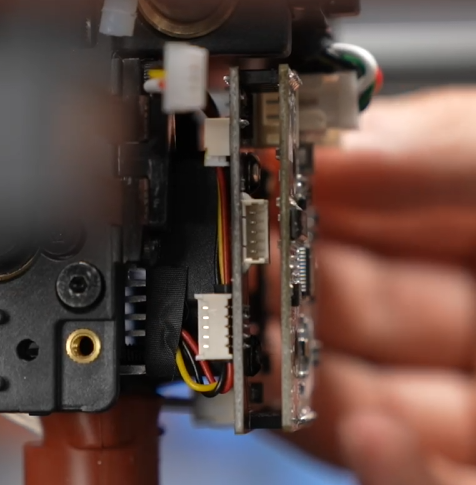
This is the Picture of my Head with the missing Connector (and missing PCB) on the red circled area.
This seems to be a completely different structure.

And this is from the install Video from Creality
I’m having the same issue - I’ve wired the extruder in, just plugging things where they will allow me to plug them in - the mechanical side of things seems OK but I can’t upgrade to any CFS firmware (the one on the USB stick doesn’t do anything - for the wrong mainboard..). Anyone else had any luck?
I fear you may have to contact the customer service…
It connects to the CFS thanks to the firmware
So you need a firmware compatible with your motherboard.
I have the same problem here. The firmware included with the CFS kit is incompatible. I would also advise against plugging the connectors into the wrong place just because they fit. I’ve contacted Creality Support, and if I interpret their response correctly, they want to send me a new one. This was the Answer from Creality: Thanks for your email. We will send you the new version of the nozzle board and hot end base on your warranty to solve the problem.
And yes, I also requested suitable firmware. When I have the answer, I’ll get back to you.
However, I’m a bit skeptical that they really understood that this problem generally occurs with the combination of the K1C printer and the CFS upgrade kit. They wanted my receipt for the printer because of the warranty. But the problem isn’t the printer’s warranty, because the upgrade kit would have to fit a printer that’s out of warranty. It’s a language barrier thing. I’m German, and on the other end of the line are people whose native language is Chinese, and we’re writing in English. Long live globalization 
Here’s what I got from Creality support:
According to my checking with our product technician, k1c 2025 will be adapted to multi-color CFS-C later, and the engineering R&D department is currently debugging it.
We don’t know the exact news yet, please stay tuned to the official website for updates.
They’re funny people, introducing a modified product before the firmware for the accessories have been updated.
Hopefully the firmware update won’t take that long.
I received a message from Creality Support that I’ll be receiving a new nozzle with a PCBA, which would also solve my hardware problem.
And now it’s clear why they’ve been avoiding responding to my firmware inquiry, they’re probably hoping it’ll be ready by the time my hardware arrives.
I’ve been looking into this “CFS-C” mentioned and it does seem to be a new version of the CFS (manual attached - found searching around). I wonder if I’ll need to return my CFS for this version of if I can use my CFS with something else….
Seems a very silly situation.
2a5dfc820743e4740ac7bc109bcc9605ee3b2aef3e684f5f15389bf0c69739e0_optim.pdf (5.0 MB)
Yes, interesting, they really need to include filament drying like Bambo has. I had to buy a space pi x4 because I couldn’t go more than 72 hrs before having to dry the filament. I’m in Louisiana and it’s very humid here. I hope the new stuff will be compatible with the K2 plus I just bought. I’ve had more time shut down than printing. My girlfriend made me get a Bambo H2d it hasn’t stopped. She’s running her Esty shop with it. My K1c is matching it.
Oops, I only just read the reply from “storks_wettest” properly.
I’m starting to lose track.
They write to me that they’ll send me a new nozzle including the PCBA so I can connect the CFS Upgrade Kit. Then they ignore the answer to my question about the firmware (as I’ve already told them several times, it can’t be installed on my K1C because of the new motherboard. So, a new printer, 2025).
And now they write to “storks_wettest” that the new CFS-C is required?
That’s so unprofessional.
Why the hell can’t I find any information online that neither the CFS nor the CFS Upgrade Kit is compatible with the new K1C (2025).
Now I’ve bought everything and it’s sitting here, and now I’m supposed to buy everything again, or what? Nobody can understand this anymore.
I have a 2025 and interested in CFS, Guess I will buy mine direct from Creality rather than Amazon.
I did find this firmware page which explicitly lists the 2025 version of firmware from August this year - Flagship Series Firmware Download | Creality 3D Printer Firmwares
Keen to find out how you get on, I don’t want these issues after spending that much.
After what felt like 100 emails, sending a new nozzle with a PCBA, and endless back and forth, they’ve now written to me stating that the K1C (2025) isn’t compatible with the CFS (and also the CFS Upgrade Kit).
I sent them the printer’s serial number and all the necessary information. I mentioned several times that I had a CR4SU200382C13 motherboard, as that was the only way to install the software in the Creality Cloud. However, they still made me open the device so I could take a picture of the motherboard and send it to them. The whole thing seemed so unprofessional to me that I probably won’t use a Creality product again in the future. There are other manufacturers, after all.
Thank you for your information. We apologize for the inconvenience. The image shows that the upgrade kit is compatible with the K1 C model. The K1 C and K1C 2025 are different models. Replacing the downgraded motherboard may not be compatible. We will have a multi-color CFS-C compatible with the K1C 2025 and related firmware available in the future. You can try using the compatible multi-color CFS-C later. We apologize for the inconvenience.
I find this all a disgrace. Nowhere can I find any indication that a K1C 2025 even exists, it’s only offered as a K1C everywhere, also in their own shop. Furthermore, there’s no indication in the Creality Shop that the CFS Upgrade Kit isn’t incompatible with a specific version.
Same experience for me. I now have a CFS I can’t use after I bought it and the ‘upgrade kit’ that claimed compatibility with the K1C.
I had no idea the K1C-2025 would somehow be less capable (and indeed had no idea I was buying a ‘K1C 2025’..). Creality have offered no help.
The fact that it’s all been handled so poorly and their ‘flagship line’ and customers are treated like this turns me off them for the future. A shame.
I will definitely sink this flagship and will get a racing boat next time 
Another answer from Creality Support:
We apologize for any inconvenience this may cause.
The K1 series multi-color upgrade kit is actually clearly marked with compatible models,pls fyi.
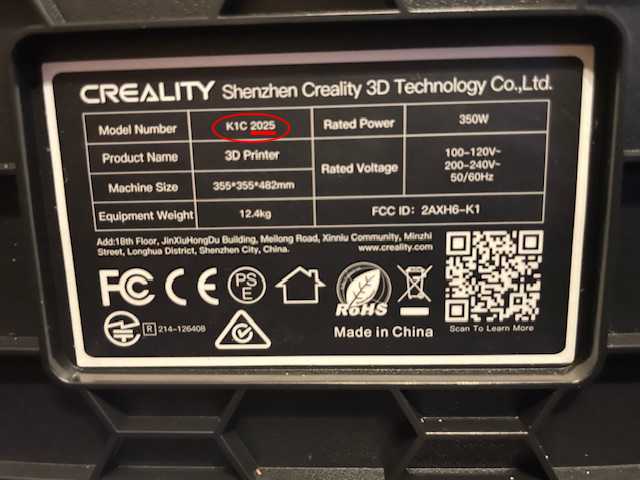
In addition, can you provide a picture of the printer’s nameplate so that we can further check whether there is a K1C 2025 model? If it is not marked, we will report it to the technical department for further analysis.
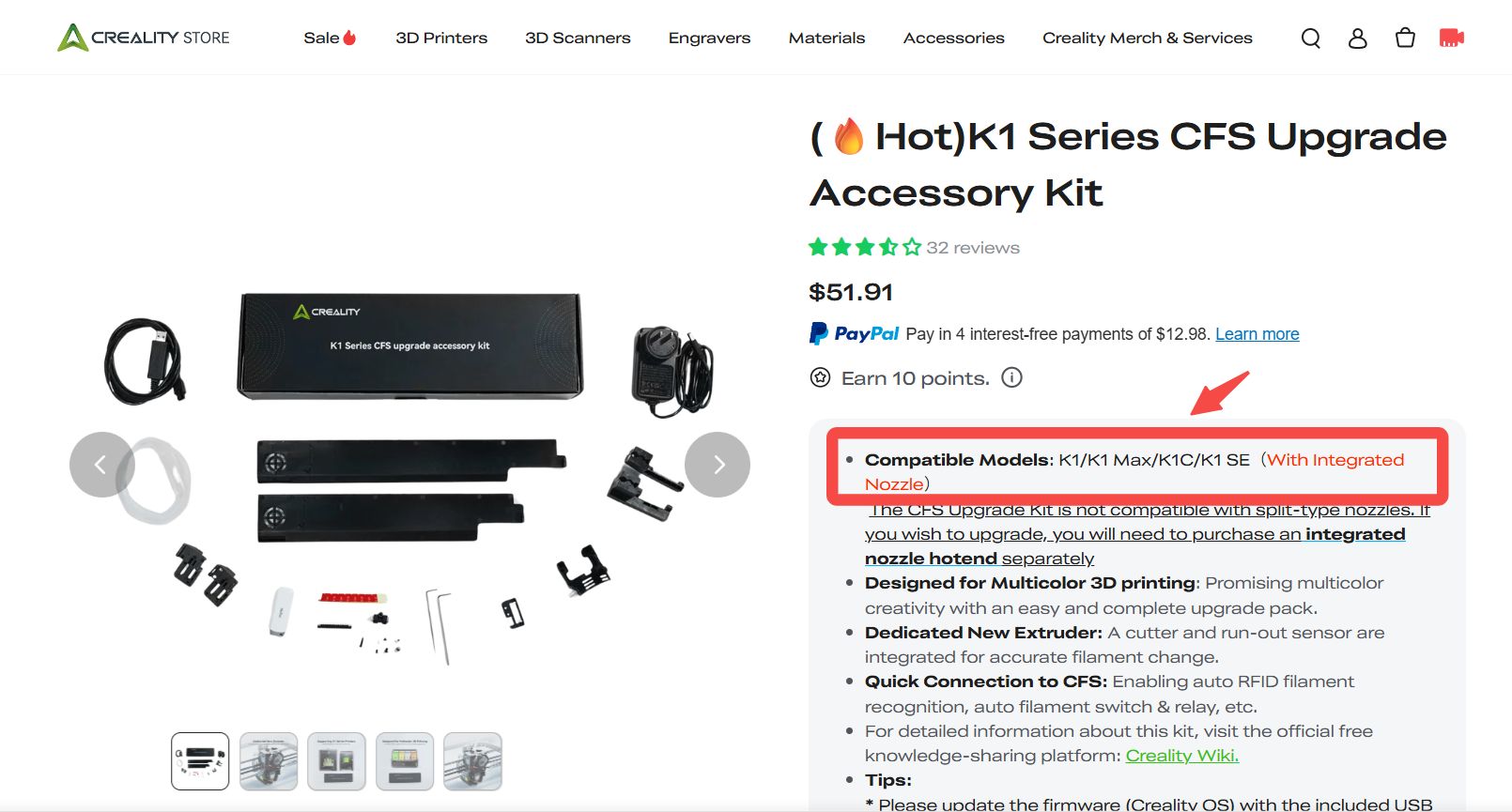
How are you supposed to know that the K1C and K1C 2025 models are different? When I bought the printer, I thought it simply indicated the year of manufacture, not that there were any differences.
I would have liked a bit more transparency and clarity in the marketing of their products, so that I know right away what I’m buying. I only find out after the purchase that I have a completely different model, and then only by chance because buying an accessory. Why didn’t simply state in the listing for the CFS Upgrade Kit that it’s incompatible with the K1C 2ß25 model? Then would have immediately recognized the model differences.
Any update on this? I might have fallen into the same trap. My nozzle PCBA board had the connectors for the filament sensor and cutter but the motherboard refuses any firmware related to the CFS, it accepts any normal firmware but fails with any firmware related to the CFS (including the one on creality cloud website). I even tried rooting into the printer and triggering the update manually with no luck. Can’t be asked to open up and check motherboard rn so I’m just gonna keep trying different firmware files.
You can Check if you are own a K1C 2025.
Take a look on the Nameplate on the backside, if it says “K1C 2025” under model number, then you’re out of luck. Then you can try to get them to take back the upgrade kit or resell it. With this model, multifilament printing will only be possible with the CFS-C. It’s also still uncertain when that will be released.
I’ve fallen for this trap too. This company would be better if they had a better understanding of how to communicate. Model numbers are added, changed, or withheld from documentation when convenient. Sales information didn’t make k1c2025 a distinct model. Until i read this post, thought i has purchased a k1c. Only today did i begin calling it a k1c2025.
Amzn sells the exact same cfs upgrade kit at 3 price levels. No comparisons, no model numbers.
Service information about replacing the k1c2025 integrated hot end that indicates an upgrade that should allow the use of the cfs (because integrated hotend is compatible). But in this case, I doubt that replacing your current supplied hot end on the k1c2025 with integrated hot end will make the cfs compatible. I trust this company no more.
It’s a shell game and I’m done with it.
Maybe I need to forget about the k1c2025 and just buy a k2+?
Nope. Returned the cfs.
when I am ready for that much hp, I’ll look elsewhere.
Hello!
Can you post the full manual? All 23 pages. I only found it in Chinese on the wiki. Thanks in advance.